
This article is for operations managers, owners, and founders of field service companies managing distributed crews, 1099 contractors, scheduling complexity, and patchwork software stacks. You may run an HVAC company with 20 technicians, a garage storage installation business with 50+ installers nationwide, or a plumbing operation that's outgrown spreadsheets but finds enterprise tools overwhelming. You've evaluated ServiceTitan, Jobber, or Housecall Pro and felt the friction between their workflows and yours. You're looking for a decision framework that goes beyond feature comparisons.
What Is FSM Software?
Field Service Management (FSM) software coordinates the people, equipment, and information required to complete work at customer locations. At its core, FSM handles four operational functions: scheduling jobs, dispatching technicians, tracking work completion, and processing payments.
A typical FSM platform includes scheduling and dispatch modules that assign jobs to available technicians based on location, skills, and availability. Mobile apps let field workers access job details, capture signatures, upload photos, and mark tasks complete. Back-office tools manage customer records, generate invoices, and produce operational reports. Route optimization features calculate efficient travel paths across multiple appointments.
The category spans simple appointment schedulers for solo operators to enterprise platforms managing thousands of technicians across multiple regions. Common industry verticals include HVAC, plumbing, electrical, roofing, appliance repair, pest control, and installation services for products like garage storage systems, windows, flooring, and solar panels.
FSM software aims to solve a specific problem: field service operations generate coordination complexity that spreadsheets and phone calls can't handle at scale. When you have 10 technicians serving 50 customers per day across a metro area, manual scheduling creates bottlenecks. Missed appointments cost revenue. Inefficient routing burns fuel and labor hours. Paper-based job tracking delays invoicing and obscures operational visibility.
The promise of FSM is straightforward: digitize these workflows, reduce coordination friction, and improve first-time fix rates, technician utilization, and customer satisfaction.
That promise is real. The question is whether any given FSM platform delivers on it for your specific operation.
Myth: More Features, Better Software
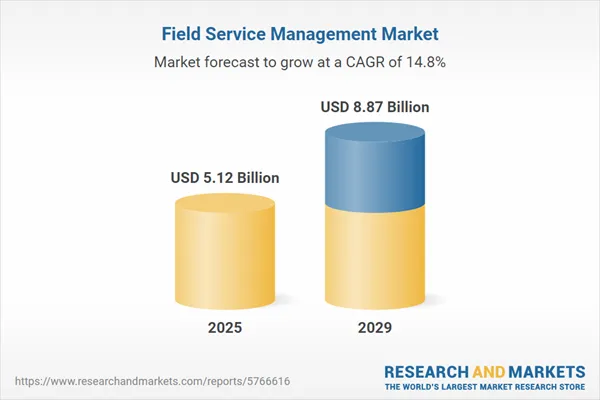
The FSM software market has reached $4.5-5.5 billion in 2024-2025, with projections exceeding $9-12 billion by 2030 (https://www.researchandmarkets.com/). This 11-14% compound annual growth reflects genuine operational demand.
The pitch from every vendor follows the same logic: more features equal more capability. Automated scheduling. Route optimization. Real-time GPS tracking. Invoicing. Customer portals. Mobile apps. The assumption is that comprehensive functionality solves operational problems.
The operational costs FSM addresses are real. Industry average first-time fix rates hover at 75-77%. hen a first visit fails, resolution costs jump 34% higher than the cost per work order, and bottom-performing companies take nearly four times longer to resolve issues than top performers, with resolution times stretching to 11 days compared to 3 days (2025 Aquant Field Service Benchmark Report). A single truck roll costs $250-$1,000+ depending on operation size. For an organization doing 500 dispatches per day with 75% FTFR, that translates to $125,000 per day in return visit costs.
These numbers explain why FSM adoption keeps climbing. Small businesses represent the fastest-growing segment at 13.5-16.4% CAGR (Mordor Intelligence, Grand View Research). Cloud deployment now dominates at 67-68% of new implementations (Grand View Research).
The market narrative is clear: invest in FSM, get productivity gains. Studies cite 24% average productivity increases within the first year (FieldServiceSoftware.io), 15-30% fuel cost reductions through route optimization (CigoTracker, Planlogi), and potential ROI of 300-400% within six months for successful implementations (FieldServiceSoftware.io, Forrester TEI Study).
The emphasis on "successful" is where the narrative breaks down.
The Tilt: Most FSM Implementations Fail or Underperform
Most Field Service Management Programs Don't Deliver on Their Promises
Large-scale studies consistently show that IT and digital transformation projects underperform. The Standish Group's CHAOS Report (2020) found that only 31% of projects are considered successful, while 50% are "challenged" (over budget, over time, or lacking functionality) and 19% fail completely (ACM Queue, 2024).
ERP-specific research paints an even starker picture. Gartner's analysis indicates that roughly 70% of ERP implementations over the next three years will fail to meet their objectives (Godlan, 2025), while other studies place failure rates anywhere from 55% to 75% depending on scope and industry (TrueList, 2024).
Buying the platform with the longest feature list doesn't fix this - it often causes it. Pendo's feature adoption research found that approximately 80% of software features are rarely or never used, while just 12% of features generate about 80% of daily usage volume (Pendo 2019 Feature Adoption Report). Publicly traded cloud companies collectively waste an estimated $29.5 billion annually building capabilities that see little or no real-world adoption (Pendo, 2019).
When the official systems don't fit how work actually happens in the field, people route around them. A Deloitte study found that 70% of companies still use Microsoft Excel for sensitive and critical data and processes, despite major investments in packaged applications (Datarails, 2021). More recent research from CFO Dive indicates that 51% of finance leaders still opt for detailed planning processes using spreadsheets, then load those sheets into formal systems (CFO Dive, 2025).
Meanwhile, Gartner estimates that 30–40% of IT spending in large enterprises now lives in "shadow IT" - technology acquired and used without IT department approval (Gartner via Zluri, 2025). BetterCloud reports that approximately 65% of SaaS applications running in enterprises are unsanctioned (BetterCloud, 2025), and Gartner projects that by 2027, 75% of employees will acquire or create technology outside of IT oversight (IEEE Computer Society, 2024).
Shadow IT and spreadsheet-driven workarounds aren't edge cases - they are visible evidence that most large software rollouts, including FSM, underperform where it matters most: in day-to-day workflows.
Daniel Vasilevski, Director and Owner of Pro Electrical, puts it plainly:
The biggest hidden cost is not the monthly fee for an off-the-shelf tool. The real cost is the daily friction added to your workflow. Many generic tools look good, but they are not designed for the specific requirements of the electrical business. They may not cater for the detailed compliance paperwork required for level 2 work. They might make scheduling emergency jobs alongside maintenance work very clumsy.
He quantifies the impact: "If a technician wastes 10 or 15 minutes on every job just trying to input data correctly, the losses are huge. We might complete 25 jobs in a day. Those lost times quickly add up to several hours of wasted labor that is paid, simply because of bad software."
Jesse Singh, Founder of Maadho (supply chain and logistics), reinforces the pattern:
Growing service companies need to focus on the process fit more than the number of features when considering custom versus off the shelf field service management software. A business should consider the solution that best reflects its specific operational flow, not the one with the most capabilities.
The hidden cost of mismatch extends beyond daily friction. Singh notes that custom solutions, while offering perfect workflow fit, carry "long term costs 300% to 500% higher than the initial software build cost over 7 years" due to perpetual maintenance and developer dependency. His team spent $150,000 rebuilding an integration layer after a custom logistics platform failed to connect with their financial ledger.
The math is uncomfortable: off-the-shelf tools don't fit, but custom builds carry long-term cost burdens. Both paths fail when workflow fit isn't the primary evaluation criteria.
The Workflow Fit Test: 5 Questions Before You Evaluate Features
The Workflow Fit Test shifts evaluation from "what can this software do" to "does this software match how my business actually operates." Each question addresses a specific failure pattern observed across FSM implementations.
Question 1: Does the software match your business size?
The "Goldilocks problem" is real. ServiceTitan complaints from small shops surface repeatedly on Reddit and review sites: "It's almost like it's too big to where my people are scared to dive in and learn, so I end up only getting the bare features from it." Another user notes: "ServiceTitan was built for enterprise-level contractors with full departments for inventory, dispatch, HR... if a company with huge staff is getting the same software as a company with six people and one office person it's really not a good fit."
Jobber faces the opposite complaint from growing companies: "Most paving contractors outgrow Jobber quickly as they grow, sometimes within their first year... the problem is that Jobber treats a $50,000 asphalt job the same as a $500 plumbing repair" (getonecrew.com).
Housecall Pro users report similar scaling friction: "Housecall Pro has served our small business well in the past, but as we've grown and begun working more with property managers and larger commercial clients, the limitations have become a significant issue, especially with invoicing" (Capterra review).
Size mismatch creates two failure modes: overwhelming complexity that suppresses adoption, or insufficient capability that forces workarounds as operations grow.
Question 2: Does the software match your industry's specific workflows?
Generic "field service" platforms assume predictable scheduling patterns. Jill Frattini, Service Coordinator at Ohio Heating (HVAC), describes the gap: "The factor nobody talks about enough: scheduling complexity during emergency calls. Off-the-shelf tools assume every job is predictable, but when a rooftop unit dies at 2 AM in a data center, we need to see which techs are certified for that specific VRF system, what parts are staged in which van, and which client has priority contracts. All while dispatching."
An irrigation contractor on the ServiceTitan Community Forum shared similar frustration: "Was told they could auto confirm spring startups and winterizations etc but they can't until the day before, which is way too late so a useless function... Major reasons for the change was to make scheduling easier and more efficient and none of the features work within the irrigation field."
Commercial contractors face the same pattern: "Service Titan was designed for Residential HVAC contractors. That's it. They HAVE NO CLUE when it comes to what commercial contractors need nor do they understand industries other than HVAC" (G2 Review).
Frattini adds: "The biggest hidden cost of off-the-shelf? Feature bloat you pay for but never use. Most platforms are built for generic 'field service' and charge you for pool cleaning workflows, lawn care invoicing, and pest control modules when you just need HVAC-specific stuff like refrigerant tracking and EPA compliance documentation. We were paying $340/month for software where our team only used maybe 30% of the features."
The universal truth from fieldforcetracker.com applies: "If the flow of the software doesn't fit the flow of your business, you and your employees will grow incredibly frustrated."
Question 3: Will your team actually adopt it?
70% of change programs fail due to employee resistance and lack of management support (McKinsey). The 2025 ACCA Contractor of the Future Study found that 56% of HVACR contractors now have FSM software, but most underutilize it, treating it like "a glorified QuickBooks" rather than leveraging full functionality.
William Workman, Owner of Harbor Roofing, explains the trade-off for smaller companies: "By using an off the shelf CRM many new hires already have familiarity with the CRM so there is less training involved. We are a smaller company so that works for us. The cost of customization would be too expensive for a small roofing company, but when using a larger off the shelf CRM the cost of R&D and updates is spread among thousands of users."
His honest assessment of the downside: "I guess the downfall of that is that we are using the same system as our competitors which doesn't help give us an edge. But it's efficient and we can gain that edge in other areas of the trade."
Adoption failure renders any feature set worthless. A platform your technicians avoid or use minimally produces negative ROI regardless of capability.
Question 4: What's the true implementation timeline and cost?
Implementation timelines for FSM vary dramatically by complexity. Small business cloud FSM typically requires 3-6 months. Mid-sized implementations run 6-12 months. Large enterprise deployments take 12-18 months. Highly customized or multinational implementations stretch to 18-24+ months.
Hidden costs consistently blow budgets. Integration with legacy systems can inflate project cost by up to 40% and lengthen timelines by half (Mordor Intelligence). Over 80% of data migration projects run over budget and past deadlines (DataFlowMapper). Annual support and maintenance adds 18-22% of initial software license cost per year.
ServiceTitan pricing reality: per-technician costs of $250-500/month plus $5K-$50K+ implementation. One user reported paying $353,000 annually. A BBB complaint from December 2024 captures the implementation nightmare: "We have NEVER BEEN ONBOARDED. At this point, we have currently paid for 1 year of Service Titan even though we do not use the software."
Question 5: What happens when you need to customize?
Every field service operation eventually hits a workflow edge case. ServiceTitan "often requires workarounds or third-party tools to support complex jobs, ERP integration, and compliance tracking" (fieldboss.com). Jobber's mobile offline mode "does not allow editing existing records or capturing customer signatures" (technologyevaluation.com).
Frattini describes the discovery moment: "If your service involves specialized equipment data (like the Honeywell, KMC, and Novair controllers we install), check whether the software can actually store and retrieve technical specs during service calls. We had techs showing up to thermostat calibrations without knowing if the building used a networked or standalone system because the FSM only had a field for 'yes/no warranty.' That's when custom starts looking cheaper than the workaround labor."
Her team's solution illustrates the hybrid approach: "We ended up keeping a hybrid approach: basic FSM for routine maintenance appointments, but a custom dispatch board our team built for $6K that pulls real-time tech certifications and inventory. That board paid for itself in three weeks by eliminating the wrong-tech-wrong-parts trips that used to cost us $400+ in wasted labor per call."
The Workflow Fit Spectrum: Three Paths Forward
The Workflow Fit Test leads to three possible conclusions based on how many questions reveal misalignment.
Path 1: Off-the-shelf FSM fits your workflows. If your operations match the platform's assumptions, your team is the right size for the tool, and you can accept the customization limitations, standard FSM delivers proven value. Companies with straightforward residential service workflows, predictable scheduling, and standard pricing models often succeed here.
Path 2: Modular configuration bridges the gap. If you need specific workflow adaptations but don't require ground-up custom development, a configurable platform approach reduces implementation risk. The key statistic supporting this path: if 12% of features generate 80% of usage, paying for a modular system where you implement only what you need delivers better ROI than comprehensive suites with feature bloat.
Path 3: Custom development makes economic sense. Vasilevski reached this conclusion for Pro Electrical: "We came to the conclusion that putting together a system that is built around our exact processes was the only smart financial decision. It costs more initially but it removes that daily friction. This allowed my team to do more jobs and keep our service up without having the daily frustration. The ROI came from that recovered time."
Custom makes sense when your workflow creates permanent competitive advantage that exceeds the ongoing development burden. Singh's caution applies: custom solutions only make sense "if the customized workflow offers a permanent cost advantage that is substantially more than the ongoing development burden."
The Product Bridge
Brocoders works with field service companies that land in Path 2 or Path 3 of the Workflow Fit Spectrum. Our approach uses a modular platform foundation, with battle-tested components for scheduling, dispatch, mobile apps, contractor management, and payment processing, configured to specific operational workflows rather than forcing workflow adaptation. For companies managing 1099 contractors, multi-location operations, or hybrid product-plus-installation models, the configuration layer addresses the specific gaps that standard FSM tools miss. Implementation timelines run 3-5 months because we're configuring proven modules, not building from scratch. We'll also tell you if off-the-shelf software actually fits your needs and custom development would be overkill.
What to Do Next
Before evaluating any FSM vendor's feature list, run the Workflow Fit Test. Document your answers to all five questions. Note where your current operations create friction with standard software assumptions. Identify the specific workflows that drive competitive advantage and can't be compromised.
The goal isn't finding software with the most features. It's finding software that matches how your business actually operates, and knowing when that match requires configuration or custom development rather than workflow adaptation.