
Looking for the short answer? The best ServiceTitan alternative depends on your revenue and operational complexity:
- Under $5M revenue, simple workflows: Choose Housecall Pro or Jobber for better UI and lower costs
- $50M+ revenue, enterprise scale: Choose Salesforce Field Service or NetSuite for unlimited customization (requires large IT team)
- $10M–$100M, complex operations: Consider the Decoupled Ops Model (custom operational layer + commodity tools) for maximum control without enterprise bloat
The key insight: If you're using spreadsheets to supplement your FSM software for more than 30% of jobs, you've outgrown SaaS platforms. Read on to understand why and explore your options.
What You'll Learn in This Guide:
- Detailed comparison of Housecall Pro, Jobber, Salesforce, and NetSuite against ServiceTitan
- Why "all-in-one" platforms create hidden costs as you scale
- The Decoupled Ops Model framework (and when to use it)
- Three paths for building your operational layer: off-the-shelf, custom from scratch, and AI-native modular
- Exact criteria for choosing build vs. buy (with revenue thresholds)
- Real ROI timelines and cost breakdowns for custom solutions
Who This Guide Is For
- Operational Leaders managing hybrid workflows like product sales combined with installation
- Owners of field service businesses ($10M–$100M) handling distributed contractor networks
- Technical Directors needing 2-way sync between dispatch tools and ERPs
- Contractor Managers coordinating mixed labor forces of W2 employees and 1099 subcontractors
Why Standard FSM Tools Fall Short
ServiceTitan is the default operating system for the trades. For residential plumbing, HVAC, or electrical shops following a standard playbook, it works well. It centralizes dispatch, booking, and payments into one flow.
However, before diving into specific alternatives, it's worth understanding the broader landscape of field service management software and how these tools address different operational models.
Most companies looking for alternatives fall into a specific category: High-Variance Operations.
Your pricing model involves complex commission splits between sales reps and install crews. Your inventory sits in three states: the warehouse, the technician's van, and the customer's site. You route jobs based on skill set and zip code rather than simple availability.
When you hit these edge cases, standard FSM (Field Service Management) tools turn into bottlenecks.
This guide compares the top market alternatives against a strategic third option: uncoupling your operations from rented tools entirely.
The Industry Norm: Standard FSM Alternatives to ServiceTitan
If you strictly want to replace ServiceTitan with another SaaS vendor, you must evaluate them against your specific operational complexity. Most comparison guides focus on features. High-variance operators should focus on failure points.
The High-Variance Ops Scorecard
We evaluated the top market contenders against the specific pains of complex field service businesses.
| Feature / Pain Point | Housecall Pro / Jobber | Salesforce Field Service | NetSuite / NextService | ServiceTitan | AI-Native FSM Platform (Brocoders) |
|---|---|---|---|---|---|
| Ideal Revenue | <$5M | $50M+ (Global) | $20M+ (Logistics-heavy) | $2M–$50M | $5M–$100M |
| 1099 Onboarding | Weak. Basic profile storage. No insurance compliance workflows. | High. Customizable but requires heavy development. | Medium. Vendor records exist but lack field context. | Medium. Good for subs, but rigid workflows. | High. Contractor onboarding and compliance workflows configured to your rules. |
| Complex Commission | Fail. Standard flat rates or % only. No split payouts. | High. Can handle any logic via custom Apex code. | High. Strong finance logic, weak field visibility. | Medium. Good for standard commissions, struggles with splits. | High. IRS-compliant split payments via Stripe Connect built in. |
| Inventory Logic | Basic. Single warehouse or van tracking. | High. Enterprise-grade multi-location tracking. | Strong. Native ERP strength. Best for pure inventory. | Good. Strong procurement, but rigid transfer logic. | Medium. Configured per vertical; connects to existing ERP. |
| Field UX | Excellent. Simple, consumer-grade mobile apps. | Poor. Often clunky, requires many clicks. | Poor. Desktop-first interfaces squeezed into mobile. | Good. Polished iPad app, but restrictive flows. | High. Mobile-first apps configured to your technician workflows. |
| Primary Risk | Feature Ceiling. You will outgrow it quickly. | Implementation Cost. High licensing + consultant fees. | Adoption. Field crews hate using it. | Data Lock. Hard to extract operational history. | Fit Dependency. Requires thorough discovery to configure correctly. |
For complex commission structures involving sales reps, installation crews, and contractor splits, standard FSM tools fall short. Solutions like Stripe Connect enable sophisticated split payment workflows that can be integrated with custom operational layers to handle these scenarios programmatically.
The Verdict on SaaS Alternatives
Choose Housecall Pro or Jobber if:
You run a streamlined residential service business with simple break-fix workflows. These tools offer a better UI and lower cost than ServiceTitan but offer less power.
Choose Salesforce or NetSuite if:
You are a global enterprise with a massive internal IT department. You gain infinite customization potential but accept high implementation costs and per-user licensing fees that scale with your headcount.
The Strategic Gap:
None of these platforms solve the specific problem of the mid-market ($10M–$100M) operator who needs agility without enterprise bloat. This is where the third option applies.
The Risk of the "All-in-One" Platform
The assumption is that an "all-in-one" platform reduces complexity. For scale-ups, this consolidation often creates operational debt.
ServiceTitan and its competitors aim to own the entire data lifecycle: CRM, dispatch, marketing, and payments.
This centralization creates two specific risks for growing enterprises:
1. Scaling Costs
SaaS pricing models typically charge per technician or per revenue percentage. As you scale from $10M to $50M, your software costs rise linearly with your growth, even though the utility of the software remains constant.
2. The API Ceiling
"All-in-one" platforms protect their ecosystem. They often restrict API access to "read-only" or limit the frequency of data calls. This prevents you from building custom dashboards, connecting independent warehouse tools, or syncing data bidirectionally with your ERP.
For complex operators, the most robust alternative is a strategic shift: The Decoupled Ops Model.
The Framework: The Decoupled Ops Model
This represents a fundamental shift from the traditional build vs. buy decision that most field service companies face. Rather than choosing one path entirely, the Decoupled Ops Model strategically combines both approaches.
The Decoupled Ops Model accepts that no single vendor can solve your specific dispatch complexity and your general accounting needs simultaneously.
Instead of buying one massive suite, you split your stack into three distinct layers.
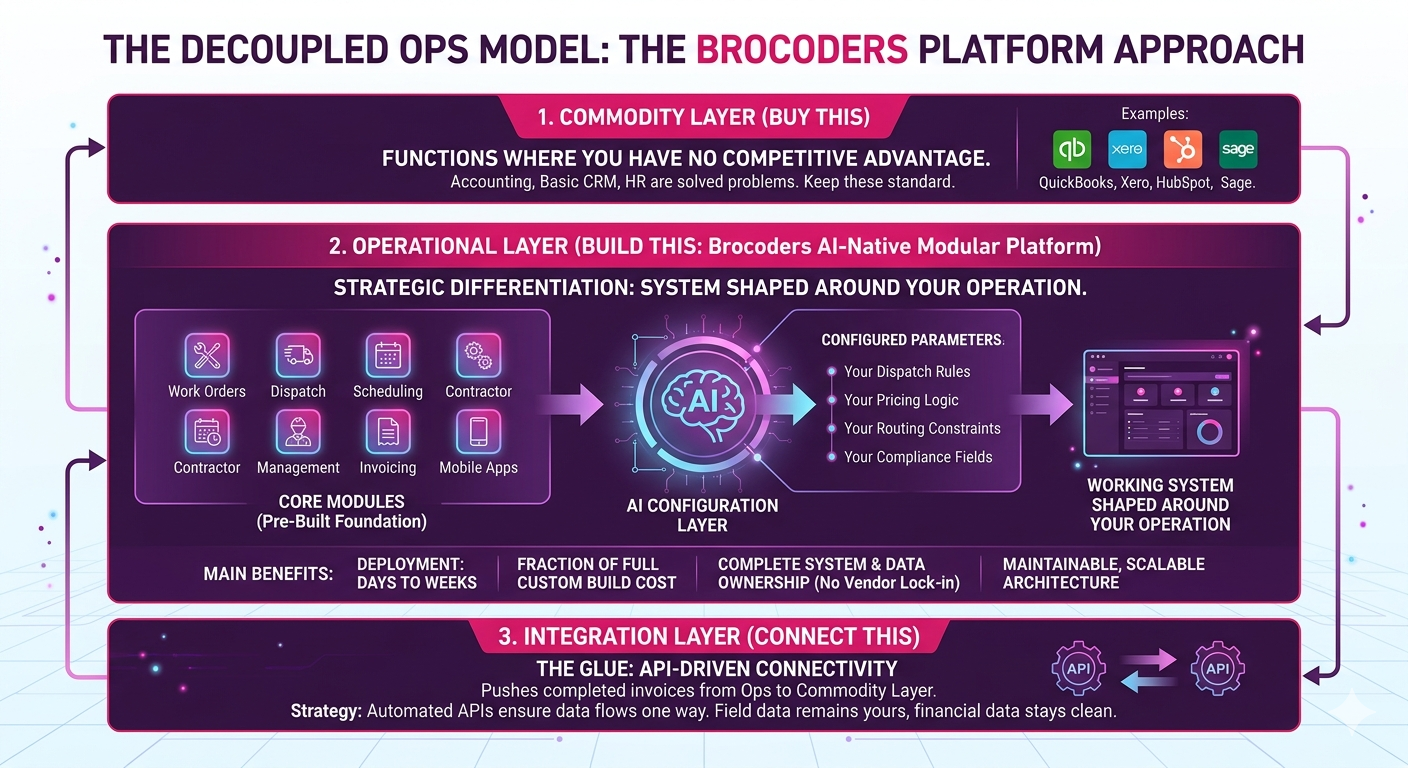
1. The Commodity Layer (Buy This)
These are functions where you have no competitive advantage. Accounting, basic CRM, and HR are solved problems.
- Tools: QuickBooks, Xero, HubSpot, Sage
- Strategy: Keep these standard. Building your own accounting software is high risk and low reward.
2. The Operational Layer (Build This)
This is where you differentiate. This includes your specific logic for dispatching, crew management, estimation complexity, and subcontractor payouts.
For businesses handling hybrid workflows that combine product sales with installation, specialized service scheduling software becomes critical. This is where a purpose-built operational layer outperforms rigid SaaS platforms.
When it comes to building this layer, operators today have three distinct paths. Understanding the tradeoffs between them determines whether you get a system that fits or a project that stalls.
Path A: Custom FSM Development from Scratch
A fully bespoke build means every feature — dispatch logic, routing rules, contractor onboarding, payment splits, mobile apps — is designed and coded specifically for your business. Nothing is borrowed or adapted from a template.
The strengths are real. You get 100% workflow fit, complete data ownership, and a codebase that can eventually become a productized platform if your operation scales or pivots. For large enterprises with deeply non-standard operations and an internal IT team, this remains the highest-ceiling option.
The weaknesses are equally real. Quotes from development agencies in this category typically run $80,000–$150,000 upfront. Timelines run 9–12 months before a working system is in production. Ongoing maintenance costs 15–20% of the build cost annually. You are also acquiring developer dependency: the knowledge of how your system works lives with whoever built it, and replacing that knowledge is expensive. Most SMBs get quotes, calculate the timeline, and return to their patchwork of tools. The budget and the wait eliminate the option before a contract is signed.
Path B: AI-Native Modular Platform (Brocoders FSM Platform)
The Brocoders approach sits between a rigid SaaS product and a custom build from scratch. The platform ships with pre-designed core modules covering work orders, dispatch, scheduling, contractor management, invoicing, and mobile apps. AI then configures these modules to the specific business: your dispatch rules, your pricing logic, your payment splits, your routing constraints, your compliance fields.
The result is a working system shaped around your operation, not a generic one you adapt to. Deployment targets days to two weeks for standard verticals, not months. Pricing runs at a fraction of a full custom build. You own the system and its data permanently — there is no vendor lock-in and no subscription dependency on someone else's roadmap.
This approach is directly different from what is sometimes called "vibe coding" — the practice of using AI code generation tools to rapidly produce a codebase from scratch with minimal engineering discipline. Vibe-coded systems tend to be fragile, poorly documented, and difficult to maintain or extend once the initial build is complete. The Brocoders platform approach uses AI to configure proven, battle-tested modules that have been refined through real deployments. The modules are the foundation; the AI is the configuration layer. The output is maintainable, scalable architecture, not disposable prototype code.
The practical difference: a vibe-coded FSM built in a week may handle 60% of your workflows adequately. A module-based, AI-configured platform handles 95%+ and grows with your operation.
IRS-compliant split payments via Stripe Connect — where a customer pays once and two charges route automatically to the company and the contractor — are built into the platform natively. This is the single most cited hard blocker in field service ICP research and absent from every major off-the-shelf FSM product.
For time-sensitive operations requiring immediate response, emergency dispatch software capabilities become non-negotiable. The modular platform approach allows these routing and response workflows to be configured specifically rather than forced into generic template logic.
- Tools: Brocoders FSM Platform (configured modules), connected via API to your Commodity Layer
- Strategy: Get working software in days to weeks. Own the system. Avoid the $100k build and the 12-month wait.
3. The Integration Layer (Connect This)
This is the glue. It pushes completed invoices from your Ops Layer to your Commodity Layer (QuickBooks) for reconciliation.
- Strategy: Automated APIs ensure data flows one way. Your field data remains yours, and your financial data stays clean.
Execution Guide
Entry Criteria (When to Use This):
- Revenue: $10M+
- Labor: Mixed workforce (W2 + 1099)
- Complexity: Standard FSMs require manual workarounds (spreadsheets) for >30% of your jobs
First Module (Where to Start):
Do not rebuild the whole system at once. Start with the Dispatch Rules Engine or the Contractor Portal. Solving the scheduling bottleneck usually yields the highest immediate ROI.
Failure Mode (Where It Breaks):
The most common mistake is trying to rebuild the Commodity Layer. Never build a general ledger or a chat tool. Connect to existing best-in-class tools for those functions.
When NOT to Build a Custom FSM Platform
Building your own Operational Layer is a powerful strategy, but it is not for everyone.
Stick with ServiceTitan or Housecall Pro if:
- You are under $5M in revenue
- Your workflow is standard (e.g., dispatch tech → fix unit → collect payment)
- You rely 100% on W2 employees with simple hourly pay
In these cases, the cost of custom development outweighs the efficiency gains. The off-the-shelf tools are designed exactly for you.
Bridging the Gap: Getting Started
For companies hitting the ceiling of rented software, the fear is often timeline. You worry that building software takes years.
That concern is valid for traditional custom development. A full bespoke build from scratch runs 9–12 months and $80,000–$150,000 before you have a system in production. For most mid-market field service operators, that timeline means the problem goes unsolved for another year while the spreadsheets and manual workarounds accumulate.
The AI-native modular platform approach changes the calculation. Rather than scoping a project and then building it piece by piece, the platform starts with working modules and configures them to your workflows. An Operational Blueprint session maps your dispatch logic, routing rules, payment structures, and contractor processes. That blueprint drives the configuration, not a year-long development sprint.
Brocoders delivers working software for standard field service verticals in days to weeks, not months. You keep the commodity tools that already work — QuickBooks, your existing CRM — and replace the operational tools that create friction: the rigid FSMs, the spreadsheet workarounds, the manual reconciliation between systems you paid for.
The comparison across all three paths looks like this:
| Generic FSM (ServiceTitan, Jobber) | Custom Dev from Scratch | AI-Native FSM Platform (Brocoders) | |
|---|---|---|---|
| Time to deploy | 30–90 days | 9–12 months | Days to 2 weeks |
| Cost | $150–300/user/month | $80k–$150k upfront | Competitive SaaS pricing |
| Workflow fit | You adapt (60–80%) | 100% fit | 95%+ fit |
| Contractor payments | Not supported | Custom build required | Built in |
| Ownership | Vendor owns it | You own it | You own it |
| Scalability | Vendor roadmap | Maintenance dependent | AI-configurable |
Your process is your product. Uncoupling it from rented software gives you the control to scale on your own terms.
Conclusion: Your Next Step
The choice between ServiceTitan alternatives is not just about software features. It is about operational strategy.
If you're running standardized workflows with predictable scaling, SaaS platforms work well. If you're managing high-variance operations with complex logic that defines your competitive advantage, it's time to consider the Decoupled Ops Model — and to choose the right path for building your operational layer.
Custom development from scratch remains the right answer for large enterprises with deeply complex, unique requirements and an IT team to support it. For mid-market operators who need workflow fit without a 12-month wait and a six-figure upfront cost, the AI-native modular platform approach delivers the same outcome at a fraction of the cost and time.
Ready to explore custom field service software? Book a discovery session with Brocoders to map your workflows and identify your highest-ROI starting module.
Related Resources:
- Build vs. Buy: Field Service Management Software Decision Framework
- Emergency Dispatch Software: Requirements for Time-Critical Operations
- Service Scheduling Software for Hybrid Business Models
- Stripe Connect Split Payments: Complete Implementation Guide
- Best Field Service Management Software: 2026 Comparison