
fintech team spent two days setting up GitHub Actions. Followed the docs. Wrote the workflow files. Added tests. Pushed to main, watched it turn green, and deployed.
Their next release broke production.
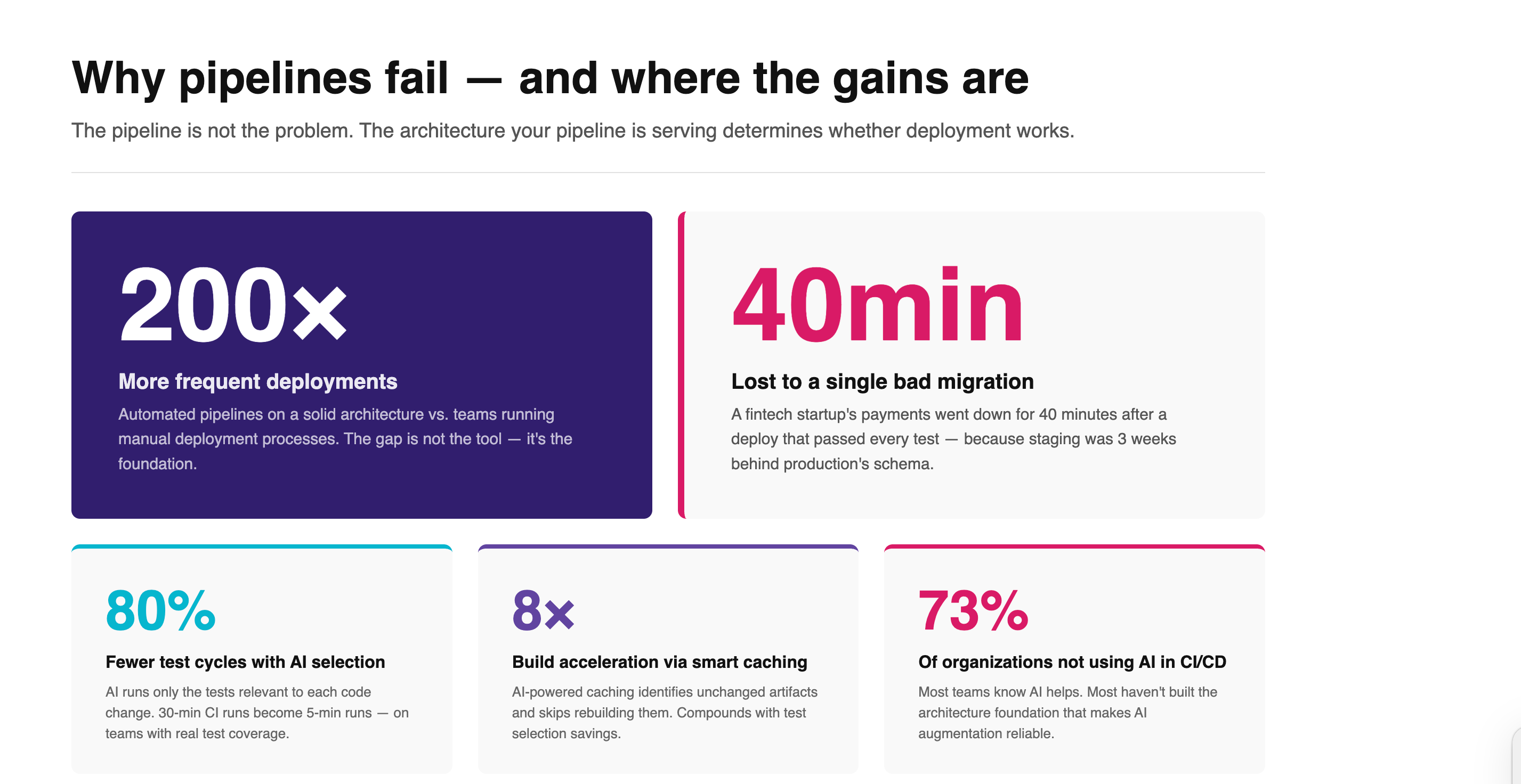
The pipeline ran correctly. Tests passed. Every status check was green. The problem was structural: their staging environment hadn't mirrored the production database schema in three weeks. A migration that ran cleanly in staging collided with live data and took down payments for 40 minutes.
This is the failure mode that CI/CD guides don't cover.
Every article on CI/CD pipeline setup starts the same way: choose a tool (GitHub Actions, GitLab CI, Jenkins), write a workflow file, add automated tests. And that advice isn't wrong. But it skips the part that determines whether any of it works in production: the architecture your pipeline is serving.
The tool is the last thing that matters. What matters first is everything underneath it.
Why CI/CD pipelines fail after you "do everything right"
If you've set up a CI/CD pipeline and still had production incidents, you're in good company. Teams using well-configured GitHub Actions workflows still ship breaking changes. Teams on enterprise CI platforms still face deployment days that feel like walking a tightrope.
The reason is almost always the same: the pipeline was built on top of an architecture that wasn't designed for automated delivery.
Think about what a CI/CD pipeline actually does. It takes code changes, runs them through a set of checks, and moves them toward production. The pipeline is just the delivery mechanism. What it's delivering into — the environments, the data, the service boundaries, the dependencies — determines whether that delivery works.
A few of the most common ways this plays out:
Environment parity gaps. Staging doesn't match production. Migrations run against a database that's weeks behind. A test environment pulls from a mocked service that behaves differently from the real one. The pipeline reports success because it passed the checks it was given. The problems only appear against real data, real traffic, real dependencies.
Unsequenced data migrations. Application code and database state need to deploy in a specific order. When schema changes and application changes ship without a sequencing plan, you get race conditions: new code trying to read columns that don't exist yet, or old code writing to a schema that's already changed. This is one of the most common sources of production incidents in startups running fast.
Security gaps baked into the process. Manual deployment steps are inconsistent by nature. One engineer stores secrets in environment variables. Another hard-codes a test key that never got rotated. A third manually SSHes into the server and makes a change that isn't tracked anywhere. Automated pipelines solve this — but only if the security baseline is designed before the automation runs, not patched on afterward.
Tests that don't cover production paths. CI/CD runs the tests you give it. If your test suite covers the happy path but misses edge cases that appear under production load or against real third-party services, your green pipeline is working as intended — and still not protecting you.
Organizations with properly architectured automated pipelines deploy 200 times more frequently than those running manual processes. Teams on manual deployments are typically limited to roughly quarterly releases. The gap isn't the tool. It's the foundation.
The CI/CD Architecture Stack
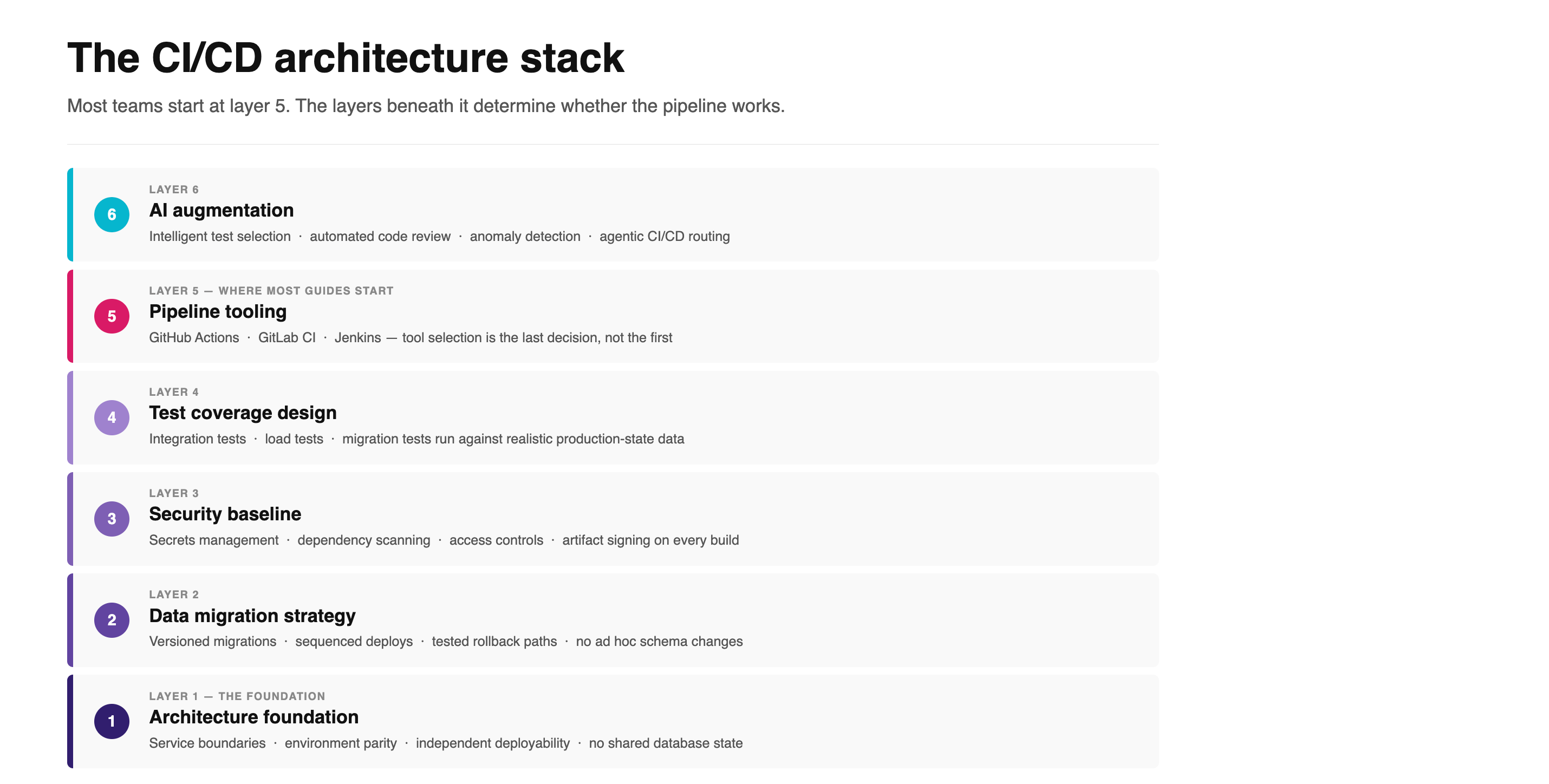
Here's a way to think about CI/CD that most guides skip: there are six layers, and most teams start at layer five.
Layer 1: Architecture foundation
Before you configure a pipeline, the codebase needs to know what it is. A tightly coupled monolith where services share database state creates deployment dependencies that automation can't untangle. Every service that needs to deploy together breaks the independence that CI/CD is supposed to create.
This doesn't mean you need microservices. It means you need defined service boundaries, clear ownership of each component, and environments that can be deployed independently. Without this, your pipeline will have implicit sequencing requirements that nobody ever wrote down — and they'll only become visible when they break.
Layer 2: Data migration strategy
This is the one that causes the most production incidents in growing products, and the one that gets the least attention in tutorials.
Every database schema change needs to travel through your pipeline in a defined order, with a versioned migration file, a clear sequence relative to the application code that depends on it, and a tested rollback path. When migrations are ad hoc — applied manually, or shipped at the same time as the application code with no sequencing — you're gambling on timing every single deployment.
When we set up CI/CD for Traders Alloy, a fintech startup in Sweden that was running entirely on manual deployments, the first work wasn't touching the pipeline tooling. It was mapping what needed to deploy, in what order, and under what conditions. That sequencing work is what made the automation reliable. The GitHub Actions configuration came later.
Layer 3: Security baseline
Automated deployment removes human inconsistency. But it also removes the human who noticed that a secret was exposed, or that a permission was broader than it should be. The pipeline needs to run those checks systematically instead.
This means secrets in a vault (not environment variables), dependency scanning on every commit, access controls that limit what the pipeline can touch in production, and artifact signing so you know what you're deploying matches what was built. These aren't nice-to-haves. They're the price of removing the human from the deployment loop.
Layer 4: Test coverage design
CI/CD tests what you tell it to test. Before you automate the testing, you need a deliberate answer to: what paths actually matter in production, and do the tests we have cover them?
Integration tests against real service behavior. Load tests against production-like volumes where performance matters. Migration tests that verify schema changes work against a snapshot of real data structure. These are the tests that catch the things that matter. Unit tests covering 95% of the codebase won't protect you if the integration between your payment service and your fulfillment service isn't covered.
Layer 5: Pipeline tooling
Once layers 1 through 4 are in place, tool selection becomes a relatively low-stakes decision. GitHub Actions is the default choice for most teams in 2026 — it's well-documented, well-integrated with the rest of the GitHub ecosystem, and has a large enough community that most problems have been solved publicly. GitLab CI is a strong alternative if you're self-hosting. Jenkins still works for teams with specific customization needs and the engineers to maintain it.
The right tool is the one your team will actually maintain. The wrong tool, on a solid architecture, still works. The right tool, on a shaky architecture, fails in ways that are harder to diagnose.
Layer 6: AI augmentation
This is where CI/CD is genuinely changing in 2026 — and where most of the hype is also concentrated. More on this below.
What AI actually changes in CI/CD (and what it doesn't)
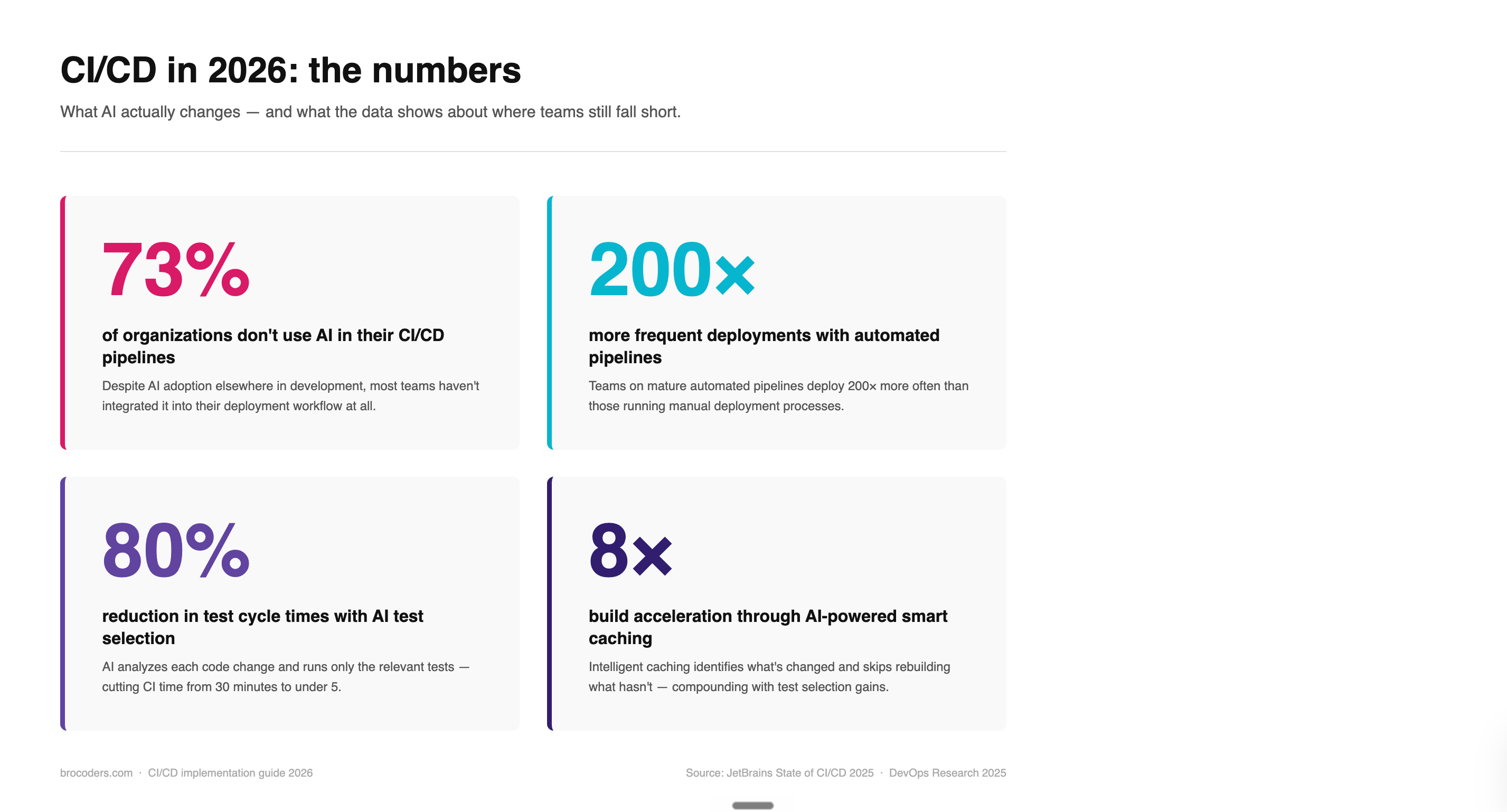
73% of organizations still don't use AI in their CI/CD pipelines at all, according to JetBrains' State of CI/CD research. The teams that do are seeing real results: up to 80% reduction in test cycle times through intelligent test selection, and up to 8x build acceleration through AI-powered caching. Those numbers are legitimate.
But they only materialize on top of the foundation described above.
Here's what AI in CI/CD actually does well:
Intelligent test selection. AI analyzes a code change and determines which tests are relevant to run, rather than running the full suite on every commit. For large codebases with comprehensive test coverage, this alone can cut CI time from 30 minutes to under 5. The catch: the tests have to exist and have to cover real production paths. AI can't select from tests you haven't written.
Automated code review in the pipeline. Security scanning, anti-pattern detection, dependency vulnerability checks — these can run automatically on every pull request, before a human reviews. This catches a class of issues that manual review misses because reviewers are looking at logic, not scanning for known vulnerability patterns.
Anomaly detection in deployments. AI monitoring that watches deployment behavior in staging and flags when something looks different from baseline — response time changes, error rate shifts, unusual memory patterns — before the change reaches production.
Agentic CI/CD. The emerging edge of this space. AI agents that can make routing decisions, trigger rollbacks based on metric thresholds, and propose pipeline configuration changes based on observed patterns. Most teams aren't there yet, but the infrastructure for it exists.
What AI doesn't fix: a test suite that doesn't cover production paths, environments that don't mirror production, or migrations that ship without sequencing. AI in CI/CD amplifies whatever's already in the pipeline. Put it on a solid architecture and it makes delivery genuinely faster. Put it on a broken foundation and it makes broken deployments arrive more confidently.
The teams getting real value from AI-augmented pipelines are the ones who spent time on layers 1 through 4 first.
What ongoing feature development does to your CI/CD setup
CI/CD is often treated as a one-time configuration project. Set it up, hand it off, move on to features.
Six months later, the pipeline is a maintenance burden. Deployment times have crept up. Tests are flaky. The security scanning is failing on a dependency that nobody's touched because nobody owns it. The migration strategy that worked for the original schema is showing cracks under the evolved data model.
Every new feature adds deployment surface area. A new service means a new thing that needs to deploy in a defined relationship with everything else. A new third-party integration means a new dependency that needs to be scanned and tested. A new database table means a new migration that needs to be sequenced correctly.
A pipeline configured once, then left alone, drifts from the product it's serving. Slowly at first. Then all at once, when a deployment that should have been routine isn't.
What ongoing pipeline ownership actually looks like:
Pipeline changes treated as a standard part of each feature sprint — not a separate DevOps ticket that goes into a backlog. Migration scripts reviewed as part of the PR that introduces the schema change, before they hit the pipeline. Security baseline reviewed when new dependencies are added, not quarterly. The AI augmentation layer updated as the test suite grows, so intelligent test selection is working from current coverage, not the state of things six months ago.
This is the difference between CI/CD as an event and CI/CD as a practice.
How to evaluate a vendor for CI/CD implementation
If you're looking at an external team to set up or own your CI/CD, the questions worth asking are mostly about architecture, not tooling.
Do they start with an architecture review, or immediately propose a tool? A team that leads with "we'll set you up on GitHub Actions" before understanding your service boundaries and data migration patterns is starting at layer 5. The tool choice should be the last conversation.
How do they handle data migrations in the pipeline? Ask for specifics: how do they sequence migrations relative to application code, how do they test migrations against a realistic data state, what's the rollback path when a migration fails mid-deploy. If the answer is vague, they haven't solved this problem in production.
How does the pipeline evolve as you add features? Ask whether pipeline maintenance is included in ongoing development work, or whether it's a separate engagement. A pipeline that gets touched only when something breaks is one that will consistently surprise you.
How is AI integrated into their pipeline? Ask which specific tools they use, at which layers, and what results they've seen. "We use AI" is not an answer. "We use AI-powered test selection that reduced our CI time from 24 minutes to 7 on a recent project" is one.
What happens when a deployment fails? Who owns the incident, what's the rollback SLA, and how is the failure analyzed so it doesn't repeat. Rollback is part of the pipeline design, not an edge case.
A vendor who thinks in architecture first, then tooling, then AI augmentation is thinking in the right order. That order is also the one that makes CI/CD actually work.
Conclusion
The debate about which CI/CD tool to use is real and reasonable. GitHub Actions is probably the right default for most teams right now. But tool selection is downstream of the architectural decisions that determine whether the pipeline works: service boundaries, data migration sequencing, security baselines, and test coverage.
Get those right, and tool selection is a preference. Get them wrong, and GitHub Actions will help you break production faster than Jenkins ever could.
If you're setting up CI/CD for the first time, or figuring out why an existing pipeline keeps causing incidents, start with the architecture. The tool configuration is the easy part.
We've helped teams from fintech startups to vacation platforms set up deployment infrastructure that holds up in production. If you want to talk through what that looks like for your product, our DevOps team is a good starting point.
FAQ
A CI/CD pipeline is an automated workflow that takes code changes from a developer's machine through a series of checks — build, test, security scan — and moves them toward production. CI (Continuous Integration) is the process of automatically testing every code change when it's pushed. CD (Continuous Delivery or Continuous Deployment) is the process of automatically moving tested changes toward production. Together, they replace the manual steps that used to sit between "code is written" and "code is running in production."
The most common cause is a mismatch between the environment where tests ran and the environment the code deploys into. Tests pass against a staging database that's weeks behind production. Tests pass against a mocked third-party service that behaves differently from the real one. Tests pass against a schema that's already been changed in production but not in staging. The pipeline is working as designed — the issue is that what it's testing doesn't reflect what production looks like. Fix the environment parity first.
CI (Continuous Integration) is the practice of automatically building and testing code every time a developer pushes a change. The goal is to catch integration problems early, before they compound. CD refers to either Continuous Delivery (the code is always in a deployable state, but a human triggers the final push to production) or Continuous Deployment (deployments happen automatically when tests pass, with no manual gate). Most production teams run Continuous Delivery rather than Continuous Deployment — the human review step before production is a deliberate choice, not a sign the pipeline isn't working.
The most practical current use cases are: intelligent test selection (AI identifies which tests are relevant to a given code change and skips the rest, cutting CI time by up to 80%), automated security scanning in the pipeline (vulnerability detection, dependency analysis, anti-pattern flagging on every PR), and anomaly detection in deployments (AI baselines normal deployment behavior and flags deviations before they reach production). Agentic CI/CD — AI agents making autonomous decisions about pipeline routing and rollback — is an emerging category that some teams are testing in 2026. All of these work better on a solid architecture foundation than on a poorly structured one.
Basic pipeline configuration for a well-structured codebase — workflow files, test automation, deployment to a cloud environment — can be done in a few days. The work that takes longer is what often gets skipped: architecture review, environment parity setup, migration sequencing, security baseline, test coverage audit. Done properly, a CI/CD setup for a production SaaS product typically takes two to four weeks depending on the complexity of the existing system. Teams that try to compress that timeline by skipping the architecture work usually end up spending more time on incident response later.
Look for a team that starts with architecture questions before proposing a tool. Ask specifically how they handle database migrations in the pipeline, how the setup evolves as new features are added, and what happens when a deployment fails. A vendor who can answer those questions with specifics has solved them in production. One who redirects to tool selection hasn't.
Database schema changes and data changes need to be versioned, sequenced, and shipped in a defined relationship with the application code that depends on them. The standard approach is migration files that run as part of the deployment sequence, with the order explicitly defined: schema changes before the application code that reads the new schema, rollback scripts ready if the migration fails, and test runs against a database snapshot that reflects production structure. When migrations are handled ad hoc — applied manually, or shipped simultaneously with application code without sequencing — deployments become fragile, and the incidents are hard to reproduce because the failure is timing-dependent.