
Document automation is bought on extraction accuracy, and the reading engines have earned their scores, but the operational numbers underneath them have barely moved, which leaves buyers comparing vendors on the one metric that does not predict whether the work goes away.
You'll be hard pressed to find a finance or operations team that hasn't bought document automation by now, and that includes the teams still opening every invoice by hand each morning. Measured by the Fraunhofer IAIS and Lamarr Institute in 2025, one model scored 96.50% on clean digital invoices, 92.71% on scanned invoices, and 87.46% on scanned receipts. Ardent Partners' 2025 benchmark data puts best-in-class straight-through processing, the share of documents that finish without a person touching them, at 49.2%, and the industry average at 32.6%.
85% true automation rate, where the 15% of the time that's not going to properly handle the document, you can catch that declaratively" beats "98% accuracy where you can't identify the problematic 2%, says Eli Badgio, CTO at Extend, in an interview on how his team ships document automation.
We have spent eight years building an accounting-automation platform for bookkeepers and accounting firms, plus document pipelines in insurance, logistics, and industrial ecommerce. The gap between those two sets of numbers is where almost every project we inherit is stuck, and closing it takes four gates rather than a better reader.
TL;DR: Extraction is one of four gates a document clears before the work is finished, and the exceptions pile up at the other three. Ask a vendor which gates they own before you ask how accurate their reader is.
What OCR automation actually does
OCR automation converts document images into machine-readable text and passes that text to something downstream. That is the whole job description. Modern OCR does it well, at scale, on messy inputs, with layout awareness the template-based tools of ten years ago never had.
The accuracy number describes that job and nothing past it. All three Fraunhofer figures came from one model, and the variable was the paperwork. If your suppliers email PDFs you get 96.50%. If half of them still fax, you get 87.46%, and no procurement decision changes that. Accuracy is a property of your document mix, which makes it a poor basis for choosing a vendor.
We hit the same boundary building AskCW.ai for Compressor World, an assistant grounded in 4,090 of their product manuals and spec sheets. Most of that corpus parsed cleanly. The image-heavy scanned manuals needed an extra OCR layer bolted onto the ingestion pipeline before anything else could touch them. OCR was one component in that build, which is where it has sat in every document product we have shipped.
The second number nobody puts on the sales page
Straight-through processing predicts whether your headcount moves, and vendors rarely print it beside the accuracy claim. Put 32.6% next to an advertised 99% and the AP manager's morning makes sense: two out of every three invoices still get touched at companies that already bought the software.
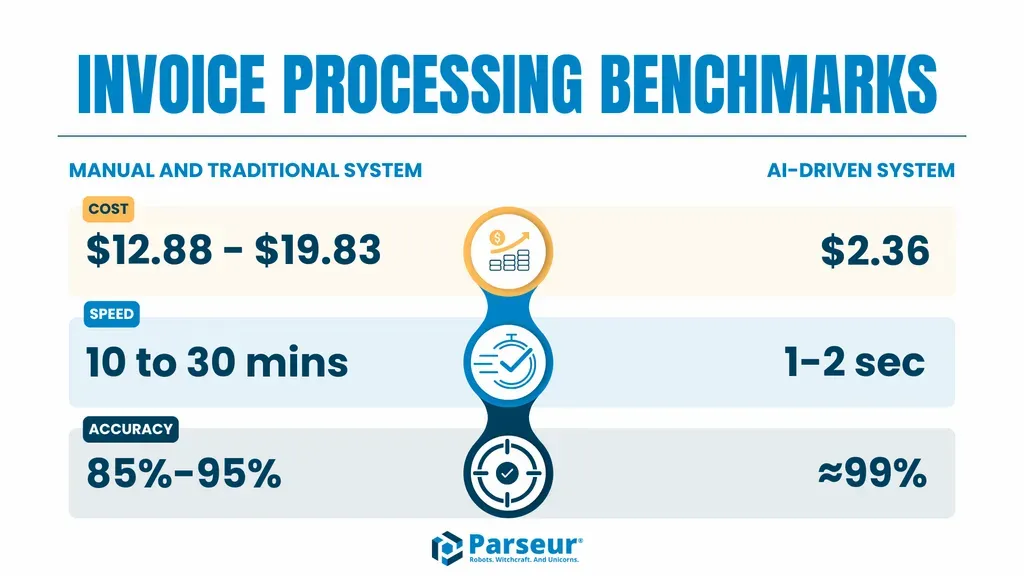
Ardent Partners puts exception rates at 9% best-in-class, 14% average, and 22% manual, while cost per invoice over that range falls from as much as $19.83 down to $2.78. Automation compresses cost hard and exceptions gently, so the exception queue survives the project and becomes the job. Throughput moves from 5 invoices per clerk-hour to 30 on Quadient's figures. The clerk gets six times faster. The clerk stays.
A failure you can route becomes a workflow. A failure you cannot see becomes a liability.
We learned that one expensively. On a build for an automotive AI client, a general model read a VIN off a photographed plate and every character came back correct. It then read the vehicle as a Golf SportWagen rather than a Golf Alltrack, which flipped front-wheel drive to all-wheel drive, and that one wrong attribute travelled downstream into the valuation and financing figures the user was shown. Extraction was perfect. The answer was wrong. The rule we wrote afterwards still governs the product: all numerical, financial, configuration, and recall data comes from the tool API, and the model only explains it.
Where the category already moved
For most of the last decade, document vendors competed on how well they read. Comparison pages ranked engines by field-level accuracy, buyers ran bake-offs on sample invoices, and the winner misread the fewest line items. That competition has ended. Vic.ai now sells its product as VicAgents, organised by the job each one owns rather than by capability, and headlines an 85% no-touch rate by month 6 alongside 5x faster invoice processing and a 7-month payback. Its 99% accuracy claim sits further down the page. The same restructuring has run through the rest of accounting automation, where products are increasingly sold as agents that own reconciliation, journal entries, PO matching, and approvals.
That 85% is the same figure Badgio names as the honest target, and it is a long way from 99%. The vendors at the front of this category now compete on the number their buyers should have been asking for all along, while search results for "OCR automation" are still full of pages selling recognition quality.
The four gates of document automation
Every document that enters your business clears four gates before the work is finished. Naming them lets you find the one your exceptions are stuck at.
Gate 1, read. Turn the document into structured data. This is OCR automation, and vendors compete here and mostly win.
Gate 2, decide. Classify the document and route it. What is this, whose is it, and what happens next. Our own agent platform, Bridge, handles this with native parsers for unstructured files (PDF, DOCX, TXT) alongside structured feeds (XML, SQL), resolved through hybrid retrieval that pairs semantic matching with exact keyword matching. Badgio's guidance applies here too: if a routing rule can be solved with code, write the code, because deterministic logic is the only kind you can guarantee.
Gate 3, match. Reconcile the document against something that already exists: a purchase order, a contract, a ledger line, a payment. For a logistics and fintech client we built a reconciliation engine that catches USPS underpayments buried in contract terms and fuel surcharges, across thousands of loads a month. Matching needs live state from a system of record, which is why Bridge runs an action layer built on the Model Context Protocol that reads from and writes back to a CRM or an ERP. A reader has no state to work with.
Gate 4, close. Complete the transaction and leave an audit trail. For an insurtech client, AI driver-document parsing sits inside a quote-to-bind flow that stays PCI SAQ-A compliant end to end, finishing in a signed DocuSign contract and a Stripe payment. Two things make that gate safe: every generated answer is citation-linked to its exact source document, and critical actions wait for human approval before they execute. That approval step is your exception queue, designed in from the start. AskCW.ai carries the same discipline more simply, telling users when an answer is not in the indexed documentation rather than improvising one.
The gate your exceptions pile up at is the gate you have not automated. It is almost never gate 1.
| Gate 1 read | Gate 2 decide | Gate 3 match | Gate 4 close | |
|---|---|---|---|---|
| OCR automation | Covered | No | No | No |
| Typical IDP platform | Covered | Partly, on known document types | Rarely, and only inside its own ERP connector | Logs extraction, not the decision |
| Document AI as it is now sold | Covered | Covered | Covered | Covered, with approval gates and citations |
What this changes about what you buy
Most operations leaders we speak to arrive with the same objection: we already pay for a tool that does this. Fair, and usually accurate. The tool clears gate 1 well enough, and the work that remains is the routing, the matching, the exception queue, and the audit trail wrapped around it. That turns the project into a layer on top of a platform you already own, which is a smaller first build than most callers expect.
Four questions get you there faster than any vendor comparison table.
What is your straight-through rate on our document mix? Their accuracy on their sample set is marketing. Their throughput on 200 of your worst PDFs is data. Which gates do you own, and which do you hand back? Most platforms cover 1 and part of 2. Say so out loud in the room. What does the exception queue look like, and who works it? With no answer, the queue is your team and nobody costed it. What gets logged? In a regulated flow the audit trail is the product, and this question separates a digital transformation project from a tool purchase.
If your documents are invoices, payments, or claims, weight the last two heaviest. Compliance is where fintech document work gets expensive once it is retrofitted.
What eight years on one document platform teaches you
We started building an accounting-automation platform in 2018 as an MVP, to test whether bookkeepers would pay for faster document handling. They did. The product began with categorisation, analysis, naming, and secure storage of financial documents, which put it at gate 1 and part of gate 2.
Eight years on it is still in production, and almost everything added since sits past extraction. Each gate got built when the business proved it needed one, in that order, and no version of that roadmap involved shopping for a more accurate reader.
That sequence is why we built Bridge the way we did. It ships with ingestion across unstructured and structured sources, retrieval that cites its sources, an action layer that writes back to systems of record, and an approval step before anything critical fires, so gates 2 through 4 stop getting rebuilt on every engagement. It deploys inside your own VPC when documents cannot leave your perimeter, which for accounts payable and claims teams is usually the first question asked. The architecture is written up in how we build LLM-based applications.
Start by finding your gate. Pull last month's exceptions, sort them by where they stopped, and count. That number tells you more about your next twelve months than any accuracy figure on a sales page.
Frequently asked questions
OCR automation uses optical character recognition to convert document images into machine-readable text without manual data entry, usually as the first step in a larger workflow. It covers reading and extraction. Deciding what the document is, matching it against existing records, and completing the transaction are separate problems handled by separate systems.
OCR reads characters off a page. Intelligent document processing (IDP) adds classification, context, and machine learning on top, so it handles document types it has not seen in a fixed template. Both stop short of executing the business process the document belongs to.
No. OCR automation is one component inside document AI, which also covers classification and routing, reconciliation against your systems of record, and completion of the transaction with an audit trail. A product that only reads documents accurately will speed up data entry and leave your exception queue roughly where it was.
Accuracy depends far more on your document mix than on your vendor. Fraunhofer IAIS measured one model at 96.50% on clean digital invoices, 92.71% on scanned invoices, and 87.46% on scanned receipts. Have any vendor run their engine against your own worst documents before comparing published figures.
Because extraction was automated and the three steps after it were not. Benchmarks put average straight-through processing at 32.6%, so two thirds of invoices still get opened by a person at companies already running automation software. Sort last month's exceptions by where they stopped and you will usually find them at routing, matching, or approval.
Most platforms ship connectors for the major ERPs, and the connector usually handles posting extracted data. The harder integration runs both ways: reading current state out of the ERP to match an invoice against an open purchase order, then writing back a decision with an audit record. Confirm which direction a vendor's integration runs before scoping.
Buy the reading layer, since the commercial engines are good and few companies have a reason to build gate 1 from scratch. The build decision belongs at gates 2 through 4, where the logic follows your business rules, systems of record, and compliance obligations. Most of the AI document work we take on is a layer over a platform the client already owns.