
The SaaS team you think you need is probably twice as big as the one you actually need.
In 2022, a production-ready SaaS MVP required a backend developer, a frontend developer, a QA engineer, a DevOps engineer, a UX designer, and a project manager. At minimum. Six roles. Six salaries. A coordination overhead that often consumed more calendar time than the code did.
In 2026, that's not how it works anymore.
AI-augmented delivery has changed what the minimum viable team looks like. Here in Brocoders, we shipped a full telehealth platform in 6 weeks with a lean team. Not because we cut corners on architecture — because we built production-grade scaffolding into the process itself, and let AI handle the parts that used to require extra headcount.
This guide covers the full SaaS application development process — from idea to deployment — and the team model that makes modern SaaS delivery work without over-hiring in the early stages.
TL;DR: Building a SaaS application in 2026 doesn't require the team it used to. AI-augmented delivery has compressed what once took 10 engineers into what a team of 4–5 can now ship. The process still follows the same arc — discovery, architecture, build, deploy, scale — but every phase moves faster, and the minimum viable team looks different than it did two years ago. This guide walks through the full SaaS development process and the Minimum Viable Team model we use at Brocoders to ship production-ready platforms without overstaffing early-stage builds.
What is SaaS application development (and what makes it different in 2026)?
SaaS stands for Software as a Service. Instead of installing software on individual machines, users access it through a browser. The provider hosts everything, handles updates, and charges on a subscription basis.
That's the textbook definition. What actually separates SaaS architecture from a standard web app goes deeper:
Multi-tenancy. A SaaS application serves many customers on shared infrastructure. Your data is isolated from every other tenant's data, but you're running on the same underlying system. That architecture decision — schema-per-tenant vs. row-level security — shapes everything from your database design to your compliance story. We cover that in detail in our multi-tenant architecture guide.
Elastic scalability. SaaS products are designed to scale with demand. A feature that works for 10 users needs to work for 10,000 without a full rewrite.
Uptime commitment. When your software is offline, your customers can't work. SaaS teams maintain zero-downtime deployment strategies and SLA-backed uptime targets from day one.
What's changed in 2026 is a new category on top of this: AI-native SaaS. This is software that doesn't just run — it decides. It adapts to usage patterns, generates outputs, and gets better over time. The architecture for an AI-native SaaS product is meaningfully different from a standard CRUD application, and it's now the fastest-growing subcategory in the market.
| Web Application | SaaS Application | |
|---|---|---|
| Hosting | Server | Cloud (multi-tenant) |
| Pricing model | One-time or licensed | Subscription |
| Scalability | Limited | Elastic (designed for it) |
| Architecture | Single-tenant | Multi-tenant by design |
| AI integration | Optional | Core requirement in 2026 |
If you're evaluating whether to build SaaS vs. on-premise, this comparison covers the full tradeoffs. And if the SaaS vs. IaaS vs. PaaS distinction is still fuzzy, this breakdown will clear it up fast.
The SaaS market in 2026: why the window is still wide open
A lot of "SaaS is growing" articles cite the same recycled numbers from 2021. Here's what the market actually looks like now.
The global SaaS market sits between $375B and $512B in 2026, depending on methodology — Fortune Business Insights puts it at $375.57B, Statista at $512.27B. Both agree on the direction: the market is growing at 18.7% CAGR and projected to reach approximately $1.2 trillion by 2032.
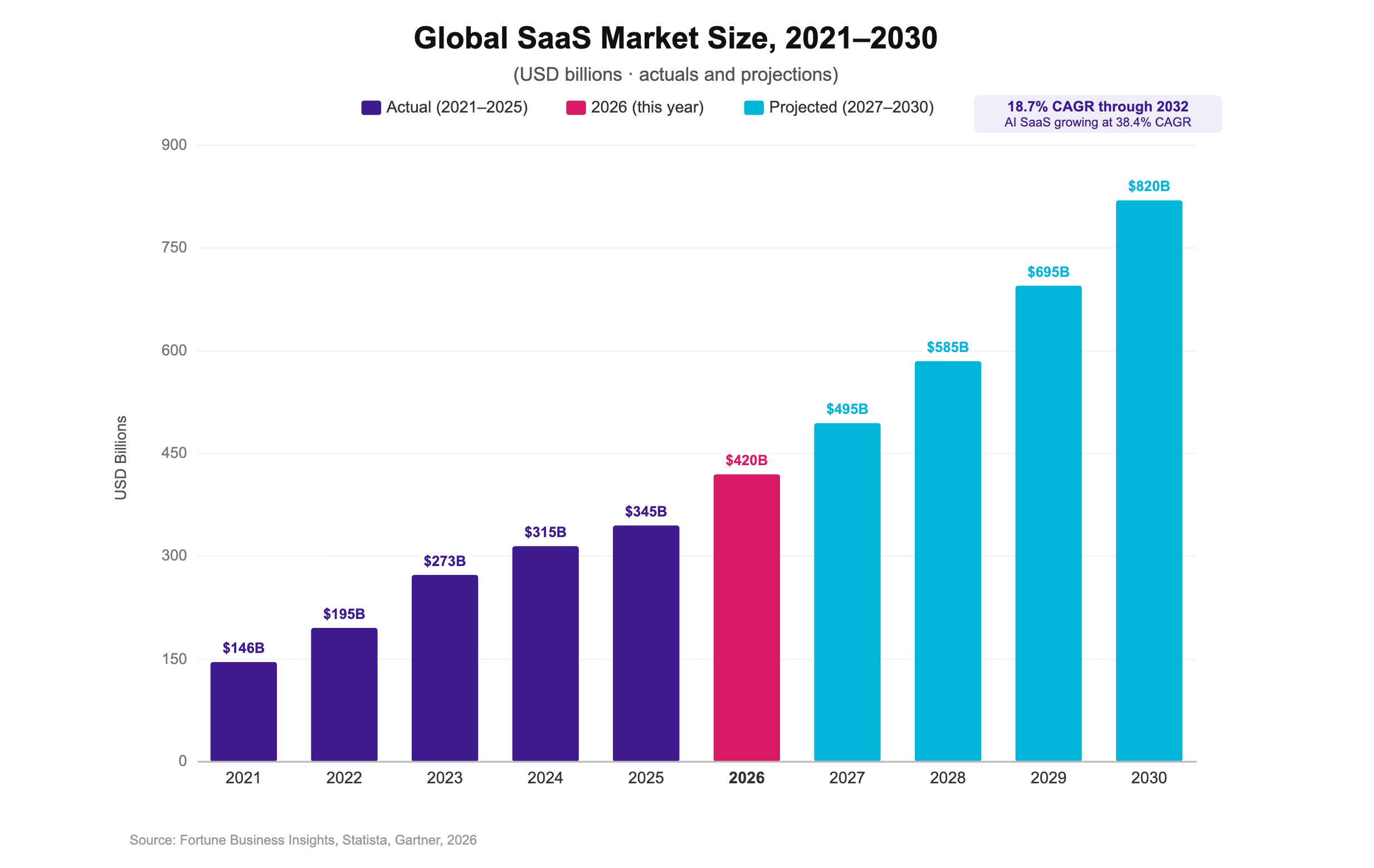
The US alone accounts for $141B of that, with North America holding nearly 47% of global SaaS revenue.
The more interesting signal: AI SaaS is growing at 38.4% CAGR (2024–2034), roughly double the pace of traditional SaaS. In 2025, SaaS M&A hit a record 2,698 deals — and 72% of targets cited AI in their product positioning. The buyers know where the value is going.
99% of organizations use at least one SaaS tool. That's not a growth story anymore — that's infrastructure. Every business function has a SaaS layer, and the companies building them are still early in the competitive lifecycle for most verticals.
The established players — Salesforce at $41.5B annual revenue, Microsoft 365 with 400M+ paid users, ServiceNow in 80%+ of Fortune 500 companies — dominate the horizontal. Every niche vertical is still up for grabs.
The SaaS development process: 6 phases (and what AI has changed in each one)
The six phases of SaaS development haven't changed. What's changed is how long each one takes and which parts of the work humans still need to own.
Phase 1: Discovery and validation
Before writing a line of code, you need answers to three questions:
- Can it be built? What expertise, infrastructure, and integrations does this product require?
- Should it be built? Is there real demand? What does the competitive landscape look like?
- Will people actually use it? What does the UX need to feel like for adoption to happen?
These aren't rhetorical questions. They're the filter that decides whether you build a business or an expensive lesson.
What's changed here: AI research tools — Perplexity, Claude, Gemini — compress competitive analysis and market research dramatically. A market scan that used to take a week of analyst time takes hours. The judgment calls still require humans. The data gathering doesn't.
Once the idea clears validation, you move into technical planning. That means your Software Requirements Specification — a document that defines exactly what the system does before any code is written. Our SRS writing guide covers the structure if you're doing this for the first time.
Phase 2: Architecture planning
This is where most SaaS projects accumulate their most expensive technical debt.
Architecture decisions made in week 2 follow you for years. The wrong database structure creates a painful migration at 10,000 users. The wrong multi-tenancy model creates security gaps you find at the worst possible moment. The wrong infrastructure choice creates cloud bills that eat your margin.
The Brocoders position on this is specific: architecture is the one place you don't want AI to lead. AI can accelerate every other phase. This one requires a senior architect who owns the structure, security, and long-term maintainability of the system — and then AI to accelerate the build on top of it.
Key decisions at this phase:
- Multi-tenancy model. Schema-per-tenant gives stronger data isolation; row-level security is cheaper at scale. Both have tradeoffs depending on your compliance requirements and expected tenant count. Our multi-tenant deep dive covers when to use each.
- Monolith vs. microservices. For most early-stage SaaS products, start with a well-structured monolith. Microservices add operational complexity before you know what you're optimizing. This comparison explains when to make the switch.
- Cloud provider. AWS, GCP, and Azure all work for SaaS. The decision depends on your team's existing familiarity, your compliance requirements, and your AI/ML roadmap. Full breakdown here.
- Serverless vs. containerized. Some SaaS workloads fit serverless perfectly; others hit its limits fast. Our serverless architecture guide covers where the model works and where it doesn't.
Phase 3: UX/UI design
UI is what the user sees. UX is how it feels to use. The distinction matters because you can have beautiful UI with terrible UX — and users will leave.
For SaaS specifically, UX carries more weight than in most product categories. Your users are logging in every day, often under deadline pressure. If a workflow requires 4 clicks where 2 would do, they'll complain. If the mental model is wrong, they'll churn.
In 2026, AI design tools — Figma AI, v0 — accelerate wireframing and component generation significantly. They're good at producing UI scaffolding fast. The UX judgment — what the flow should feel like, what the hierarchy of information is, what a first-time user needs to see — that still requires a human designer who understands your users.
What doesn't change: the designer working closely with engineers from the start, not handing off finished comps at the end. Design that's built without engineering input creates implementation surprises. SaaS design principles that actually hold up if you want the longer version.
Phase 4: Development and testing
This is where the AI-augmented delivery model changes things most visibly.
A traditional SaaS sprint looks like this: developer picks up a ticket, writes code from scratch, opens a PR, waits for review, addresses feedback, merges. For standard modules — authentication, user management, admin panels, billing — a developer is essentially reimplementing patterns that have existed for years.
An AI-augmented sprint looks different. Engineers write code with AI assistance, supervised by a senior architect who owns the structure. Standard modules are built on top of production-grade boilerplate rather than from scratch. The result: authentication that would take 60–80 hours with a traditional approach takes 15–20 hours with our BC Boilerplates and AI tooling (see bcboilerplates.com).
That's not a marketing claim — it's the number we give clients when they ask how our estimates compare to other agencies. If another agency quotes you 80 hours for auth, ask them whether they're building from scratch or using pre-built, production-tested components. The answer tells you a lot.
QA in the same model: AI-automated testing catches regressions faster and generates test cases for common patterns. Fewer manual testing cycles. Shorter feedback loops. Higher quality at the end.
For the DevOps layer: DevOps for SaaS projects — a full guide.
Phase 5: Deployment
The primary goal of deployment is shipping what you planned, without scope creep, with clean and maintainable code in production.
CI/CD (Continuous Integration / Continuous Deployment) is not a nice-to-have for SaaS. It's the pipeline that makes everything else possible — automated testing before merge, staged rollouts, environment parity between development and production. At Brocoders, CI/CD is a line item in discovery, not an afterthought added six weeks before launch.
The challenge specific to SaaS: your platform has to stay online while you update it. Users can't tolerate maintenance windows. The standard approach is Blue-Green deployment — you run two identical environments ("blue" is live, "green" is where the next version is tested), then cut traffic over when the new version is validated. If something breaks, you cut back. No downtime, no rollback drama.
Phase 6: Maintenance, scaling, and iteration
The SDLC doesn't end at launch. It loops.
Once users are in the product, three things happen simultaneously: they find bugs, they ask for new features, and the metrics tell you what's actually working. All of it flows back into your product backlog.
A maintenance budget that works: roughly 20–25% of your development budget per year. Most founders don't plan for this and then find themselves unable to address bugs without diverting the whole engineering team. Plan it before launch, not after.
The SaaS metrics worth tracking at scale:
- ARR (Annual Recurring Revenue): ARR = MRR x 12. Tracks year-over-year growth.
- MRR (Monthly Recurring Revenue): ARPU x total monthly users. Your baseline health metric.
- Churn Rate: (Lost customers / Starting customers) x 100. The metric most founders underwatch early.
- LTV (Lifetime Value): Average order value x average yearly transactions x average customer lifespan.
- CAC (Customer Acquisition Cost): Total acquisition spend / customers acquired in the same period.
- Conversion Rate: (Conversions / Total visitors) x 100.
Which ones matter most depends on your stage. At seed, churn and activation dominate. At Series A, LTV:CAC ratio tells you whether the model works. For the pricing side of this — how pricing decisions affect the revenue metrics — SaaS pricing and sales synergy has the full picture.
The Minimum Viable Team: how SaaS staffing has changed in 2026
Here's the conventional wisdom you'll find in most SaaS development guides:
To build a SaaS product, you need a backend developer, a frontend developer, a QA engineer, a DevOps engineer, a UX designer, and a project manager. Ideally all senior. Ideally all specialized.
That advice was reasonable in 2022. It's expensive in 2026.
AI-augmented engineering has changed what roles actually need to be filled by humans versus what can be handled by a senior engineer using AI tools. The result is a smaller, leaner team that ships the same scope — sometimes faster — because there's less coordination overhead and more building.
We call this the Minimum Viable Team (MVT).
The MVT has 4 core roles:
1. Solution Architect. Owns structure, security, and long-term maintainability. This is the role you never remove. AI can't design a system responsibly — it can implement patterns, but it can't make the tradeoff decisions that determine whether your product survives at scale. Every SaaS project needs one human with the experience to own the architecture.
2. Full-Stack Engineers (1–2). Write code with AI assistance, under architect review. In the MVT model, generalist engineers who work across the stack are more valuable than specialists who silo in one layer. AI handles the repetitive implementation; engineers handle the decisions.
3. Product Strategist. Owns scope discipline, user story mapping, and priorities. Not a project manager in the administrative sense — this is the person who tells you what not to build. The product strategist is the firewall between a feature factory and a product that ships on time.
4. QA + DevOps (hybrid or shared). AI-augmented pipelines handle most of the regression testing and deployment automation. One engineer who owns both the quality gate and the infrastructure is viable for early-stage SaaS in a way it wasn't two years ago.
| Role | Traditional model | MVT model | What AI absorbs |
|---|---|---|---|
| Backend developer | 1–2 dedicated | Part of full-stack | Boilerplate code, CRUD, standard patterns |
| Frontend developer | 1–2 dedicated | Part of full-stack | Component scaffolding, repetitive UI logic |
| QA engineer | 1 dedicated | Hybrid with DevOps | Regression testing, test case generation |
| DevOps engineer | 1 dedicated | Shared / part-time | Pipeline config, infra-as-code templates |
| UX Designer | 1 dedicated | Part-time or consultant | Wireframe generation, component libraries |
| Product Strategist | 1 dedicated | 1 dedicated (no change) | Sprint reporting, status summaries |
| Solution Architect | Sometimes omitted | Essential — never remove | Nothing |
How you scale the MVT: you add engineers before anything else. Not new roles — more build capacity on a well-designed foundation. The architect and product strategist stay constant. The engineering muscle grows with the roadmap.
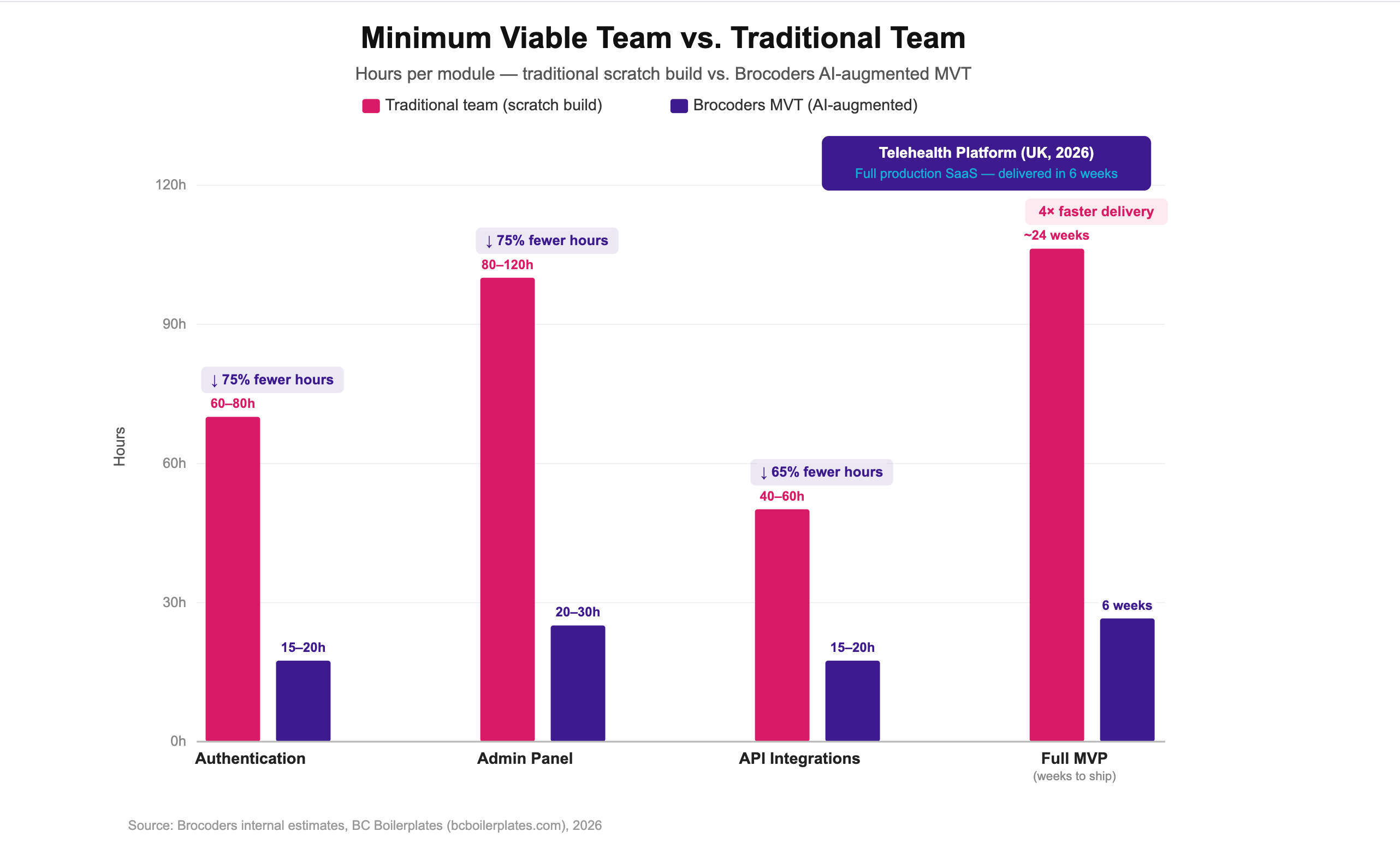
The proof is in the numbers. The telehealth platform we delivered in 6 weeks here at Brocoders ran on this model. The Adact gamification platform — 16–22% bounce rate versus the industry's 60–80%, 96% of users completing games, half a million users through a campaign in its first major launch — was built and has been running on an ongoing Brocoders engagement since 2021. Neither project required the full traditional agency headcount.
SaaS security: the layer you can't bolt on after launch
Security decisions made at the architecture phase are cheap. Security decisions made after launch — when you've got 5,000 users and a data breach — are not.
The three areas that cause the most problems in SaaS security:
Multi-tenant data isolation. Every tenant's data needs to be completely invisible to every other tenant. Schema-per-tenant (each customer gets their own database schema) gives you the strongest isolation at the cost of higher infrastructure complexity. Row-level security in a shared schema is cheaper to run but requires rigorous policy enforcement. Both work — the choice depends on your compliance requirements and projected tenant count. Full breakdown in our multi-tenant architecture guide.
Authentication and access control. Don't build your own auth. The number of things that can go wrong — token handling, session management, credential storage, OAuth flows — is long, and the consequences of getting any of them wrong are severe. Use a proven solution. The Auth0 vs. Cognito comparison covers the two most common choices for SaaS. And if you're building for enterprise buyers, SSO is a requirement you need to plan for early.
Compliance. GDPR, SOC 2, HIPAA — the compliance requirement depends on your market and your data category. The important thing is knowing which frameworks apply to you before you finalize the architecture. Retrofitting compliance onto an existing data model is painful and expensive. The SaaS security guide goes deeper on this.
The AI-specific risk in 2026: if your SaaS product includes LLM features — generated text, AI-assisted decisions, user data flowing to a model — you need a data handling policy before launch, not after. What data is sent to the model? What's retained? What's the user's consent status? These are architecture questions, not legal department questions.
AI in SaaS development: what's real and what's noise
Every SaaS article in 2026 has an AI section. Most of them say the same thing: "AI is transforming software development." That's not useful.
Here's what AI has actually changed, specifically:
At the delivery level (how you build):
AI-assisted coding tools — GitHub Copilot, Cursor, and similar — reduce the time to implement known patterns. Authentication, admin panels, CRUD interfaces, API integrations with well-documented endpoints: all of these are faster with AI assistance. The reduction varies but 40–70% on standard module development is realistic when combined with production-grade boilerplate.
What AI hasn't changed: the decisions. Which architecture to use. What to build and what to cut. How to handle a novel integration that has no established pattern. These still require experienced engineers.
At the product level (what you ship):
AI-native SaaS products — software that includes LLMs, automation agents, or machine learning at the core — have become their own category. The fastest-growing SaaS companies in 2025 cited AI in their positioning. The architecture for these products differs from a standard CRUD application: you're managing inference costs, latency budgets, prompt versioning, model evaluation pipelines, and output safety.
For a practical look at how MCP agents fit into SaaS products, this piece on MCP AI agents for SaaS covers the current state of the tooling.
The architecture gap:
AI tools have made it possible for someone with no engineering background to ship a working application in an afternoon. This is genuinely good — it lowers barriers to building.
It's also creating a quiet problem. Applications built without architectural oversight look like real products. They have UIs, they handle payments, they collect data. What they frequently lack is security, privacy compliance, sustainable data handling, and any meaningful ability to scale or be maintained. The person who built them often doesn't know what they don't know.
AI writes faster code. Architects make it the right code. The companies getting burned by AI-accelerated SaaS aren't the ones using AI — they're the ones using it without architectural oversight.
For a specific comparison of AI-first tools versus hiring an agency — v0 vs. Replit vs. a development agency — we did that comparison directly.
SaaS development cost in 2026: what you're actually paying for
Cost estimates for SaaS development are all over the internet and most of them are useless because they don't tell you what model they're describing — traditional agency, freelancers, AI-augmented team, offshore vs. nearshore.
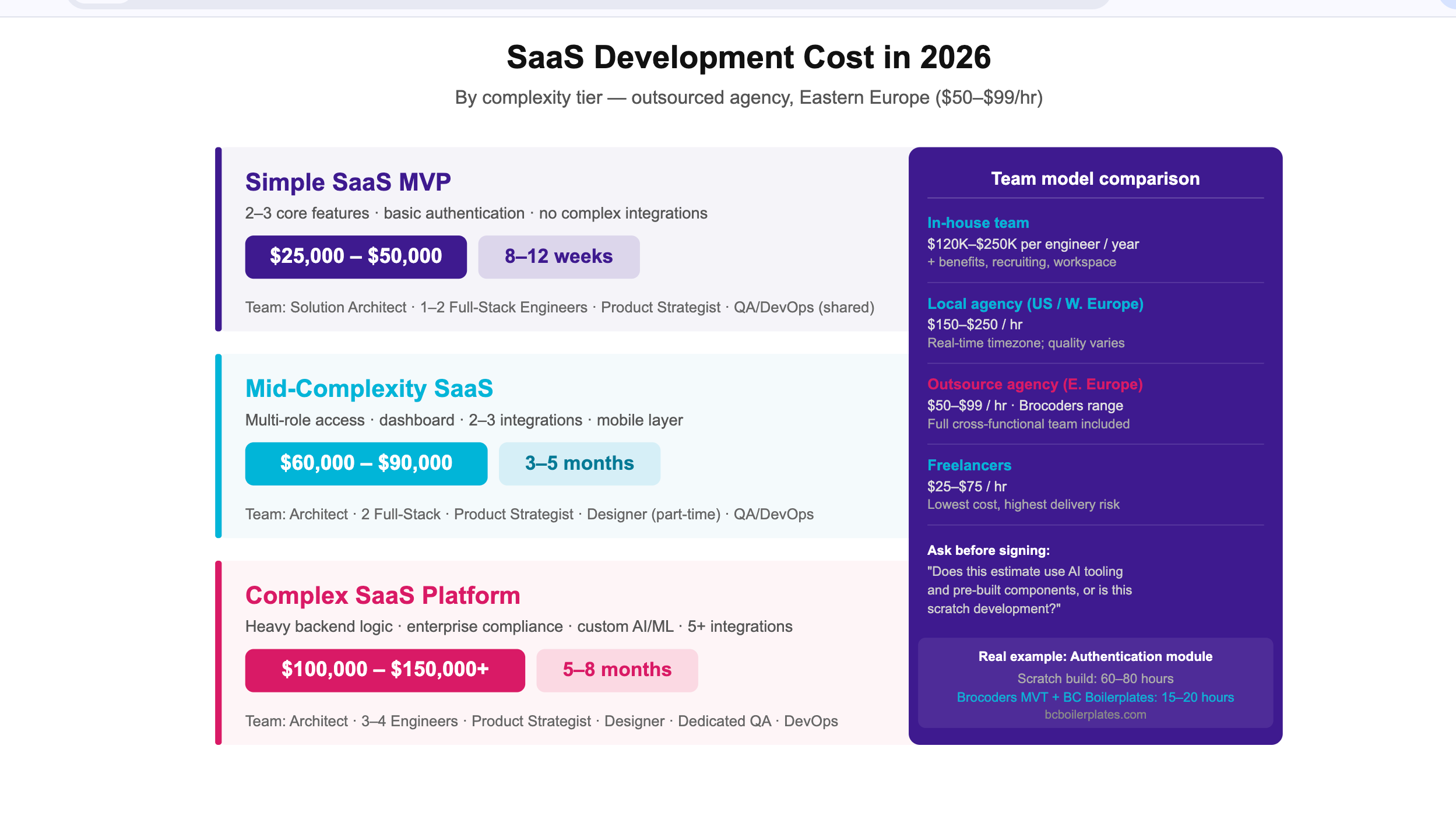
Here's what the numbers actually look like in 2026:
By complexity:
| Build type | Core features | Timeline | Cost range |
|---|---|---|---|
| Simple SaaS MVP | 2–3 features, basic auth, no complex integrations | 8–12 weeks | $25,000–$50,000 |
| Mid-complexity SaaS | Multi-role access, dashboard, 2–3 integrations | 3–5 months | $60,000–$90,000 |
| Complex SaaS platform | Heavy backend logic, enterprise compliance, custom AI | 5–8 months | $100,000–$150,000+ |
By team model:
| Team model | Hourly rate | Notes |
|---|---|---|
| In-house team | $120,000–$250,000/year per senior engineer | Add benefits, recruiting, workspace overhead |
| Local agency (US/Western Europe) | $150–$250/hr | Real-time timezone; quality varies significantly |
| Outsource agency (Eastern Europe) | $50–$99/hr | Brocoders range; full cross-functional team |
| Freelancers | $25–$75/hr | Lowest hourly cost; highest management overhead |
One thing to ask any agency you're evaluating: "Does this estimate account for AI tooling and pre-built components, or is this scratch development?"
The answer matters. Authentication built from scratch by a traditional team is 60–80 hours. Authentication built on production-grade boilerplate with AI tooling is 15–20 hours. If two agencies quote you the same scope and one is 40% cheaper, that's usually why — and it's not a red flag if they're transparent about it.
The agencies that still quote everything at scratch-development rates either aren't using modern tooling, or they are and they're billing you as if they aren't. Ask directly.
How Brocoders builds SaaS products: four projects in practice
Adact — Marketing gamification SaaS (Estonia)
Adact is a no-code platform that lets marketers build gamified campaigns without writing a single line of code. The business problem: static landing pages have bounce rates of 60–80%. Gamified campaigns run on Adact have 16–22% bounce rates. 96% of players complete the games. One campaign generated 18,000+ leads in 10 days, with nearly half a million users completing it.
The platform runs on multi-tenant SaaS architecture. We've been building and maintaining it since 2021 — an ongoing engagement that reflects what a real development partnership looks like beyond the initial launch.
Telehealth Platform — Healthtech SaaS (UK)
A full telehealth SaaS platform, delivered in 6 weeks.
This is the number that surprises people. Six weeks for a production-ready healthtech platform. It's possible because of how the work is structured — architecture owned by a senior engineer from day one, AI-augmented build process, production-grade boilerplate for the standard modules, QA embedded in every sprint rather than bolted on at the end.
This project is the clearest proof of what the Minimum Viable Team model actually delivers in practice.
HeyPractice — AI-powered sales training SaaS (Germany)
HeyPractice is an AI learning platform for enterprise sales training. Users practice sales conversations with an AI roleplay partner, get scored on performance, and track improvement over time.
The architecture combines a standard SaaS backend with LLM integration for the conversation engine, evaluation pipelines for scoring, and a multi-tenant data model that keeps each enterprise customer's training data isolated.
Read the HeyPractice case study →
Revenue Boosters — Route management SaaS (USA)
Revenue Boosters is a route management platform for amusement operators — managing the logistics, scheduling, and revenue tracking for businesses with distributed field operations.
Stack: React (web), NestJS (API), React Native (mobile). An ongoing engagement. Multi-platform SaaS serving both office and field users on a single backend.
Read the Revenue Boosters case study →
How to choose a SaaS development company
There are a lot of agencies that will take your money and deliver working software. Far fewer will push back on your scope, challenge your assumptions, and still hit the deadline.
Five signals that separate the good ones from the rest:
1. They challenge scope before accepting it. Ask any agency you're evaluating: "Tell me about a feature you convinced a client not to build." If they can't answer clearly, they're a feature factory. Good partners remember the features they cut.
2. Discovery is a paid deliverable. A free discovery call is a sales motion. A real discovery sprint — 2–4 weeks, $5,000–$15,000 — delivers an architecture diagram, a user story map, a third-party integration audit, a phased roadmap, and a risk register. If they can't tell you what you'll receive at the end of discovery, you're paying for their learning, not yours.
3. They're transparent about how tooling affects estimates. "Does this estimate assume scratch development or AI-augmented delivery?" is a fair question. An agency that can't answer it cleanly either isn't using modern tooling or is billing you as if they aren't.
4. The post-launch SLA is defined before you sign. A 30–90 day warranty covering bugs in delivered scope is the minimum. Get severity tiers and escalation paths in writing before you sign.
5. Response time to your first inquiry. Response time to a sales email is a direct proxy for response time to a production incident. Under 24 hours with a proposed agenda: strong signal.
For a direct comparison of agencies across these criteria — including an honest look at our own weaknesses — see our full list of SaaS development companies.
If you're coming from internal tools and evaluating a move to SaaS, Internal tools to SaaS: lessons from real migrations has the most practical framing for that decision.
Mastering these principles positions your project for sustainable growth. Partnering with the right experts in SaaS development ensures you leverage modern tools and lean teams to deliver value faster.
FAQ
The SaaS industry is currently worth $176,62 billion and is expected to grow with a CAGR of 27.5% during the 2021-2028 period. SaaS applications make up 70% of total company software use and offer businesses a range of benefits, including:
- Accessibility;
- Cost-effectiveness;
- Operational management;
- Scalability;
- Flexibility and simplicity;
- Compatibility;
- Access to data reporting and intelligence tools.
Small and medium-sized businesses are more agile and respond to market needs faster than big-brand competitors. They are predicted to be the most immediate market for SaaS as it represents a low entry barrier, and enterprise services are available at an affordable operating cost model based on usage or user-based pricing. SaaS gives SMBs access to software that provides a needed solution within their financial capacity.
Three main categories of cloud computing include SaaS (software as a service), IaaS (infrastructure as a service), and PaaS (platform as a service).
- SaaS products offer consumers and businesses cloud-based tools and applications for everyday use.
- IaaS products enable organizations to manage their business resources such as networks, servers, and data storage in the cloud.
- PaaS products enable businesses and developers to host, build, and deploy consumer-facing apps.
The main steps to building a SaaS product from scratch include:
- Idea generation;
- Planning;
- Technical requirements;
- UX/UI design;
- Software development and testing;
- Product deployment;
- Maintenance and updates;
- Product scaling.
The approximate development time for SaaS applications is about 3 - 9 months. In some cases, developing a SaaS-based app can take longer, as the timeline depends on the complexity, the features you need to enable, and the steps you need to go through before launching the application.
The cost of building the SaaS product can vary from $20,000 to $700,000 and always depends on factors such as:
- Scope of the SaaS app;
- The app features;
- API integration;
- The platform selected;
- Tech decisions;
- Deadlines;
- Additional spendings.
Hiring an outsource development agency for your SaaS product offers a range of benefits like access to skills and resources worldwide, increased efficiency and focus on core competencies, and lower costs. Outsourcing also provides increased flexibility to meet changing business and commercial conditions and reduces ongoing investment costs for in-house infrastructure.