
Join us as we explore our Top 6 favorite Apple Watch workout apps across 5 categories in 2026: best overall app, best home workout app, best app for hikers and runners, and best free app.*
As a bonus, we’ll give you 5 tips for what you can add to your app to help people reach their fitness goals.*
Anyone who runs, swims, cycles, or does any sort of workout will find it easier to track their activities using a smartwatch or wearable. And that’s why the wearables market is so popular among fitness enthusiasts and the average person trying to stay healthy.
After researching and testing, we identified the best Apple Watch workout app for five categories: best overall, best home workout, best for hikers and runners, best for the entire family, and best free app.
To start, let’s see why people love the Apple Watch and what health data it’s capable of tracking.
Why the Apple Watch is so popular and has the best workout apps

The Apple Watch has evolved from a nice-to-have gadget into one of the central devices in Apple's ecosystem, largely because it combines deep health sensing, tight iPhone integration, and a mature Workout app that third-party fitness apps can build on.
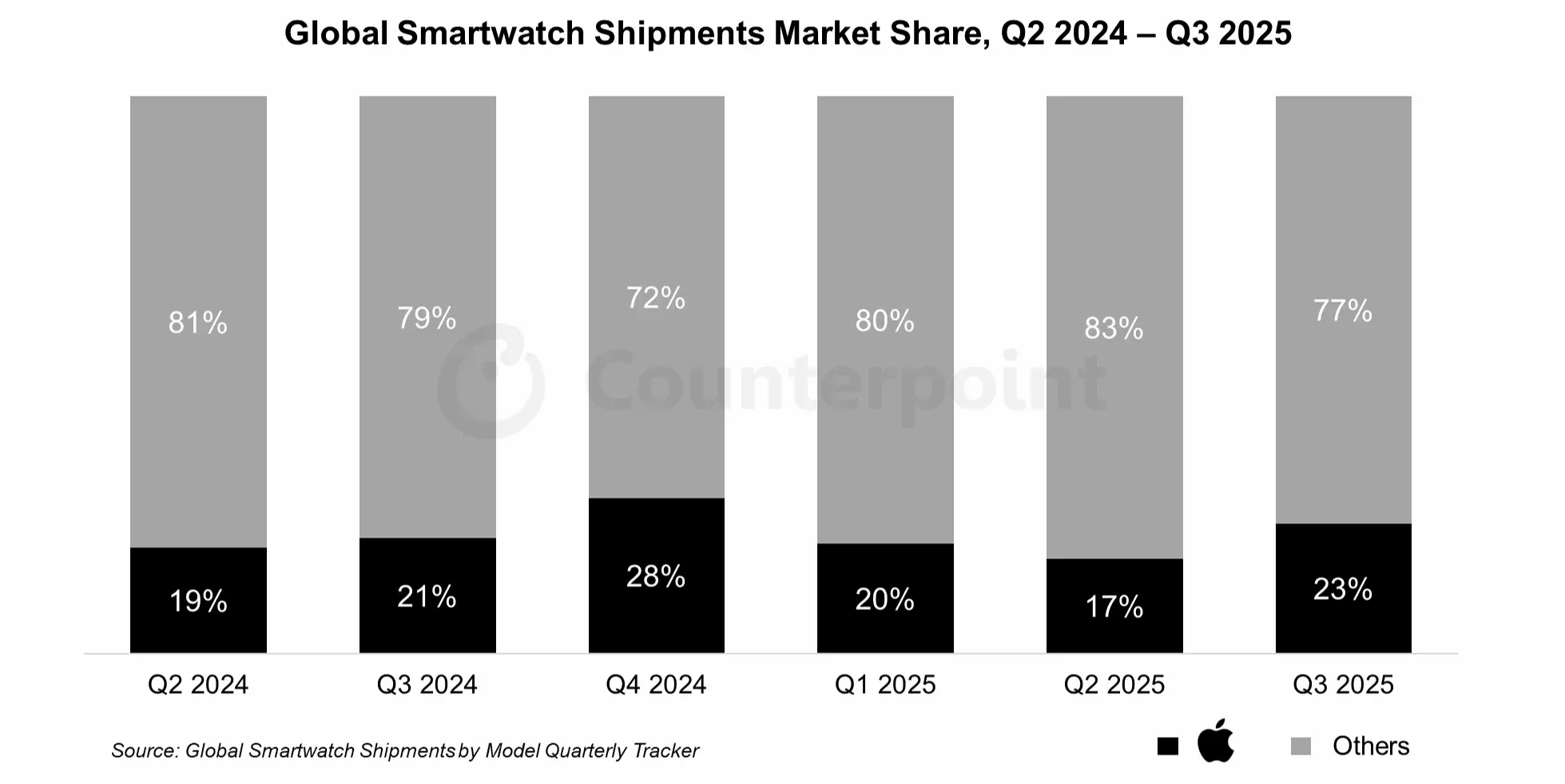
Recent IDC-based estimates put Apple's wearables share around 18% in 2024, with the smartwatch segment itself shrinking slightly - meaning Apple is holding a leading position even as competition from Huawei, Xiaomi, Garmin, and Google intensifies. This "ecosystem moat" is what keeps the Watch popular for workouts: your activity rings, workouts, heart data, and coaching insights stay synced across Apple Watch, iPhone, iPad, and Apple TV via HealthKit and iCloud.
 *
*watchOS 11 Upgrades for Fitness
On the software side, watchOS 11 (released in late 2024) brought several upgrades that directly benefit workout apps:
- Vitals app — Surfaces overnight and all-day metrics like heart rate, respiratory rate, wrist temperature, and sleep trends in one place
- Training Load — Analyzes how hard you've been working across runs, rides, gym sessions, and more to help you balance effort and recovery
- Sleep apnea detection — Powered by motion-based "Breathing Disturbances"
- Expanded Cycle Tracking — Now includes support for pregnancy
- Customizable Activity rings — Pausable and fully adjustable by weekday, making the Watch more usable for real-world training cycles, deload weeks, and life events
For developers, HealthKit still provides a single, privacy-controlled interface to read and write workouts, heart rate, sleep, and other data. This allows specialized apps (for strength, HIIT, endurance, or sports-specific training) to plug into the same health database instead of building their own silo.
What Types of Health & Fitness Data Can the Apple Watch Track?
Beyond basics like distance, calories, steps, elevation, and heart rate, recent Apple Watch models on watchOS 11 pull together a broad set of health and fitness signals that workout apps can tap into.
Key Tracking Capabilities
Sleep & Recovery
- Sleep stages and trends via the Sleep and Vitals apps
- Detection of signs of sleep apnea using night-time movement and new "Breathing Disturbances" metrics
Heart Health
- High/low heart-rate alerts
- Irregular rhythm notifications
- ECG recordings
- Heart-rate variability (feeds into Training Load and coaching logic in third-party apps)
Blood Oxygen
- Blood oxygen saturation via the Blood Oxygen app on supported models
- Results stored in the Health app for long-term trend analysis
Mindfulness
- Guided breathing and reflection sessions
- Contributes to overall health metrics and can be surfaced in wellness-focused workout apps
Menstrual & Fertility
- Cycle Tracking with enhanced support for pregnancy timelines in watchOS 11 and iOS 18
Safety Features
- Fall detection
- Crash detection
- Emergency SOS
- Particularly relevant for outdoor workouts and older or at-risk athletes
Supported Workout Types
The built-in Workout app supports dozens of workout types. Apple's latest support documentation lists categories including:
| Category | Examples |
|---|---|
| Walking | Outdoor Walk, Indoor Walk |
| Running | Outdoor Run, Indoor Run |
| Cycling | Indoor Cycling, Outdoor Cycling |
| Fitness Classes | HIIT, Yoga, Dance, Pilates |
| Strength | Core Training, Functional Strength Training, Strength Training |
| Water Sports | Swimming, Rowing |
| Combat | Martial Arts |
| Team Sports | Basketball, Soccer, Tennis |
For more niche activities, users can log accurately by choosing from over 60 predefined categories under "Other"—ranging from Barre and Cross-Country Skiing to Tai Chi, Water Fitness, and Wheelchair workouts. This granular taxonomy gives both Apple's Workout app and third-party apps a rich foundation to build experiences on.
Next, we’ll dive into our top 5 favorite Apple Watch workout apps in 2026 and why we love them so much.
Our 6 Favorite Apple Watch Workout Apps That Help People Reach Their Goals
In case you didn’t know, you need an iPhone to activate an Apple Watch. With this in mind, it’s obvious that to be among the best workout apps, yours will have to work well across at least two Apple devices — iPhone and Apple Watch.
Also, as we go through our top 6, you’ll see that each app has a unique selling point. And as a bonus, we’ll give you five tips to help you make your app stand out among the sea of workout apps.
Best overall workout app: Hevy – Workout Tracker Gym Log
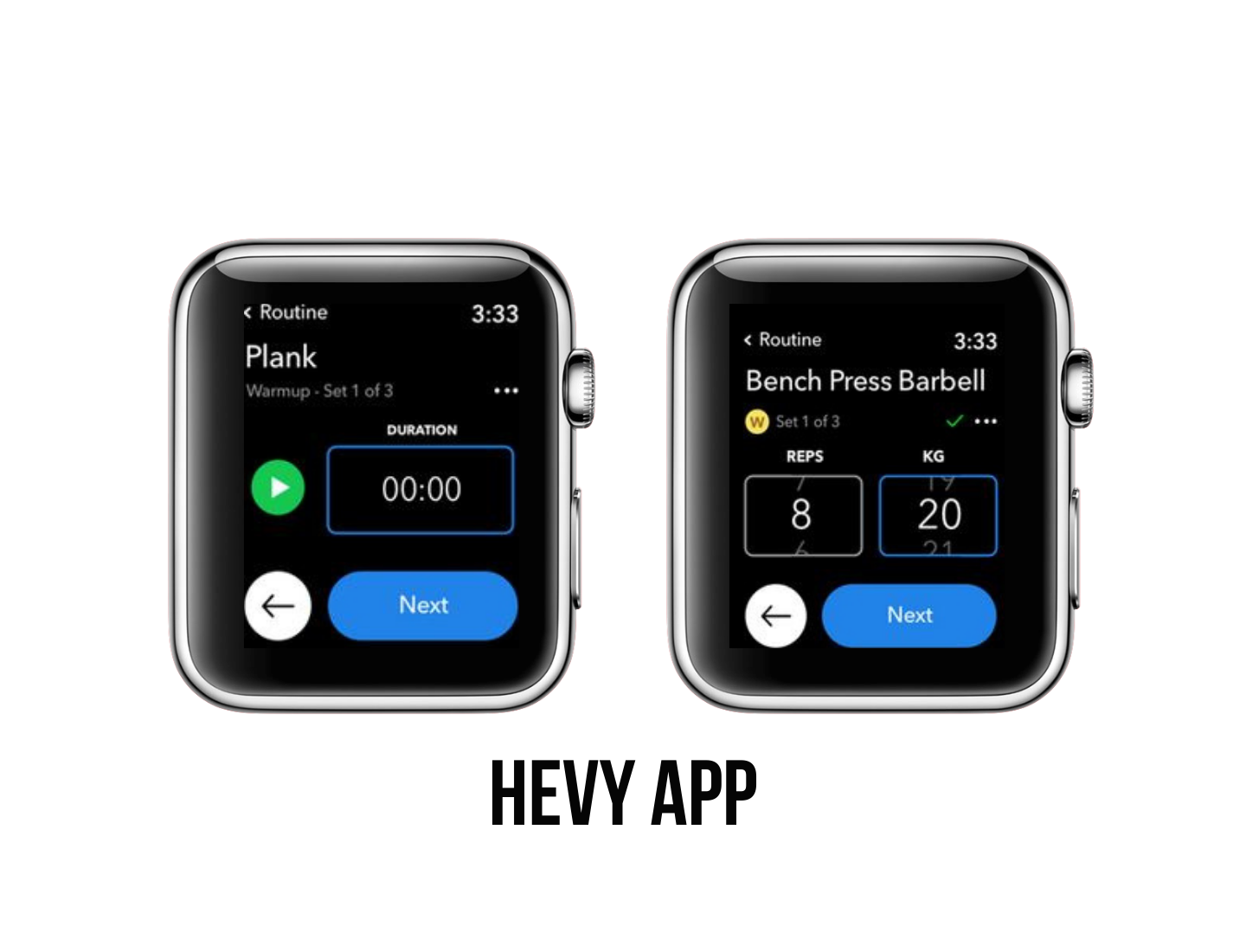
Hevy is a standout workout tracker for gym and strength training. It's super intuitive interface that makes logging sets, reps, and weights incredibly fast and easy, even in mid-workout. No ads in the free version, high-quality exercise videos, detailed progress graphs makes this app popular in the App store. With a stellar 4.9 out of 5 rating from over 55,000 reviews on the App Store, it's consistently praised as one of the best options out there for serious gym-goers! Their Apple Watch integration for live tracking, custom routines without limits on the free tier, and strong community vibes that keep users coming back.
Unique selling point: Social features – follow friends' routines for extra motivation.
Hevy stands out with its super simple and clean interface that’s really easy to understand — everything you need for logging sets, reps, and weights is right there without any clutter, so you stay fully focused on your workout instead of fiddling with the app. Another big plus that especially appeals to younger users is the ability to add friends and follow each other’s routines — it turns training into a fun, social experience, motivates you to show up consistently, and helps explain why Hevy keeps growing fast among teens and people in their 20s.
Best apps for home workouts: Strong Workout Tracker Gym Log and SmartGym
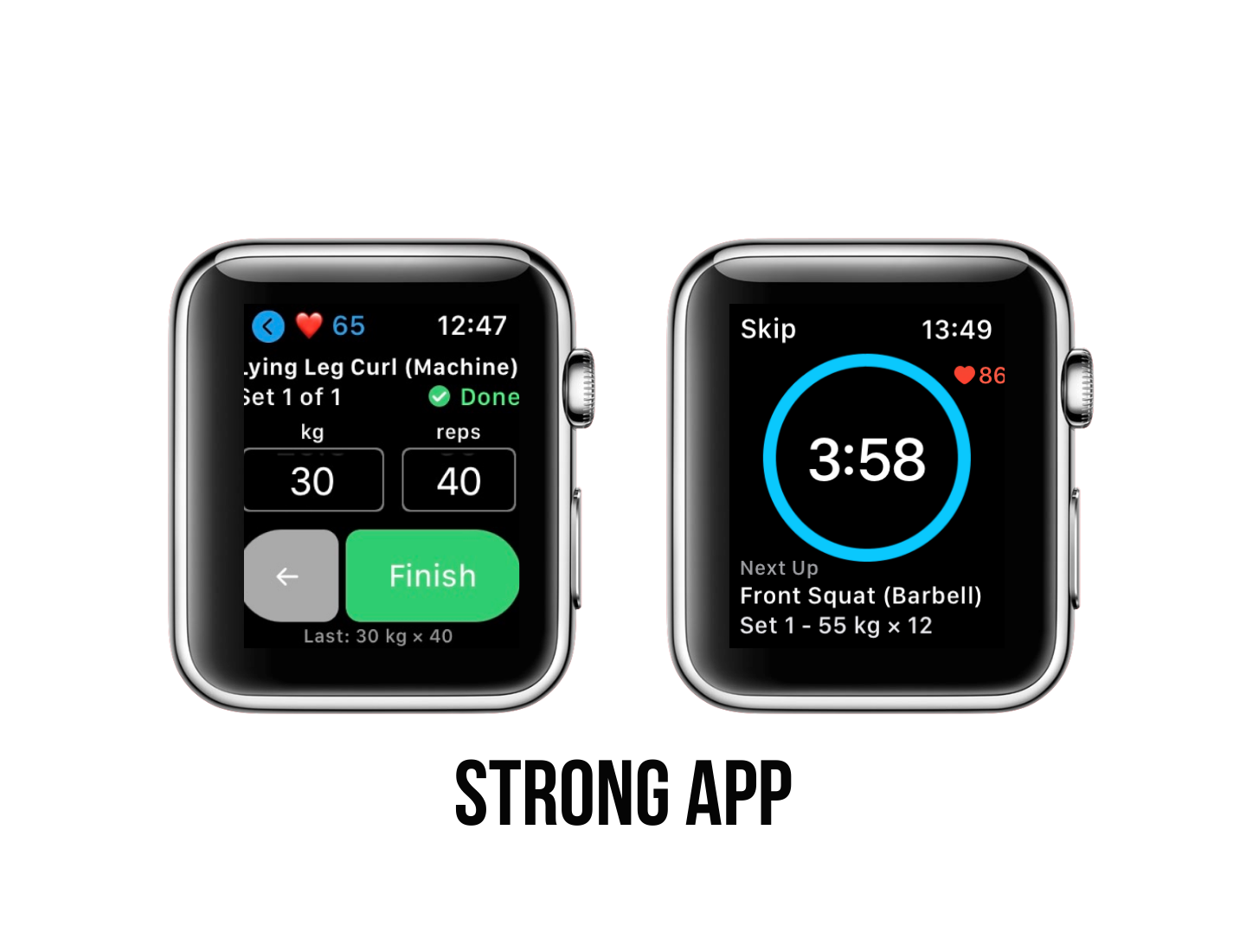
For home workouts in 2026, Strong Workout Tracker Gym Log edges out as the stronger choice overall — especially if you want guided, equipment-adaptive sessions without much gear, thanks to its AI-powered personalization and excellent standalone Apple Watch support that lets you train independently right from your wrist.
Unique selling point: Minimalist tracking with advanced progress stats.
Strong shines with its ultra-clean, distraction-free interface for logging any routine (including bodyweight or home setups), making it feel effortless and precise — it has a stellar 4.9 out of 5 rating from over 108,000 reviews on the App Store.
📲 Download: App Store | Google Play
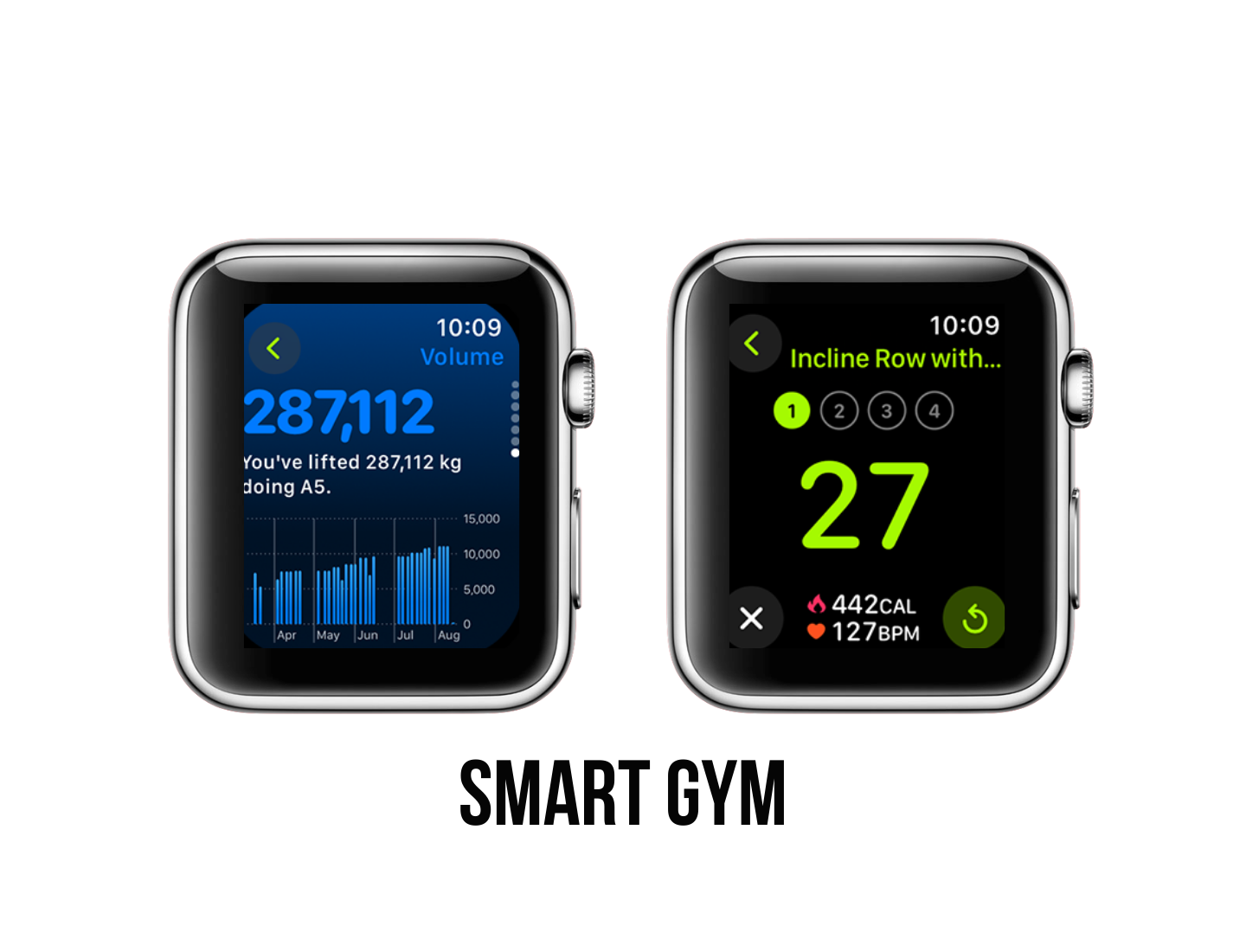
SmartGym offers more hand-holding for home users with its Smart Trainer AI that instantly builds full workouts based on your available equipment (or none at all), skill level, and goals, plus voice-guided HIIT and bodyweight options — it holds a solid 4.7 rating from about 30,000 reviews, complete with on-wrist workout generation and real-time adjustments, which makes it incredibly convenient for quick, motivating home sessions.
Unique selling point: Killer unique feature is the fully standalone Apple Watch experience (no iPhone needed during workouts).
📲 Download: App Store (Apple devices only)
Best app for hikers & runners: Runna
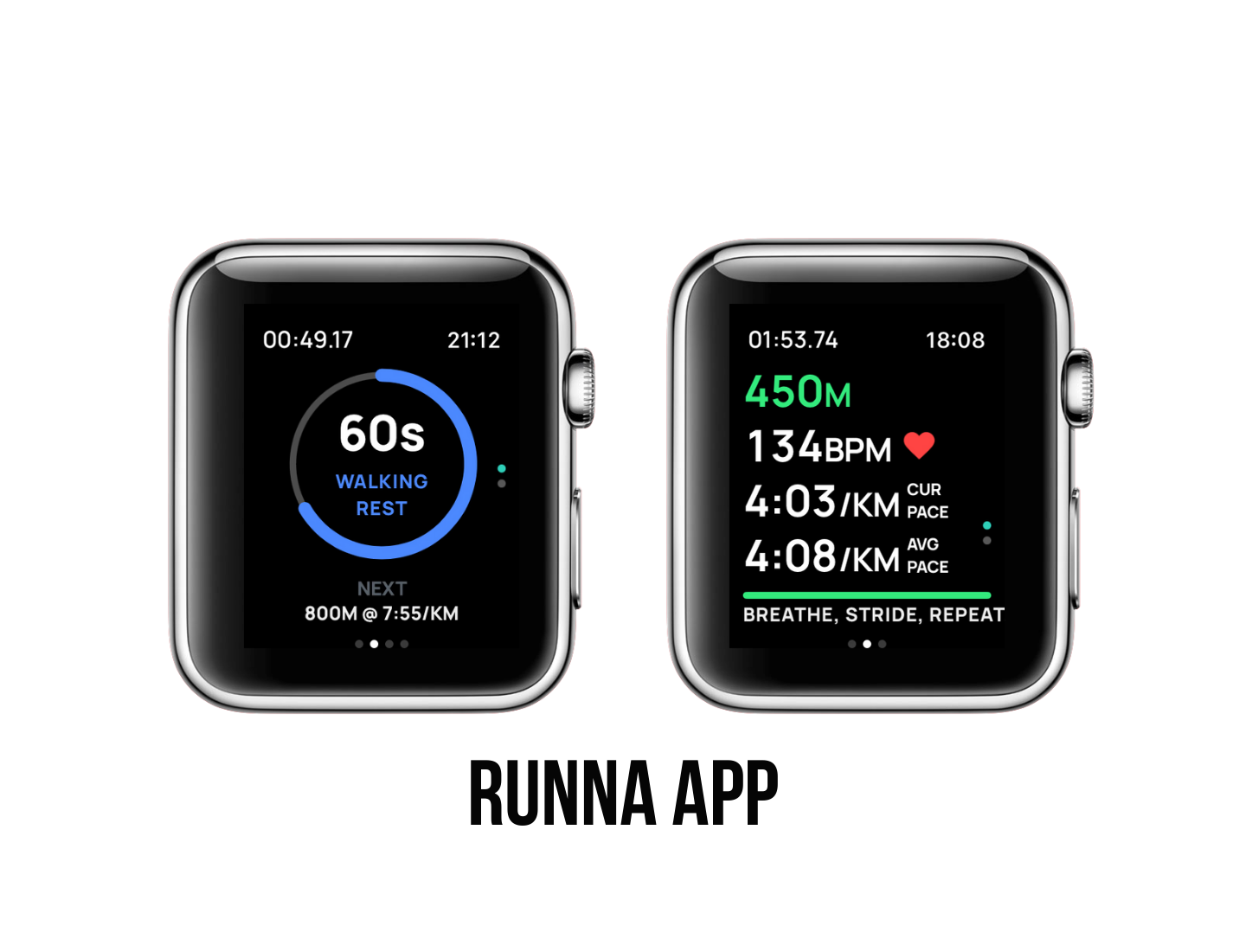
For runners in 2026, Runna is the clear winner. It's specifically designed as a dedicated running coach with personalized, structured plans that guide you from beginner 5K to marathon or ultra goals, making it far more targeted and effective for dedicated running progress compared to Gentler Streak's broader, wellness-focused approach.
Unique selling point: Live audio coaching cues.
This app delivers elite-level personalized running plans crafted by expert coaches, complete with pace targets, interval/tempo sessions, strength cross-training, nutrition tips, and flexible scheduling to fit your life — it holds an impressive 4.9 rating from over 25K reviews on the App Store, and its killer standout feature is like having a personal running coach in your pocket for race prep, PB chasing, or steady improvement.
📲 Download: App Store | Google Play
Best app for the entire family: Komoot
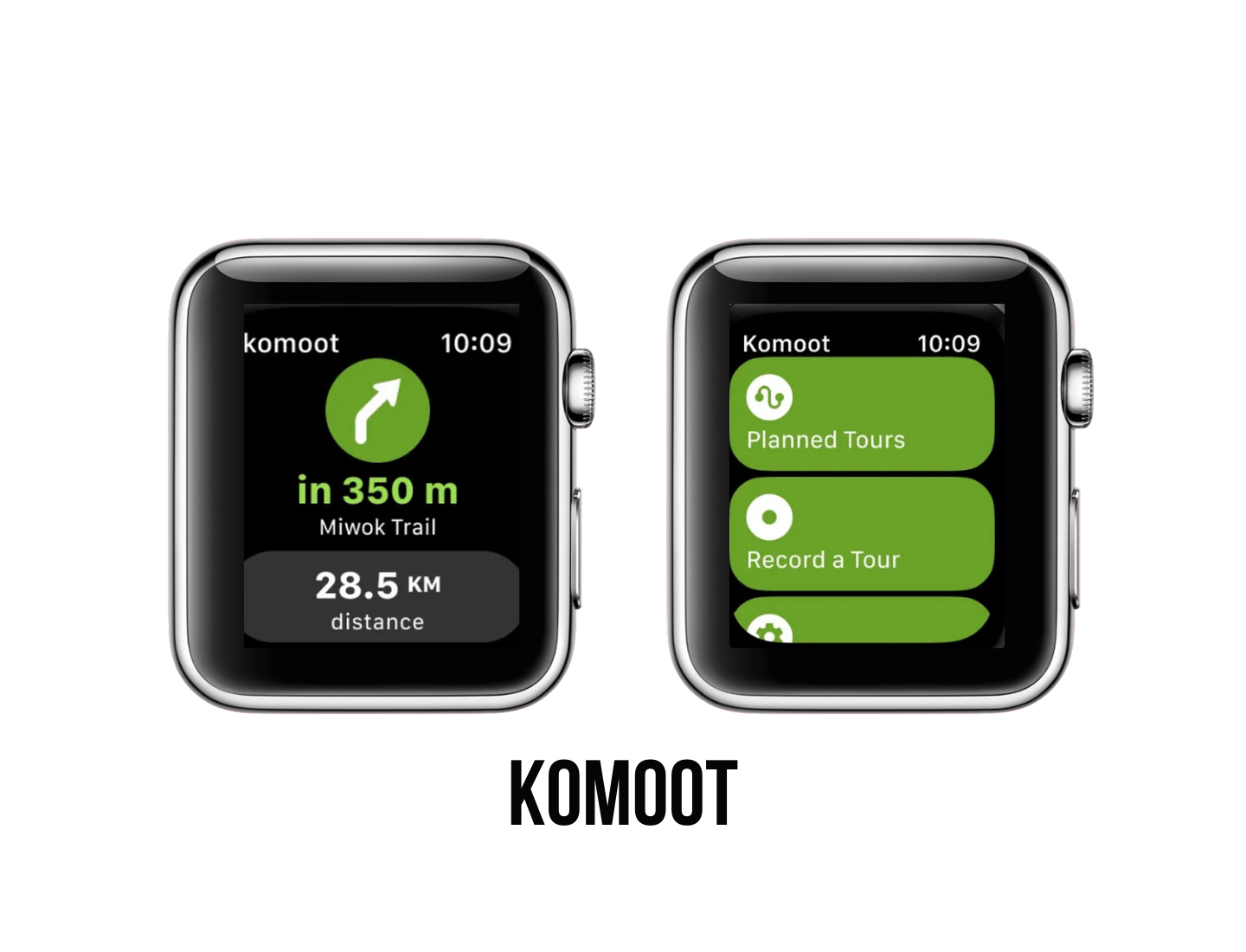
Komoot stands out as a fantastic all-in-one route planner and navigation app for hiking, biking, running, and outdoor adventures, with super accurate turn-by-turn voice guidance, detailed surface/difficulty info, offline topographic maps (great for no-signal areas), community-shared highlights like scenic spots or kid-friendly paths, and seamless Apple Watch integration for real-time stats and directions right on your wrist — making it ideal for family outings where everyone can explore safely and discover new trails together.
This social discovery layer, combined with highly accurate sport-specific routing (factoring in surface types, difficulty, elevation, and activity like hiking, gravel biking, or family walks), offline topographic maps, and precise turn-by-turn voice navigation that keeps your eyes on the trail — a mix of intelligent planning, reliable offline guidance, and vibrant community input that makes it feel like having insider tips from fellow adventurers right in your pocket — perfect for turning ordinary outings into memorable family explorations!
Unique selling point: Community-powered Highlights system.
It holds a strong 4.7 star rating from about 7.2K reviews on the App Store, earning consistent love for its intuitive design and reliable adventure inspiration.
📲 Download: App Store | Google Play
Best free app: Gentler Streak
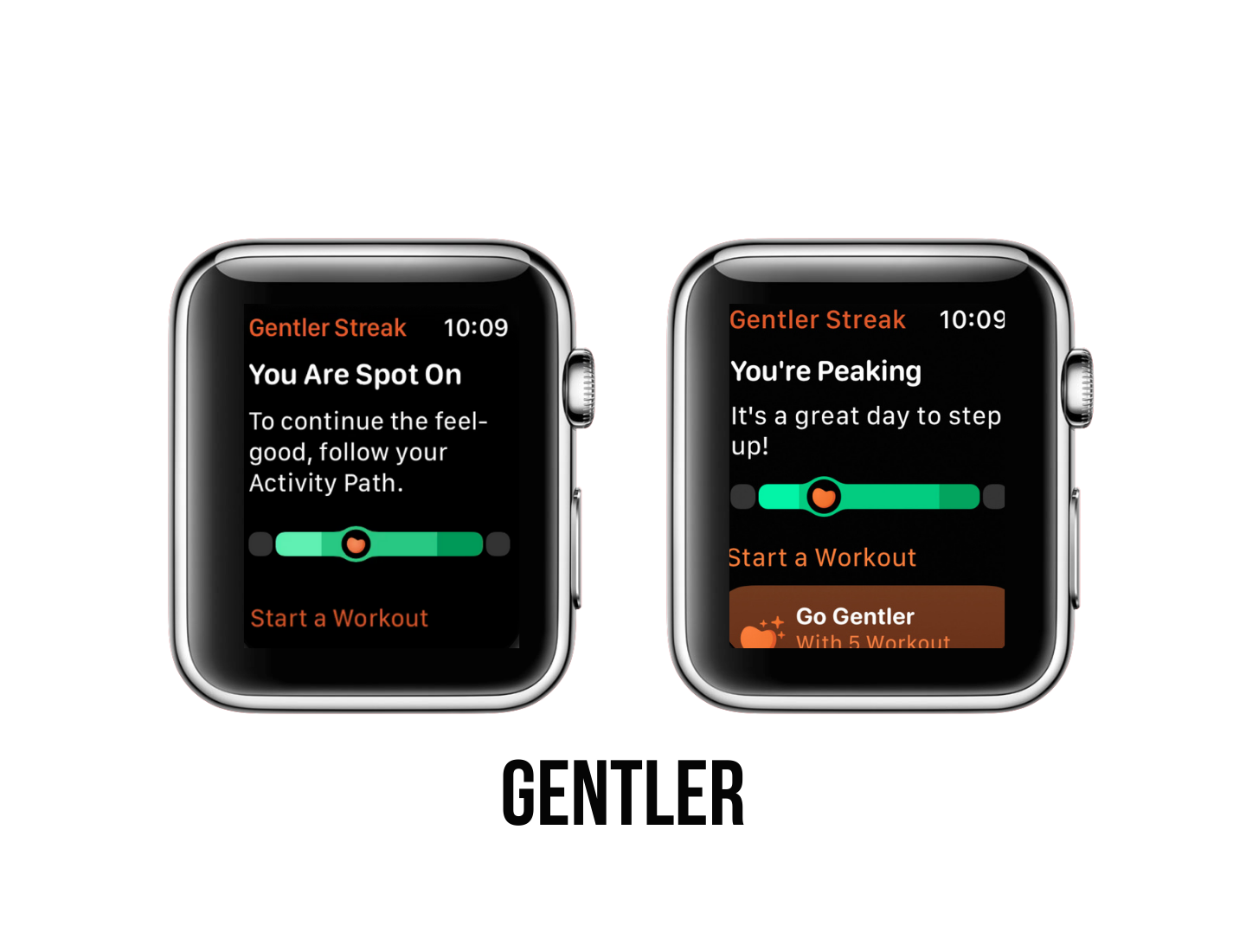
Gentler Streak is the cheapest (and often the better value among the more affordable options) in 2026 — it offers a solid free tier with core tracking features, while premium unlocks everything for about $7.99/month or $39.99–$49.99/year.
Gentler Streak gives you a generous free version for basic workout logging, real-time heart rate zones, and activity monitoring right out of the gate, making it accessible without paying upfront. But premium gives personalized daily suggestions, advanced insights, sleep/cycle tracking, and "Go Gentler" nudges.
Unique selling point: Burnout-proof approach in beginner-friendly training.
Gentler Streak excels at a gentle, balanced take on overall fitness (including running). This tool boasts a strong 4.7 rating on the App Store, which is perfect for runners who want to avoid overtraining while building sustainable habits.
📲 Download: App Store (Apple devices only)
5 Tips for how to make the best workout app for Apple Watch
After researching and trying out dozens of workout apps and reading stories from people struggling to stay motivated with their fitness goals, we’ve learned a few lessons.
Here are our suggestions for how you can improve your Apple Watch workout app:
#1 Emulate the best-of-the-best apps — reinventing the wheel can take precious time out of your budget and bog down the development process with (possibly) unrealistic goals. That’s why we recommend emulating the highest-rated apps out there, like the ones on our list.
#2 Create a web app — Viewing workouts on a small screen can be difficult, so it would be cool to have a web app where you can view watch workouts, view advanced stats, etc.
#3 Utilize integrations — We’ve mentioned the importance of integrations in our other articles — Best Fitness Apps of 2026 and 9 Best Diet Apps — and the same goes for workout apps. Integrations are a must-have considering how seamless Apple’s HealthKit makes sharing data between apps.
#4 Target a niche group — To stand out, you can design your app to have workouts and features according to age, gender, fitness level, etc. Who knows, maybe your app can be the best workout app for men.
#5 Offer additional content— Working out is only one part of the equation to getting fit. Unfortunately, we encountered just a handful of workout apps that offer advice on nutrition and wellness. We believe content targeting more than just the workout itself will help your users reach their goals.
Learn more about Fitness Apps Development cost and process.