
The average company manages 305 SaaS apps in 2026. Most are now asking where AI fits into that stack — whether to use AI tools built into existing software, connect to AI capabilities via API, or build AI infrastructure from scratch.
Three models used to cover every answer: IaaS, PaaS, and SaaS. They still describe most of what teams build and buy. But for anyone building AI-powered products or evaluating AI infrastructure, a fourth model now belongs in the conversation: AI as a Service, or AIaaS.
This guide covers all four. We define each model, show real examples, and give you a framework for deciding which one fits your situation.
The Cloud Responsibility Stack
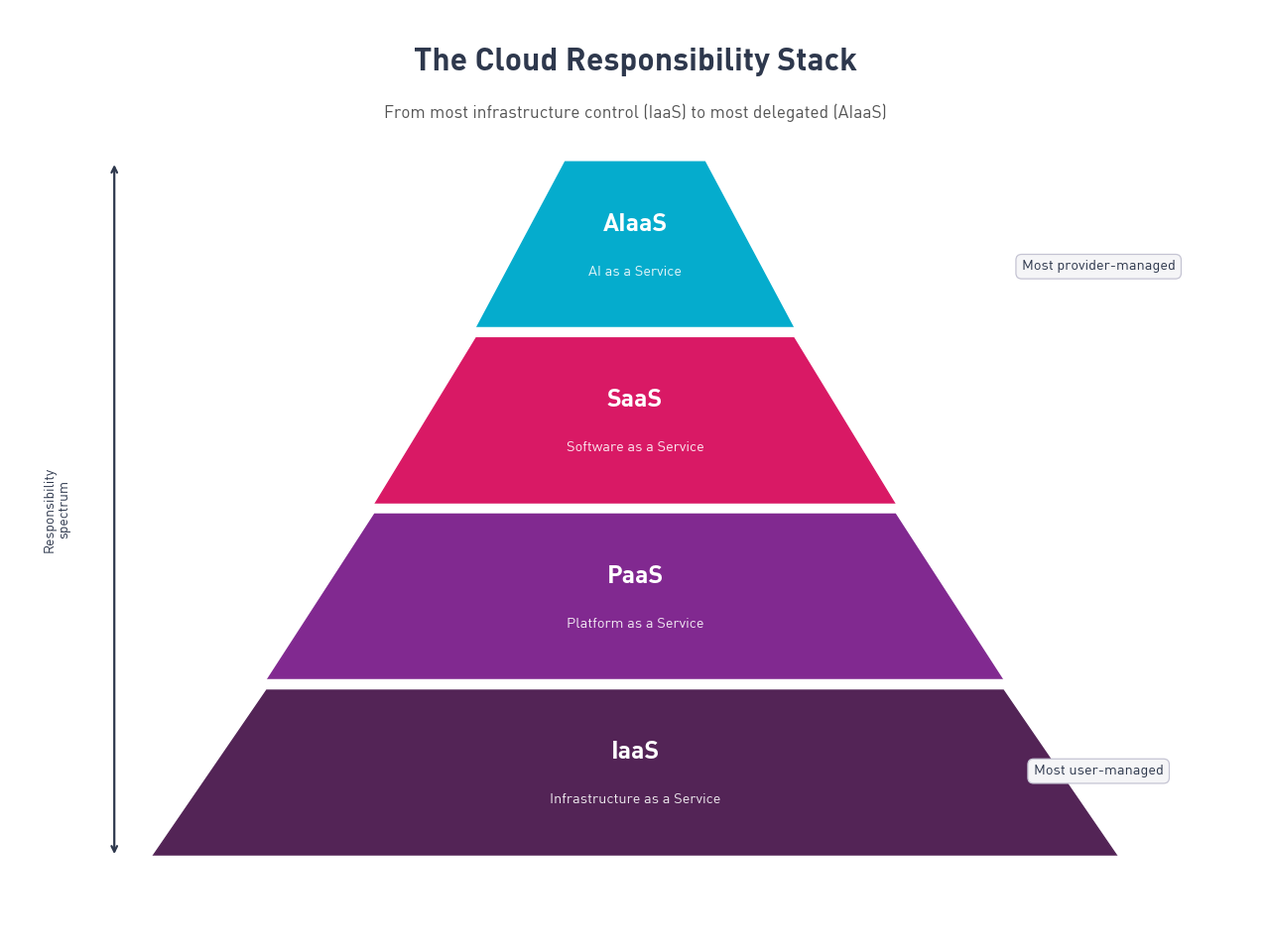
Every cloud model is an answer to one question: how much infrastructure responsibility do you want to manage yourself?
The Cloud Responsibility Stack maps all four models on that axis, from most user-managed to most provider-managed.
| Tier | You manage | Provider manages |
|---|---|---|
| IaaS | OS, apps, data, runtime, middleware | Servers, storage, networking, virtualization |
| PaaS | Applications and data | Everything in IaaS, plus OS, runtime, middleware |
| SaaS | Nothing technical | Everything |
| AIaaS | How you call and use the AI | Models, compute, training pipelines, and the infrastructure they run on |
AIaaS sits closest to SaaS on the responsibility scale. The key difference is what you receive. SaaS delivers a complete application (Slack, Salesforce, Zoom). AIaaS delivers a reusable AI capability via API or SDK that you integrate into your own product.
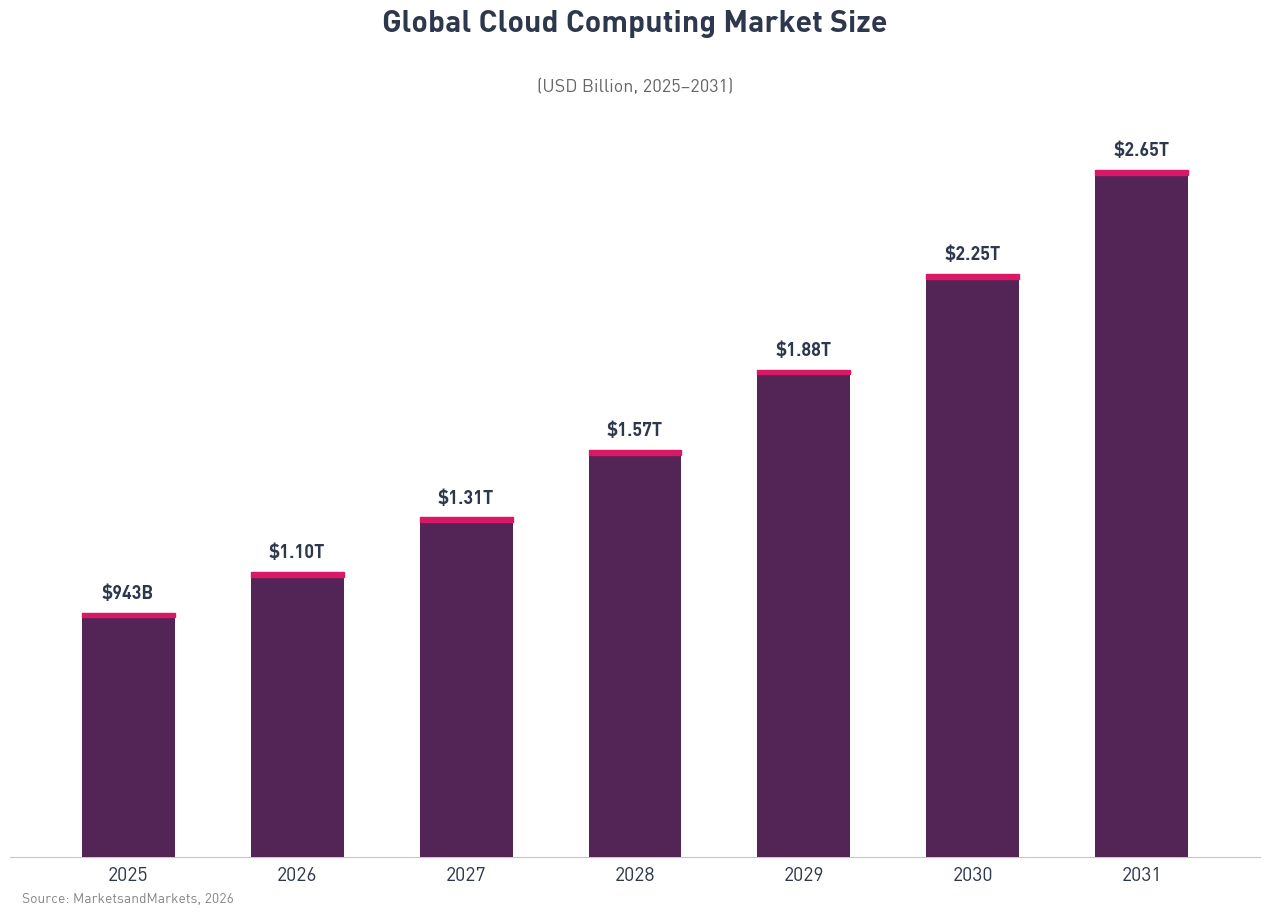
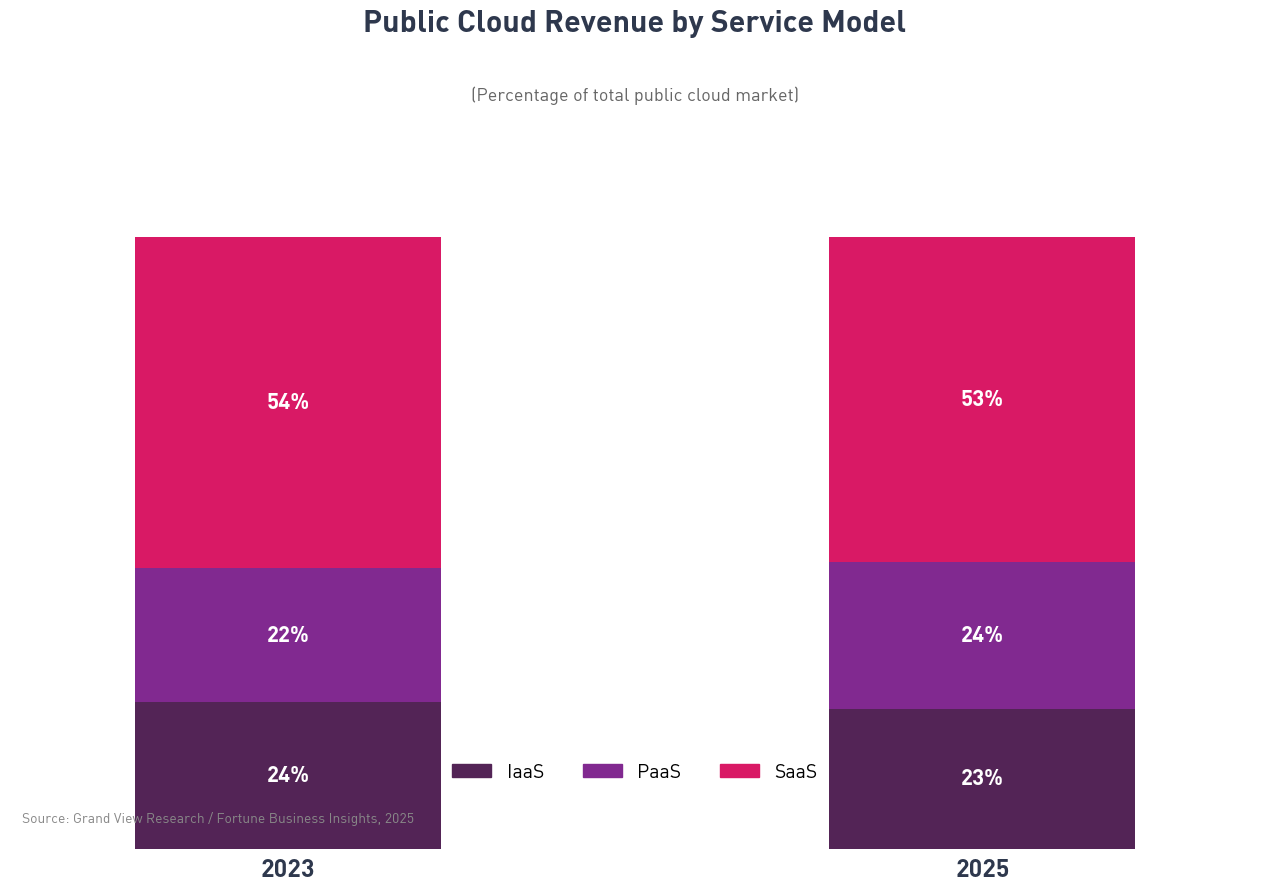
The global cloud market reached approximately $943 billion in 2025. SaaS accounts for 52 to 54% of that revenue. AIaaS, at $24.95 billion in 2024, is smaller but growing at 46.52% annually (Research and Markets, 2025).
Software as a Service (SaaS)
Software as a Service delivers complete applications over the internet. You subscribe, you log in, you use the software. The provider handles everything underneath: servers, databases, updates, and uptime.
Characteristics:
- Accessible from any device with a browser or native app
- Subscription pricing, typically monthly or annual
- Shared multi-tenant architecture — your data is isolated, but the underlying infrastructure is shared
- The provider controls release schedules, feature sets, and maintenance windows
How SaaS is delivered:
You access SaaS products through a web browser, mobile app, or desktop client. There is no installation on your own servers. Google Workspace, Salesforce, Slack, HubSpot, and Zoom are all SaaS products.
Advantages:
- No infrastructure setup required — start using the product immediately
- Lower upfront cost than buying or building software
- Security patches, updates, and availability are managed for you
- Scale by adjusting seats or plan tier, not server capacity
Concerns and limitations:
- Limited customization — you work within the product's feature boundaries
- Data lives on the provider's infrastructure, which raises compliance questions in regulated industries
- Vendor lock-in is real; migrating away from a deeply embedded SaaS product takes significant effort
- Costs compound quickly when you're running dozens or hundreds of tools
SaaS examples:
Salesforce (CRM), Slack (team communication), Zendesk (customer support), Shopify (e-commerce), Zoom (video conferencing).
When to choose SaaS:
SaaS fits when you need software for a standard business process — email, CRM, analytics, project management — and customization is secondary. It also fits early-stage companies that want to move fast without managing infrastructure.
If you're evaluating whether to build a custom SaaS product or buy off the shelf, the question usually comes down to whether your use case is generic (buy SaaS) or specialized (build it). Read more in our cloud vs SaaS breakdown.
SaaS accounts for the largest share of cloud spending across all organization sizes. The average enterprise runs approximately 700 SaaS apps; at the midmarket level, that number is around 305 (Zylo, 2026 SaaS Management Index).
Think of it this way: taking a bus. Someone else owns the vehicle, drives it, and handles all maintenance. You pay a fare and ride.
Platform as a Service (PaaS)
Platform as a Service gives developers a cloud environment to build, test, and deploy applications without managing the underlying servers, networking, or operating systems. You bring your code; the platform handles everything underneath.
Characteristics:
- Development and deployment tools hosted in the cloud
- Managed runtime environments — databases, middleware, OS
- Pricing tied to compute resources consumed
- Built-in scaling, load balancing, and availability tools
How PaaS is delivered:
PaaS providers give you a managed environment that accepts your application and runs it. You deploy your code; the platform handles the rest. Common PaaS products include Google App Engine, Heroku, AWS Elastic Beanstalk, and Microsoft Azure App Service.
Advantages:
- Developers focus on application code, not infrastructure configuration
- Faster deployment cycles — changes go live without provisioning new servers
- Built-in CI/CD pipelines, monitoring, and autoscaling
- Lower operational overhead than IaaS
Concerns and limitations:
- Less control over the underlying environment than IaaS — some configurations may not be possible
- Vendor-specific tooling can make migration expensive
- Performance depends partly on platform decisions outside your control
- Costs are harder to predict at high traffic volumes compared to IaaS
PaaS examples:
Google App Engine, Heroku, AWS Elastic Beanstalk, Microsoft Azure App Service, Red Hat OpenShift.
When to choose PaaS:
PaaS fits teams building web applications or APIs that need fast deployment without spending engineering time on infrastructure. It's also the right fit when you need multi-tenant architecture for a SaaS product but want the platform layer managed for you. The PaaS market exceeded $176 billion in 2024 (Statista).
Think of it this way: leasing a car. You drive wherever you want; the dealer handled the manufacturing, and your service plan covers routine maintenance. You manage the vehicle — just not the factory that produced it.
Infrastructure as a Service (IaaS)
Infrastructure as a Service gives you virtualized computing resources over the internet — servers, storage, networking, and virtualization — on demand. You rent the raw infrastructure and manage everything on top of it.
Characteristics:
- On-demand access to compute, storage, and networking resources
- Pay-as-you-go pricing based on resources consumed
- You manage the operating system, applications, and data
- Maximum control over the environment configuration
How IaaS is delivered:
IaaS providers supply virtual machines, block storage, and networking components accessible via console, CLI, or API. AWS EC2, Google Compute Engine, Microsoft Azure Virtual Machines, and DigitalOcean Droplets are all IaaS products.
Advantages:
- Full control over infrastructure configuration
- Cost-efficient for workloads where resource optimization is feasible
- No capital expenditure on physical hardware
- Geographic flexibility — deploy in data centers around the world
Concerns and limitations:
- Significant operational overhead — your team is responsible for the OS, security patches, and uptime
- Requires experienced DevOps or infrastructure engineers
- Configuration errors at the infrastructure level carry significant downstream consequences
- Total cost of ownership is higher than PaaS when you factor in engineering time
IaaS examples:
AWS EC2, Google Compute Engine, Microsoft Azure Virtual Machines, IBM Cloud Infrastructure, DigitalOcean Droplets.
When to choose IaaS:
IaaS fits teams with strong infrastructure expertise who need precise control — for compliance requirements, for workloads with unusual resource profiles, or because PaaS platforms don't support specific technical requirements. Read more in our cloud application development guide.
Think of it this way: buying a car outright. Complete ownership, complete control, and complete responsibility for maintenance, insurance, fuel, and repairs.
AI as a Service (AIaaS)
AI as a Service delivers artificial intelligence capabilities via cloud-hosted APIs and SDKs. You call the API; the provider runs the model, the compute, and the infrastructure behind it. Your team integrates the capability into your own product.
AIaaS is distinct from SaaS products that include AI features. When you use Notion AI or Salesforce Einstein, you are using SaaS — a complete application that happens to include AI. When you call the OpenAI API to build a document classification feature in your own platform, you are using AIaaS. The capability is reusable and composable; the finished product is yours.
Characteristics:
- AI capabilities — language models, image generation, speech recognition, prediction — accessed via API or SDK
- Pricing based on usage: tokens consumed, API calls made, data processed
- No AI infrastructure to provision, maintain, or scale
- Pretrained models available immediately; some providers allow fine-tuning on your own data
How AIaaS is delivered:
You call a REST API or use a provider SDK. The provider handles model hosting, inference compute, autoscaling, and uptime. Common AIaaS products include:
- OpenAI API — GPT-4o (text generation and reasoning), DALL-E (image generation), Whisper (speech transcription), Embeddings
- Amazon Bedrock — access to foundation models including Anthropic Claude, Meta Llama, Mistral, and others via a unified API
- Google Vertex AI — Gemini models, AutoML, and custom model training and deployment on Google infrastructure
- Azure AI and Azure OpenAI Service — OpenAI models hosted on Azure, integrated with Microsoft enterprise tooling
- IBM watsonx — enterprise AI models with governance and compliance features
The global AIaaS market was $24.95 billion in 2024 and is projected to reach $168.45 billion by 2029 at a 46.52% annual growth rate (Research and Markets, 2025). IBM published its first standalone AIaaS explainer in January 2026, a signal that the model has arrived as a recognized category.
Advantages:
- No AI infrastructure investment required to start building
- Faster time to market for AI-powered features
- Accessible to engineering teams without ML expertise
- Usage-based pricing scales with actual product usage
- Access to state-of-the-art foundation models maintained by specialists
Concerns and limitations:
- Vendor lock-in on proprietary model APIs — switching providers requires rewriting integration code
- Model opacity: foundation models are largely black boxes, which matters for regulated industries or explainability requirements
- Data privacy: data sent to an AIaaS endpoint passes through the provider's infrastructure; review data processing agreements before sending sensitive information
- Cost unpredictability at scale — token-based pricing can spike significantly at high query volumes
- Model output is probabilistic, not deterministic; quality assurance requires different approaches than testing traditional code
AIaaS examples:
OpenAI API (GPT-4o, Whisper, DALL-E), Amazon Bedrock, Google Vertex AI, Azure OpenAI Service, IBM watsonx, Cohere, Mistral AI.
When to choose AIaaS:
AIaaS fits teams building products that need AI capabilities — document processing, conversational interfaces, image understanding, recommendation engines — but where building and maintaining AI infrastructure would pull resources away from the core product. It also fits teams evaluating whether AI is worth deeper investment before committing to a larger ML engineering effort.
For most teams, AIaaS is the right starting point. You can move toward custom model training on a PaaS or IaaS foundation later, once the capability has proven its value in your product.
Think of it this way: hiring a driver who is also a route expert. You describe the destination and the requirements. They handle the vehicle, the navigation, and the real-time decisions. You focus on where you need to go.
Security considerations for each model
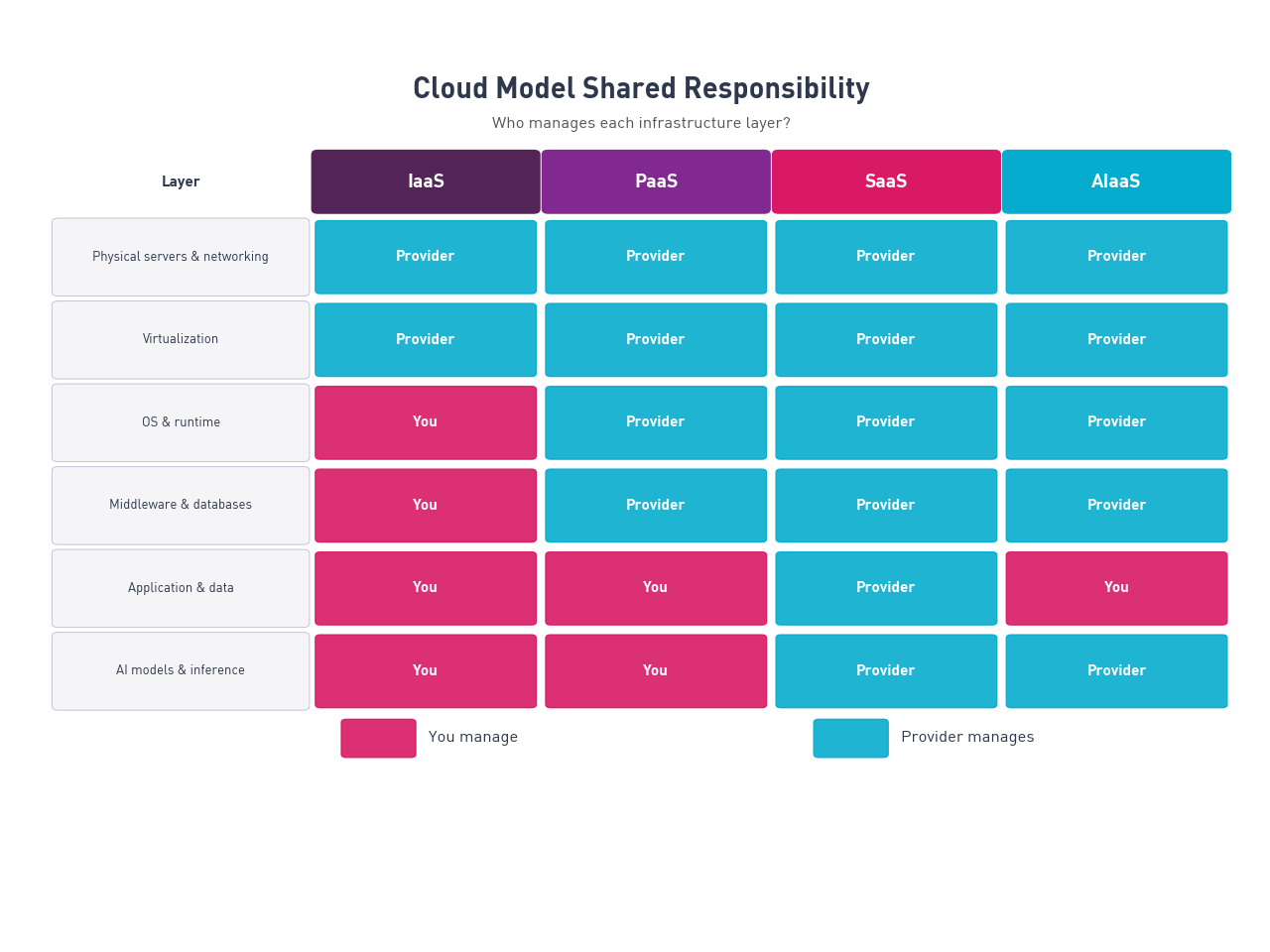
Cloud security follows a shared responsibility model. The provider secures what it controls; you secure what you control. That boundary shifts depending on which model you use.
SaaS security:
With SaaS, the provider manages nearly all security. Your responsibilities center on access controls, data classification, and user behavior. Key risks:
- Misconfigured sharing permissions — data exposed to the wrong users or made public
- Over-privileged accounts and weak authentication settings
- Third-party integrations requesting excessive data access
- Shadow IT — employees using SaaS tools that aren't reviewed or sanctioned by IT
Best practices: enforce single sign-on (SSO), apply least-privilege access, review third-party integrations regularly, and maintain an approved-app list.
PaaS security:
With PaaS, the provider handles the infrastructure and runtime. Your team is responsible for application security — the code, the data, and how the application handles authentication and authorization.
Key risks:
- Insecure APIs and authentication flaws in the application layer
- Misconfigured environment variables — secrets exposed in logs or version control
- Dependency vulnerabilities in third-party libraries
- Inadequate input validation, leaving the application open to injection attacks
Best practices: integrate security scanning into your CI/CD pipeline, rotate secrets regularly, use a dependency vulnerability scanner, and apply OWASP Top 10 guidelines to all application code.
IaaS security:
With IaaS, your team is responsible for everything above the virtualization layer — OS configuration, network security groups, encryption at rest and in transit, and patch management.
Key risks:
- Exposed SSH ports and misconfigured security groups
- Unpatched operating systems, common when infrastructure management is under-resourced
- Overly permissive IAM (Identity and Access Management) roles
- Unencrypted data in storage volumes or in transit between services
Best practices: follow least privilege for all IAM roles, enable cloud provider security benchmarks (CIS benchmarks for AWS, GCP, or Azure), use infrastructure-as-code for auditable configuration, and automate patch management.
AIaaS security:
AIaaS introduces security considerations that don't map neatly onto traditional cloud frameworks. Key risks:
- Data leakage via inference inputs: data sent to an AI model endpoint may be used to improve the model, depending on the provider's processing terms. Review and negotiate data agreements before sending sensitive data
- Model output unpredictability: AI models can produce unexpected outputs, including outputs that disclose confidential information if prompted adversarially. Validate and sanitize outputs before passing them to other systems or displaying them to users
- Compliance uncertainty: many regulatory frameworks (HIPAA, GDPR, financial services regulations) were written before AIaaS existed. Get explicit legal guidance on what data you can send to which providers
- Vendor dependency: if a provider changes its model or API, your application behavior changes. Pin API versions and test model updates before deploying to production
Best practices: treat AI model calls as untrusted external services in your application architecture, establish an AI governance policy defining what data is permitted to reach model endpoints, and conduct adversarial testing on any user-facing AI feature before launch.
Model comparison table
| IaaS | PaaS | SaaS | AIaaS | |
|---|---|---|---|---|
| User manages | OS, apps, data, runtime, middleware | Applications and data | Nothing technical | How the AI is called and integrated |
| Provider manages | Servers, storage, networking, virtualization | Everything in IaaS, plus OS, runtime, middleware | Everything | Models, compute, training pipelines, APIs |
| Primary users | DevOps and infrastructure engineers | Developers, platform teams | End users across all business functions | Developers, data scientists, product teams |
| Pricing model | Pay-as-you-go for compute and storage | Usage-based or subscription | Monthly or annual subscription | Pay-per-token, per-API-call, or subscription |
| Customization | Maximum | High at the application layer | Low to medium — within vendor's feature set | Medium — shaped via prompting and fine-tuning |
| Operational overhead | High | Medium | Low | Variable — depends on query volume and integration complexity |
| Security boundary | User owns OS and everything above | User owns application code and data | User manages access controls and compliance | User manages data governance and output validation |
| Best for | Complex, compliance-heavy workloads requiring full infrastructure control | Teams building custom applications without infrastructure overhead | Standard business processes with off-the-shelf software needs | Teams building AI-powered products without ML infrastructure investment |
The four models in plain language:
- SaaS: taking a bus — someone else owns it, drives it, and maintains it. You pay a fare and ride.
- PaaS: leasing a car — the dealer handled the manufacturing. You drive; routine maintenance is covered.
- IaaS: buying a car outright — full ownership, full control, full responsibility.
- AIaaS: hiring a driver who is also a route expert — you describe the destination; they handle the vehicle, navigation, and real-time decisions.
How to choose the right model
The right model depends on what you are building, who is on your team, and how much control you actually need.
Work through these four questions:
1. Do you need a complete application for a standard business process?
SaaS is the answer. Accounting, CRM, email, project management, customer support — these are solved problems with dozens of mature options. Building custom software for a generic use case adds cost and maintenance burden without a meaningful advantage.
2. Are you building a custom application but want to avoid managing servers?
PaaS is the right layer. You get a managed environment that handles the infrastructure while you focus on application code. This fits most web application and API development, especially for teams without dedicated DevOps capacity.
3. Do you need direct control over the infrastructure — for compliance, performance, or technical requirements a PaaS platform can't meet?
IaaS gives you that control. It also gives you the full maintenance burden. This is the right choice for organizations with experienced infrastructure teams and real reasons to need that level of control.
4. Are you building AI capabilities into your product?
AIaaS is where to start. It gives your team access to state-of-the-art models via API, without the infrastructure investment required to train or host models yourself. If AI becomes a core differentiator and you need more control over model behavior, you can move toward custom training on a PaaS or IaaS foundation later.
Most modern products use more than one model. A typical stack might use SaaS for internal tooling, PaaS for the product's application layer, and AIaaS for AI-powered features. The Cloud Responsibility Stack helps you identify which answer applies to which layer.
Here in Brocoders, we work through this decision with clients regularly when scoping new SaaS and cloud development projects. The answer almost always involves more than one model working together.
Building on the right cloud model
The shift from three cloud models to four is already underway. Most teams will operate across multiple layers: SaaS for standard tooling, PaaS or IaaS for their own product, and AIaaS for AI capabilities. The Cloud Responsibility Stack gives you a clear way to identify which model fits which decision.
Here in Brocoders, we work with clients across all four layers — building custom SaaS products, cloud applications, and AI-integrated platforms. If you're deciding which model fits your next project, or evaluating how AI fits into an existing stack, we're glad to talk through the specifics.
Schedule a call with our team — we can review your requirements and help you make the right call before you commit to an architecture.
Frequently Asked Questions
The four models represent different levels of infrastructure responsibility. With IaaS, you manage everything above the virtualization layer: the operating system, runtime, and applications. With PaaS, the provider takes on the OS and runtime, so you focus on your application code and data. With SaaS, the provider manages everything — you use the application directly with no technical infrastructure to manage. With AIaaS, you call AI capabilities via API; the provider manages the models, compute, and infrastructure required to run them. Each model sits progressively further from the hardware and closer to a finished user experience.
AWS is primarily an IaaS and PaaS provider. AWS EC2 (virtual machines) and S3 (object storage) are IaaS products. AWS Elastic Beanstalk, Lambda, and RDS (managed databases) are PaaS products. AWS also offers AIaaS products: Amazon Bedrock (access to foundation models including Anthropic Claude, Meta Llama, and others) and Amazon SageMaker (a managed environment for building, training, and deploying machine learning models). A few AWS products are SaaS — Amazon WorkMail, Amazon Chime — but infrastructure and platform services are the core of the business.
The most widely used AIaaS product is the OpenAI API, which gives developers access to GPT-4o (text generation and reasoning), Whisper (speech transcription), and DALL-E (image generation). A company might call the OpenAI API to build a document processing feature in their operations software. The model does the analysis; the application logic, data handling, and user interface are entirely the company's own. Other common AIaaS products include Google Vertex AI, Azure OpenAI Service, Amazon Bedrock, and Cohere. All of them follow the same pattern: AI capability delivered via API, without the user needing to train or host the model.
Most early-stage startups should start with PaaS. It deploys faster and requires less infrastructure expertise. The cases where IaaS makes more sense from day one: regulated industries with specific data residency or isolation requirements (HIPAA, PCI DSS), applications with unusual infrastructure needs that PaaS platforms don't accommodate, or teams with strong existing DevOps expertise who want full control from the start. For a typical SaaS startup, starting on PaaS and migrating to IaaS if the need later arises is far cheaper than building on IaaS from scratch.
Yes, and most do. A typical setup includes SaaS tools for internal operations (HR, finance, communication), a PaaS or IaaS platform for the company's own product, and AIaaS calls to power AI-powered features within that product. Using multiple models is the natural result of using the right tool for each layer of the stack. More than 85% of organizations have adopted hybrid or multicloud architectures (Gartner, 2025), and that number rises further when you count AIaaS as a distinct layer.
The distinction is in what you receive and what you're responsible for. A SaaS product with AI features — Notion AI, Salesforce Einstein, Grammarly — gives you a complete application; the AI is a feature inside it. You can't extract that capability and use it elsewhere. AIaaS delivers the AI capability itself via API, without the surrounding application. You're responsible for building the product experience around it, but you can use the capability in any context you choose. If you're a user of AI-enhanced software, you're using SaaS. If you're a developer integrating AI into your own product, you're using AIaaS.
At low-to-medium query volumes, AIaaS is almost always cheaper. You pay only for usage, with no upfront infrastructure investment and no ongoing cost for model maintenance or ML engineering. A team calling the OpenAI API for a document processing feature might pay a few hundred dollars per month at moderate scale. Building, training, and hosting an equivalent model in-house would require ML engineers, GPU compute (several thousand dollars per month per training run), and ongoing maintenance. At very high scale with stable, predictable workloads, the economics can shift toward custom infrastructure. For most teams at most stages, AIaaS is the faster and lower-risk starting point.