
Last updated: October 2026.
Lake, a US vacation rental marketplace, ran its whole product on WordPress, and its plugins could not sync bookings with the property management systems its hosts used. Its founder and CEO, David Ciccarelli, talked to 150 vendors about a rebuild. The one he hired was, in his words, "the only one of 150 vendors who asked to speak with the integration partner that we were working with."
That question is the best vendor test we know for a WordPress to React migration, and it works the same way for a PHP app. Brocoders was that vendor, so we left ourselves off the company list below and use Lake only to show how the checks work in practice.
TL;DR: Choose a WordPress or PHP to React migration vendor by what it asks before it quotes: your integrations, what should stay on WordPress, and how rankings survive the move. Lake, a US vacation rental marketplace that Brocoders migrated, kept its content pages on WordPress, moved the product to Next.js, and grew from ~500 to 40,000 connected properties.
Why WordPress and PHP products hit a ceiling
WordPress and server-rendered PHP stop scaling when the product needs real-time data from other systems. A plugin can show listings. It struggles to keep thousands of them in sync with outside software every few minutes.
Lake hit exactly that wall. Its platform was a WordPress monolith (one codebase holding the website, the content and the product logic), and its plugins could not sync with the property management systems (PMSs, the software hosts use to run bookings) that Lake needed to connect.
The symptoms look similar in most products we see. Pages slow down as plugins pile up, every integration is a custom patch, and the team spends its week keeping the website alive instead of shipping.
React, usually through a framework like Next.js, fixes the interface layer. The integration layer needs a real back end, a separate server application that exchanges data with other systems on a schedule, which is where most of the migration work sits.
If you are still deciding whether to leave WordPress at all, start with our guide on when you outgrow WordPress.
Headless, partial or full rebuild: decide before you hire
There are 3 ways to move a WordPress or PHP product to React, and the right one depends on which part of the website earns money. Decide this before you talk to vendors, because each vendor tends to sell the option it knows best.
| Option | What stays on WordPress or PHP | What moves to React | Fits when |
|---|---|---|---|
| Headless WordPress (WordPress keeps content and editing, React shows it to visitors) | All content and editing | The whole front end | Content is the product and editors love WordPress |
| Partial split | Marketing pages, blog, SEO landing pages | The product app and its back end | The product needs integrations, the content needs rankings |
| Full rebuild | Nothing | Everything, with a new CMS | The content is small or already broken |
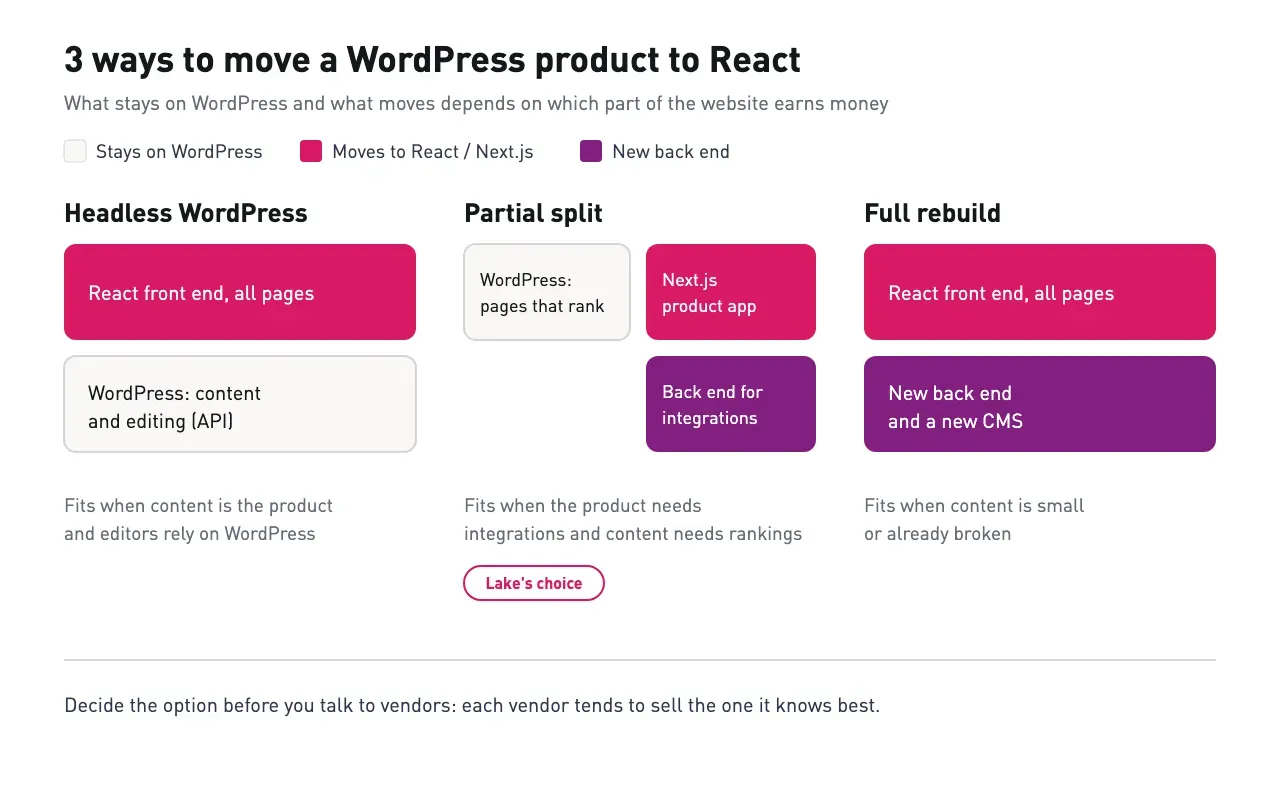
Most guides treat this as all or nothing. Lake went with the partial split: the homepage, blog and city pages stayed on WordPress because they held the organic rankings, and the core product became a standalone web app.
For a PHP app with no CMS, the same logic applies screen by screen. Keep the PHP back end serving data through an API while React replaces the interface, then decide whether the back end needs to go too. Our comparison of refactoring and rewriting legacy software covers that second decision.
The Integration-First Vendor Test: 6 checks
The Integration-First Vendor Test judges a migration vendor on what it asks and plans before writing code. A React portfolio tells you a team can build screens. These 6 checks tell you whether it can move a live product without breaking it.
- It asks about your integrations before it quotes. Which systems send and receive data, who owns those APIs, and whether it can talk to their teams. Lake's founder heard that question once in 150 calls.
- It proposes what stays. A good vendor names the pages that should remain on WordPress or PHP and explains why. A vendor that defaults to "rewrite everything" is pricing its own comfort.
- It sets up staging and deployment first. At Lake, one of the first red flags Brocoders found was that there was no staging environment. No feature work should start until changes can be tested away from live users.
- It has a rankings plan with named URLs. Ask for the redirect map format, which pages keep their URLs, and how it will check rankings after launch.
- It shows a published migration with a number after it. A case study that names the old stack, the new stack and one result you can hold the next vendor to.
- It stays after launch. Ask who supports the product 6 months later. A team that keeps running what it built lives with its own decisions.
For the wider version of this checklist, see how to choose a software development partner.
How a good migration runs, step by step
A safe migration fixes the delivery process first, then moves the product in pieces while the old site keeps earning. Here is how that looked at Lake, and the shape we would expect from any vendor on your shortlist.
Step 1: Staff for the split. Lake's team at kickoff was 5 people: a product manager, 1 front-end developer, 2 back-end developers and a part-time QA engineer, with DevOps on demand. The back-end weight reflects where the work was.
Step 2: Build the delivery pipeline. Staging, automated deploys and a way to test integrations without touching live bookings.
Step 3: Draw the line. Decide which pages stay on WordPress and which become the app. At Lake, content pages stayed and the product moved.
Step 4: Rebuild the product. Brocoders built the new app on Next.js (a React framework) with a NestJS back end (a Node.js framework for server applications), and rebuilt the platform in 3 months.
Step 5: Connect the partners. Integrations go live one by one, each tested in staging first.
Step 6: Measure and keep going. Track the numbers you agreed on and keep a team on the product after launch.
Keeping SEO through the move
The safest way to keep rankings is to not move the pages that earn them. Lake kept its homepage, blog and city pages on WordPress, so the URLs, content and internal links that Google had already ranked stayed where they were.
When pages must move, the vendor needs a 1:1 redirect map from every old URL to its new home, and a check after launch. WebDevStudios, which rebuilt a 1,000-page WordPress website on Next.js, had to handle a large set of redirects because many URLs changed. Ask any vendor how it handled that on its last project.
React itself is not an SEO problem when pages are rendered on the server. Next.js does that by default, which is one reason most WordPress to React migrations land on it.
What happened at Lake
Lake went from a WordPress website whose plugins could not sync with partners to a platform with 6 PMS partnerships and ~500 to 40,000 connected properties, an 80x increase. The rebuild itself took 3 months.
| Before | After | |
|---|---|---|
| Product | WordPress monolith with plugins | Next.js and NestJS app |
| Content pages | WordPress | WordPress, unchanged for SEO |
| Connected properties | ~500 | 40,000 |
| PMS partnerships | Plugins could not sync | 6 |
| Repeat users | Baseline | +146% |
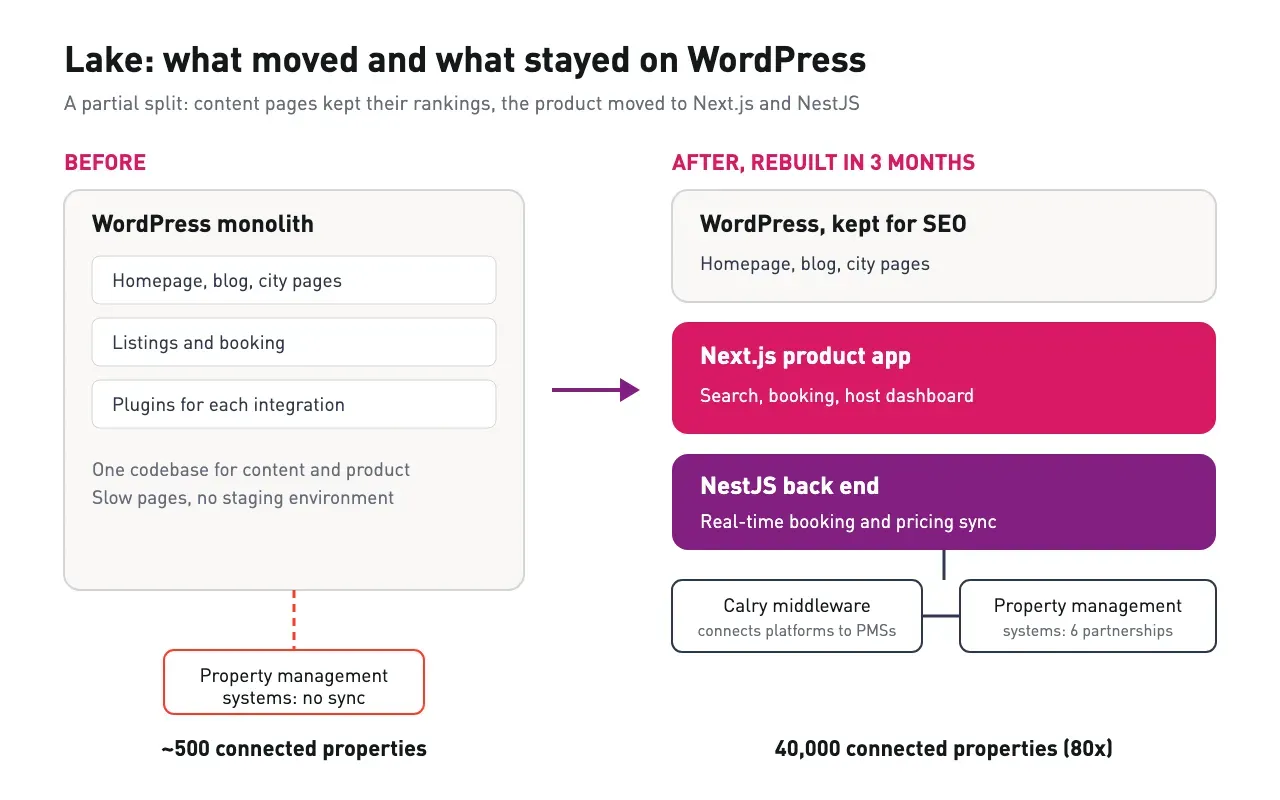
After a technical audit and a round of front-end performance fixes, overall visitors rose 40% and total tracked events rose 210%. The case study does not state the measurement period. Brocoders still supports Lake as its long-term tech partner. The full story is in the Lake migration case study.
6 companies with published WordPress and PHP to React migrations
We read the case studies and engineering write-ups of 11 candidates in October 2026, and these 6 published a real WordPress or PHP migration to React or a React framework. A service page alone did not count. We found no published migration case study from rtCamp, Taction Software, Netguru, Quintagroup or Apriorit.
Brocoders wrote this list and is not on it. Clutch (a B2B review website where clients rate agencies) figures are as of October 2026, so check each profile before you shortlist.
| Company | Published migration | Clutch rating | Hourly rate | Min. project | Best for |
|---|---|---|---|---|---|
| The Frontend Company | WordPress views to a standalone React app | 5.0 (29 reviews) | $50 to $99 | $10,000+ | Small products leaving WordPress entirely |
| Yellow Systems | PHP system to React, run in parallel | 5.0 (60 reviews) | $50 to $99 | Undisclosed | PHP apps that cannot stop during the move |
| WebDevStudios | 1,000-page WordPress website to headless Next.js | 5.0 (1 review) | Undisclosed | $5,000+ | Large content websites keeping WordPress as CMS |
| 10up | HeadstartWP framework for WordPress plus Next.js | 5.0 (1 review) | $150 to $199 | $75,000+ | Enterprise publishers going headless |
| ScienceSoft | PHP and Flash system to React and Java | 4.8 (46 reviews) | $50 to $99 | $5,000+ | Regulated enterprise systems |
| Octahedroid | WordPress to Drupal with a Gatsby front end, phased | No Clutch profile found | Not listed | Not listed | Teams moving CMS one section at a time |
The Frontend Company
Sources: Clutch, WordPress to React case
The Frontend Company, founded in 2016 in Covina, California, rebuilt Social Curator's WordPress views as a standalone React app on Firebase, Google's hosted back end. The company reports that Social Curator went on to serve more than 21,000 small business owners.
Limitations: the outcome is self-reported and comes without performance figures, and the project left WordPress entirely rather than keeping content pages.
Yellow Systems
Sources: Clutch, logistics platform case
Yellow Systems, listed on Clutch as Yellow, moved a moving and junk removal franchise's legacy PHP apps to React while the old PHP system stayed in use. The 2 systems shared data through APIs and a middleware layer (software that passes data between the 2 systems) during the phased move, and the client's time to market for new features was cut by 25%.
Limitations: the 25% figure is the vendor's own, the project is still ongoing, and Clutch lists no minimum project size.
WebDevStudios
Sources: Clutch, Next.js headless WordPress write-up
WebDevStudios, founded in 2008, rebuilt a 1,000-page WordPress website as headless WordPress with a Next.js front end. The team turned the work into an open-source Next.js WordPress starter.
Limitations: the write-up is from 2021, the starter repository was archived in February 2024, and the Clutch profile rests on 1 review.
10up
Sources: Clutch, HeadstartWP
10up built HeadstartWP, an open-source framework that pairs WordPress with Next.js, and says client websites run on it.
Limitations: we found no named client migration case study, the Clutch profile has 1 review, and the listed minimum project is $75,000.
ScienceSoft
Sources: Clutch, medical system migration case
ScienceSoft moved a medical enterprise system's 200+ Flash screens to React and replaced its PHP back end with Java.
Limitations: the back end moved to Java rather than a JavaScript stack, which suits enterprises with Java teams but adds a second language for smaller ones.
Octahedroid
Sources: migration case on The Drop Times
Octahedroid moved a website off WordPress one section at a time, starting with the blog. Both systems ran side by side behind a reverse proxy (a server that sends each request to the old or new system), with Drupal (another open-source CMS) as the new CMS and Gatsby, a React framework, rendering pages.
Limitations: no Clutch profile found, the target CMS is Drupal rather than headless WordPress, and the published results have no independent benchmarks.
For vendors that modernize larger legacy systems beyond the front end, see our list of legacy application modernization companies.
What a WordPress to React migration costs
A WordPress to React migration costs most where the integrations and back end change. At Lake, the budget went to a team of 5 weighted toward the back end, because the product needed a new server application on top of the new interface. We do not publish a price range, because the number of integrations moves it more than any other factor. The listed minimums above range from $5,000 to $75,000, and hourly rates from $50 to $199.
| Scope | What it includes | What drives the price |
|---|---|---|
| Headless front end | New React or Next.js front end, WordPress stays as CMS | Number of templates, redirects |
| Partial split | Product app plus back end, content stays on WordPress | Number of integrations, data migration |
| Full rebuild | New CMS, front end and back end | Content volume, every integration rebuilt |
Frequently Asked Questions
Lake's partial split was rebuilt in 3 months. Your timeline depends mostly on the number of integrations that must move with the product.
It does not have to, if the pages that rank stay where they are or get 1:1 redirects. Lake kept its homepage, blog and city pages on WordPress for that reason.
Use headless WordPress when content is the product and editors rely on WordPress. Rebuild the product in Next.js when it needs real-time integrations, and keep content on WordPress if it ranks.
Vendor minimums on Clutch range from $5,000 to $75,000, with hourly rates from $50 to $199. The number of integrations and how much of the back end must change decide where your project lands.
Yes, by running both systems in parallel and moving screens or sections one at a time. Yellow Systems and Octahedroid both published projects that worked this way.
Ask how it would handle your integrations, which pages it would keep, and what its staging setup looks like. Then ask for a published migration with a number after it.
Ask the integration question first
The vendor that asks about your integrations and your rankings before it quotes is the one most likely to move your product without breaking it. Use the 6 checks on every call, and hold each shortlisted company to a published migration.
If your WordPress or PHP product has hit its ceiling, start with a software code audit of your integrations and codebase before any rebuild quote. Our application modernization services take it from there. For a broader look at turning an old product into a modern platform, read modernizing a legacy app into SaaS.