
An ecommerce assistant that answers confidently and wrong is worse than no assistant at all. A shopper asks about a compressor's duty cycle, a car's accident history, a product's return window, and the bot makes something up in the same friendly tone it uses for everything else. That's the moment trust in the whole site drops, not just trust in the chat window.
Anyone can add a chat bubble in an afternoon. The real risk behind "conversational AI integration" for an ecommerce team is whether every answer that bubble gives can be traced back to something real.
TL;DR: A conversational AI layer for ecommerce succeeds or fails on one decision: whether every answer is grounded in a real, indexed source, not the model's best guess. Three Brocoders builds on Bridge, our AI-agent layer, one for an industrial parts retailer, one for a vehicle-research platform, one a Nordic equipment-rental demo, show what that looks like in practice. Each replaced a specific piece of the buying journey instead of just adding a chat widget on top of it.
The problem with bolting a chatbot onto an ecommerce store
Most ecommerce teams already know they need something smarter than a search bar and an FAQ page. Product catalogs are too deep, buyers are too specific, and support tickets pile up asking the same technical questions over and over.
So the instinct is to add a chatbot. Grab a platform, point it at the product feed, ship it.
Here's what breaks. A generic model trained on the open internet doesn't know your return policy, your spec sheets, or which SKU actually fits a customer's setup. It answers anyway, because that's what language models do. It sounds sure of itself even when it's wrong.
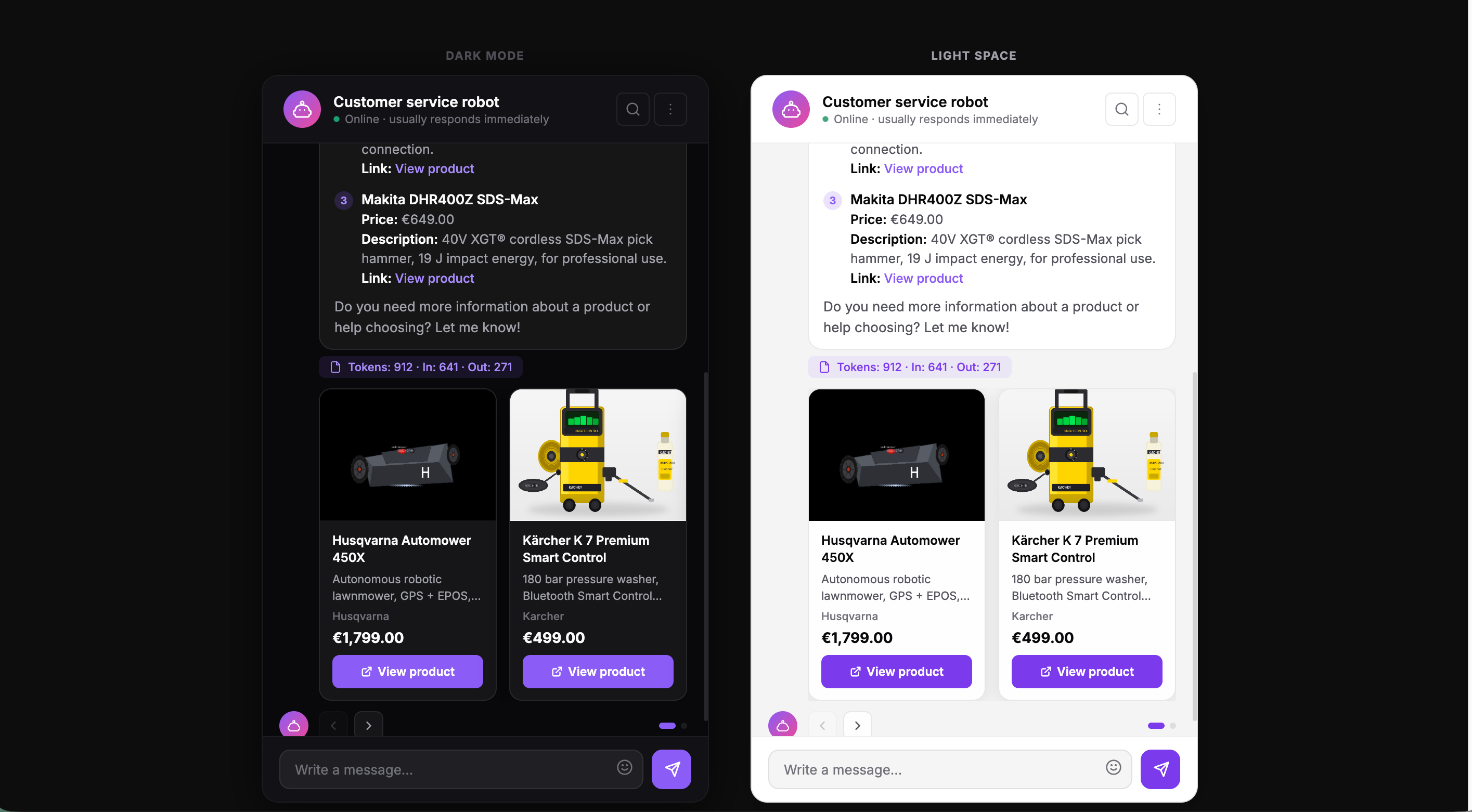
A polite chatbot with a high satisfaction score and zero grounding in your actual data is a liability, not a feature. It escalates the easy questions to a human and answers the hard ones incorrectly.
The fix is an engineering decision made before the UI gets built: every answer has to trace back to a real document, not a hallucinated guess.
What a conversational AI layer actually needs to do
Strip "conversational AI" down to its working parts and an ecommerce integration needs four things.
Retrieval over real sources. The assistant needs a searchable index of your actual catalog, manuals, spec sheets, and policies, not general internet knowledge. This is the part most teams underestimate. It's not a chatbot problem, it's a retrieval architecture problem.
Grounded answers. Every response should point back to the source it came from. If a shopper asks about a part's voltage rating, the assistant should be able to show where that number came from, not just state it.
Memory across a session. A shopper comparing three products across five messages shouldn't have to repeat context every time. That's table stakes now, not a differentiator.
Multimodal input, where it earns its place. Voice, image upload, a photo of a part number. These are worth building only when they remove a real manual step in the buying journey, not because a competitor has one.
That last point matters more than it sounds. Multimodal input as a feature checkbox is wasted engineering. Multimodal input that replaces typing a 17-character serial number by hand is a real improvement.
Proof: an industrial parts retailer that stopped guessing
We built AskCW.ai for Compressor World, an industrial equipment ecommerce brand based in Massachusetts. Their catalog runs deep: thousands of compressor models, each with its own technical manual and spec sheet, and a set of questions that don't have obvious answers on a product page.
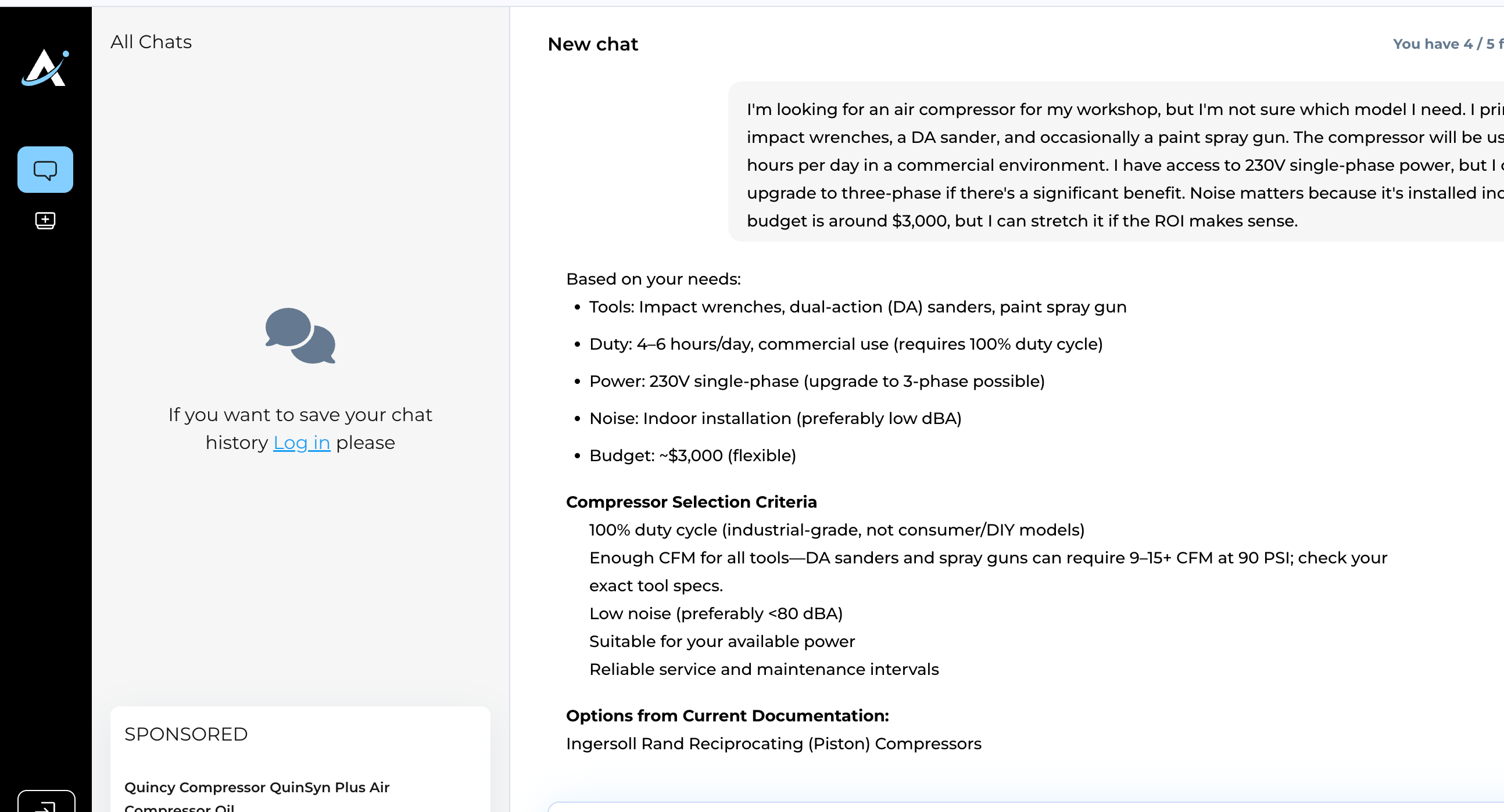
Before AskCW.ai, those questions went to human support, or the shopper left the site to search elsewhere. Neither outcome converts.
We indexed 4,000+ product manuals and spec sheets and built a retrieval layer on top of them using LlamaIndex and OpenAI, with a NestJS and Next.js stack handling the interface and orchestration. Every answer the assistant gives is traceable to the document it came from. No hallucinated specs. No made-up compatibility claims.
The assistant now answers technical questions around the clock, offloading the routine support load and, more importantly, catching researchers before they bounce to a competitor's site and turning that research moment into a quote request.
The real lesson is narrower than "add AI to your product pages." A deep, technical catalog is exactly the kind of ecommerce business where grounded retrieval pays for itself immediately, because the alternative to a good answer is the shopper leaving.
Proof: replacing a static report with a conversation
The second build sits in vehicle research, a different kind of ecommerce decision but the same underlying problem: buyers need trustworthy, specific answers before they'll commit real money. It's also the one with the most complex integration constraints of the three, worth walking through in some depth because most ecommerce teams face the exact same constraints when they don't own their entire stack outright.
The old way to research a used vehicle online is a static report: a wall of VIN data, accident history, and depreciation numbers a shopper has to parse alone. The brief was to replace that report with a conversational interface, without touching the underlying platform's codebase, which our team didn't have direct access to.
That single constraint shaped every architecture decision that followed. We built the assistant as a separate, independently deployed service and embedded it through a widget: a script tag and a widget tag placed at specific points in the existing site (the homepage hero, the account dashboard, the report page itself), each instance aware of its own context. The report-page instance, for example, needed access to the specific report being viewed, not just the general product catalog, so its session gets initialized with that report's identifier baked into a signed token rather than pulled from a shared global state.
Identity and permissions cross that boundary through a signed JWT generated by the platform's own backend: session ID, user ID, subscription status, and an expiration timestamp, all in one token the widget can read without ever needing its own login system. Behind that boundary, the backend runs an MCP server as the layer that lets the language model call real tools (a VIN decoder, a recall lookup, a residual-value estimator) instead of guessing at any of it. Every one of those tools maps to a dedicated API. The model's job is narrowed to detecting which tool a question needs and explaining the result in plain language, never inventing the number itself.
Account tiers determine what the assistant is even allowed to answer, not just how much of it. An anonymous visitor gets general vehicle information and a capped number of questions before the input locks (the conversation stays fully readable, nothing is lost as a penalty). A registered user gets higher limits and persistent chat history. A subscriber gets unlimited lookups and full report generation. When an anonymous user asks a question that needs tool-based data (a VIN-specific lookup, for instance), the system doesn't run the tool and let the model fill the gap. It declines and prompts registration instead, the same grounding discipline applied to access control, not just to facts.
Two build decisions came down to an explicit tradeoff instead of a default. First, payment: rather than build a checkout form directly into the widget, which would have made the new AI layer responsible for account creation and payment-state reconciliation, purchases route through the platform's existing, already-proven payment flow and redirect back on completion. Second, multimodal input: voice goes through a dedicated speech API rather than the browser's native, inconsistent voice recognition, and image upload feeds a real VIN and license-plate extraction endpoint, not a general vision model describing a photo. Both inputs resolve to the same grounded lookup a typed question would trigger. Neither is a feature bolted on for a demo.
The assistant carries memory across a session and across return visits, so a shopper doesn't start from zero every time they come back to compare cars, and it surfaces vehicle previews, plain-language history summaries, recall lookups, depreciation graphs, and financing tools, all through conversation instead of a static page. Purchased reports stay accessible for a fixed window after generation, and once that window closes, the assistant still answers from whatever summary data remains rather than failing outright. On a freemium model, that chat interface is the primary way people enter the funnel at all, which is what made getting the grounding and access-tier logic right non-negotiable before a single UI screen shipped.
Proof: a Nordic equipment-rental demo built on Bridge
The third example is a demo, not a delivered client project. We built it on Bridge, our own AI-agent layer, to show what this pattern looks like for a Nordic equipment-rental business, styled after a real regional rental site to make the scenario concrete rather than abstract.
A contractor types one sentence into the search bar: a 2-meter trench, 50 meters long, in clay soil, needed in Tampere next week. The assistant reads that as a spec problem, not a keyword search. It matches the excavation depth and soil type against the equipment catalog, checks which specific machines are available at the Tampere depot that week, and returns three ranked options, each with a plain-language reason it fits (or doesn't quite fit) the job, not just a spec sheet dump.

That match-and-explain step is the same grounding discipline as the other two builds, just applied to inventory instead of manuals. The assistant isn't guessing which excavator handles clay soil. It's reasoning over indexed spec data and a live availability check, the same "call the source, don't invent the number" rule from earlier in this piece.
Two things about this build are specific to the Nordic market and worth naming directly. First, the responses are native-quality Finnish, not machine-translated English, which matters more than it sounds for a buyer's trust in a technical answer. Second, this is a market where procurement and legal teams routinely ask where the data lives before they'll sign off on an AI tool. Bridge deploys inside the customer's own cloud environment or on Nordic infrastructure, so catalog and customer data never has to leave the region, which is often the difference between a pilot getting approved and stalling in legal review.
How we build the layer
All three of these builds sit on Bridge, the AI-agent layer we've built and refined internally. It breaks into three layers that stay the same from project to project. What changes is the source data and the tools each business needs, not the architecture underneath.
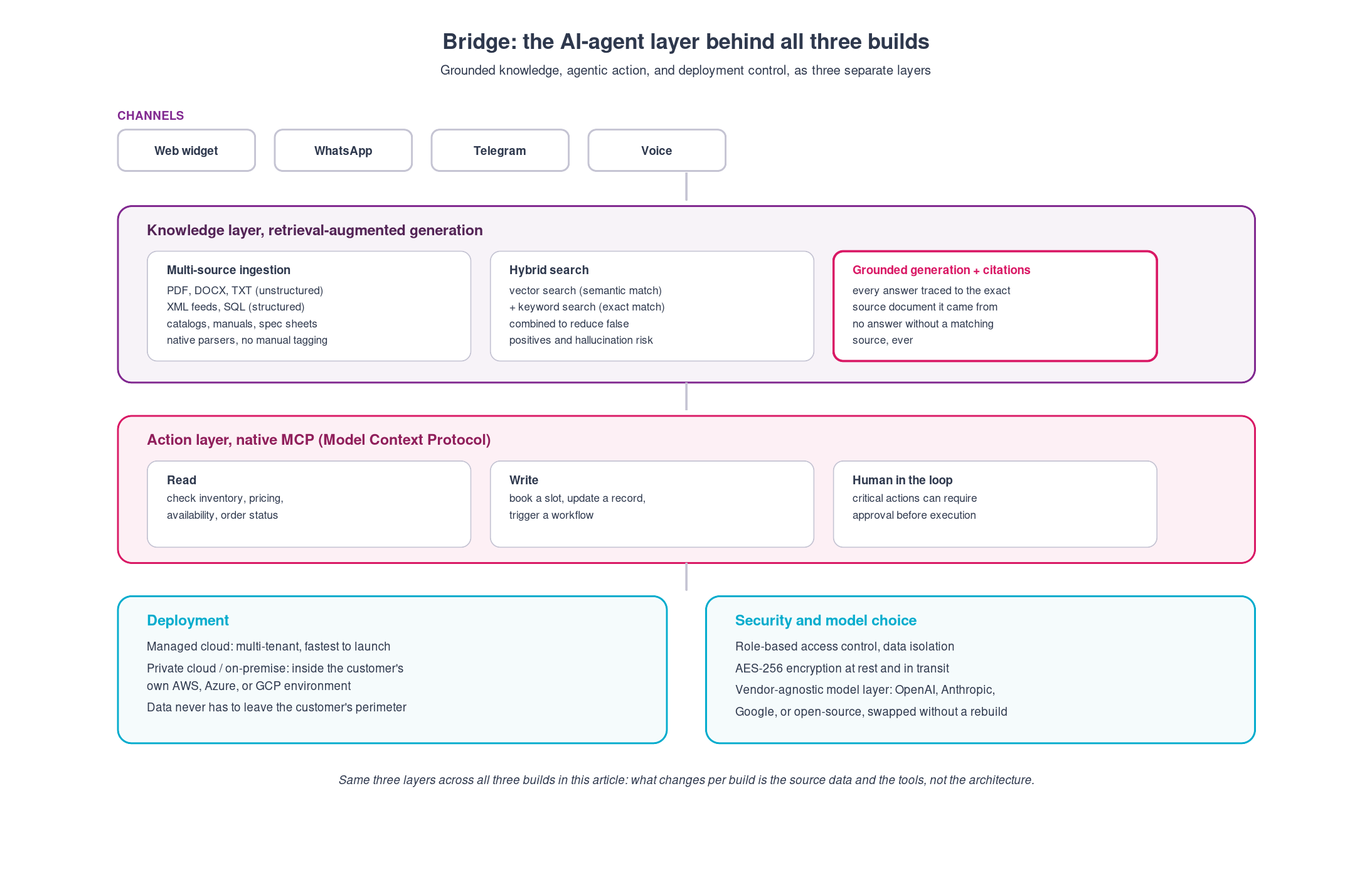
The knowledge layer handles ingestion and retrieval: native parsers pull in unstructured sources (PDF, DOCX, plain text, the manuals and spec sheets from the Compressor World build) alongside structured sources (XML feeds, SQL, the live inventory data behind the equipment-rental demo), with no manual tagging step in between. Retrieval itself runs as a hybrid search, vector search for semantic matches paired with keyword search for exact ones, because relying on either alone leaves a gap: vector search alone can surface a plausible-sounding but wrong document, keyword search alone misses a question phrased differently than the source text. Every answer that comes out the other side carries a citation back to the specific document or record it was grounded in. That's the mechanism behind the "call the source, don't invent the number" rule from earlier in this piece, not a policy layered on top of it.
The action layer is where the assistant stops being a search box and starts doing things. It's built natively on the Model Context Protocol (MCP), which gives the model a standardized way to read from external systems (check inventory, pull a customer record, look up availability) and write to them (book a slot, update an order, trigger a downstream workflow), the same pattern behind the depot-availability check in the equipment-rental demo. Actions flagged as sensitive can require human approval before they execute, so "agentic" doesn't mean unsupervised.
The deployment layer is a decision, not a default. Bridge runs as a managed, multi-tenant cloud service when speed to launch matters most, or fully inside a customer's own AWS, Azure, or GCP environment when it doesn't, with data never leaving that perimeter either way. Role-based access control and encryption at rest and in transit apply regardless of which option a client picks. The model underneath is swappable by design (OpenAI, Anthropic, Google, or an open-source model), so a pricing change or a better benchmark from a different provider doesn't force a rebuild.
That layered separation is also why timelines on these builds run in weeks, not the months a generic "add AI to our platform" initiative usually takes. The knowledge and action layers are already built. Each new project customizes what they connect to, it doesn't rebuild them from scratch.
The integration playbook: seven decisions, in order
Most "how to add AI chat" guides give you five bullets and call it a plan. That's not enough to actually scope a build. Here's the deeper version, built from what breaks (and what doesn't) when you integrate a conversational layer into a live ecommerce platform that already has real customers on it.
Phase 1: Run discovery before you write a spec
Don't start with a requirements document. Start with a short, structured discovery pass that produces one artifact: a pre-discovery SRS (software requirements specification) marked explicitly as a draft, subject to validation.
That draft should nail down five things before any estimation happens: the product overview in one paragraph (what this assistant is and isn't), the target users (be specific, "consumers comparing used vehicles before a purchase decision" beats "our customers"), the in-scope list, and, just as important, the out-of-scope list. Writing down what you're explicitly not building this release (multi-language support, a dedicated admin panel, long-term memory across independent sessions) does more to control scope creep than any amount of in-scope detail.
The output of this phase isn't a contract. It's a shared, written understanding that gets "refined and extended during discovery," which sounds soft until you realize it's the thing that prevents a mid-build argument about what "conversational AI integration" was supposed to mean.
Phase 2: Decide the integration architecture before the UI
There are two fundamentally different ways to integrate a conversational layer into an existing ecommerce platform, and the choice shapes everything downstream.
Native integration. You have full access to the existing codebase, and the assistant is built directly into the product. Faster iteration later, but only possible when the team building the assistant owns or has full access to the underlying platform.
Widget-based integration. The assistant is built and hosted as a separate service, then embedded into the existing site through a script tag and a widget tag placed at defined points in the page (a homepage hero section, a dashboard, a product or report page). This is the pattern to use when the team building the AI layer doesn't have direct access to the ecommerce platform's codebase, which is the normal situation when an agency or vendor builds the layer for an existing product.
The widget pattern isn't a compromise. It's the correct architecture for a real constraint: the ecommerce team keeps full control of their site, APIs, authentication, and payments, while the AI layer handles UI and conversational logic as an isolated, independently deployable service. Name this decision explicitly before scoping anything else, because it determines your auth model, your payment flow, and your deployment process.
Phase 3: Design the trust boundary (auth and data handoff)
Once you've picked widget-based integration, you need a secure way to pass identity and permissions from the ecommerce platform into the AI layer without building a second authentication system.
The pattern that works: a signed JWT (JSON Web Token) generated by the ecommerce platform's existing backend, containing session ID, user ID, subscription status, and an expiration timestamp, signed with a shared secret key. The widget receives this token on load and uses it to know who it's talking to and what that user is allowed to see, without ever needing its own login system or a separate user database.
This single decision (JWT-based identity handoff instead of a second auth system) is what lets a conversational layer respect existing account tiers (anonymous, free registered, subscriber, or your platform's equivalent) without duplicating logic that already exists.
You'll also need to decide how the widget and the host site communicate about actions like sign-up, purchase, or navigation. Two options: pass URLs and let the widget redirect the browser directly, or use browser events (the widget dispatches an event, the host site listens and handles it). The event-based approach is more flexible, especially once your site uses modals instead of full page navigation for sign-up or checkout, which is increasingly the norm.
Phase 4: Build the grounding contract, and make it a hard rule, not a guideline
This is the phase that actually determines whether the assistant is trustworthy. Write it down as an explicit, non-negotiable rule in your requirements: for any data point that has an authoritative source, the AI layer does not generate or approximate it. It calls the source API and presents what comes back.
In practice this means every category of specific, checkable information (pricing, specs, recall status, technical compatibility, financial calculations) gets its own dedicated API or indexed source, and the language model's job is narrowed to detecting intent and explaining the result in plain language, never inventing the number itself. If a user asks a question that needs tool-based data and the system can't call the right tool for their access tier, the correct behavior is to say so and prompt the next step (registration, upgrade), not to let the model guess.
This is also where multimodal input earns or loses its place. An image upload that feeds into a real extraction API (pulling a VIN or part number from a photo, then handing that to the same grounded lookup every text query uses) is worth building. An image upload that just gets described by a general vision model with no downstream grounding is a feature for a demo, not a product.
One more grounding decision worth naming early: where the data and the model actually run. For ecommerce businesses selling into markets with strict data residency expectations (the Nordic region is the clearest example), that means an option to keep catalog and customer data inside the company's own cloud environment or regional infrastructure, not just picking whichever model API is fastest to wire up. Decide this alongside the grounding architecture, not after legal asks.
Phase 5: Design the conversion architecture into the account model, not the chat script
Don't script conversion prompts into the conversation. Build usage limits and calls to action as a property of the account tier, enforced consistently regardless of what the user asks.
A workable pattern: three tiers (anonymous, free registered, paying), each with its own message and lookup limits. When a tier's limit is hit, the input locks, the existing conversation stays fully readable, and a single clear action unlocks it (register, or purchase). The user never loses their conversation as a penalty for hitting a limit, that's the fastest way to make an assistant feel punitive instead of helpful.
Tie the CTA to context, not to a hardcoded turn count. A user who's been asking general questions gets a soft registration nudge. A user who just provided a specific product identifier and is one step from a real purchase decision gets a directly relevant purchase or upgrade prompt. The assistant should know which moment it's in.
Phase 6: Route payment through the platform you already trust, not through the chat
When a conversational layer needs to handle a purchase, you'll be tempted to build the payment form directly into the chat widget. Resist it unless you have a specific reason not to.
Weigh it as an explicit tradeoff. Handling payment inside the widget means the user never leaves the conversation, but it also means your new AI layer now owns account creation, payment state, and reconciliation with the platform's existing billing system, three places for data to drift out of sync, and a meaningfully higher failure surface. Redirecting to the platform's existing, proven payment flow (and back again on completion) is slower to feel seamless but reuses logic that already works and already handles edge cases you haven't thought of yet. For a first release, redirect. Earn the in-widget payment experience later, once the integration has real usage data behind it.
Phase 7: Plan the data lifecycle, not just the first response
A conversational layer isn't done when it answers correctly once. Plan explicitly for what happens to a conversation and its underlying data over time: how long an anonymous session survives before it's lost for good, what happens to a purchased report or generated result after it expires, and whether a summary or lighter version stays accessible after the full data access window closes.
Decide this before launch, not after a support ticket forces the question. Users will return to a conversation days or weeks later expecting it to still make sense, and an assistant that can explain "your access to the detailed report expired, but here's what I can still tell you" reads as considered. One that just breaks reads as abandoned.
The five commitments, if you need the short version for a kickoff deck
- Ground every answer that has an authoritative source in a real API or index, never a guess.
- Decide widget versus native integration first, it determines everything else.
- Hand off identity with a signed token, don't build a second login system.
- Put usage limits and conversion prompts on the account tier, not the chat script.
- Route payment through your existing, proven flow unless you have a specific reason not to.
Ready to see what a grounded conversational AI layer looks like on your product? Talk to our AI product development team.
Frequently Asked Questions
A chatbot is the interface. A conversational AI layer is the retrieval and grounding architecture underneath it that decides whether the interface tells the truth. You can have a polished chat UI sitting on top of no real data at all.
Ground every answer in a retrieval index built from your real documents, catalog data, and policies, and require the assistant to trace its answer back to a source. That's the architecture decision behind both builds described above.
No. Both projects here were built on top of existing platforms, not as replacements for them. The layer sits alongside your current stack and connects into it.
Yes, and for some markets it's a requirement, not a preference. Bridge, our AI-agent layer, can deploy inside a customer's own cloud environment or on regional infrastructure, so catalog and customer data doesn't have to leave the region it needs to stay in.
Whatever a real buyer would need to make a decision: product manuals, spec sheets, policies, past support answers, and in the vehicle-research case, structured history and pricing data. If it's not indexed, the assistant can't ground an answer in it.
It depends on how much of your buying journey depends on answering specific, hard-to-search questions. A shallow catalog with simple products may not need it yet. A deep, technical, or high-consideration catalog usually sees the payoff fast, because the alternative to a good answer is a lost sale.
The delivered builds here shipped in a matter of weeks, not months, because the retrieval architecture is a pattern we've already refined, not something built from scratch each time.