
Event Production Software to Streamline Management 2026
Most event production teams hit the same wall. They're running 10–15 contractors per event across a tangle of WhatsApp threads, spreadsheets, and emailed contracts. A sound engineer confirms availability by text. A lighting tech submits a timesheet via PDF. No one can see the full picture — until something goes wrong at load-in.
Event production software changes that. The right platform consolidates contractor scheduling, onboarding, time tracking, and payroll into a single operational layer — replacing reactive coordination with a system that actually holds together at volume.
This guide covers what to look for, how to compare platforms, and when building your own makes more sense than subscribing to someone else's.
What is event production software for contractor management?
Event production software is a category of tools designed to manage the full operational lifecycle of live events — from pre-production planning through post-event reconciliation. For agencies and production companies, the defining feature is contractor management: the workflows that govern how freelance crews are sourced, scheduled, deployed, and paid.
The distinction from general event planning software matters. Event planning tools handle attendee registration, venue logistics, and programming. Event production software handles the people executing the event — crew availability, call sheets, role-based access, labor cost tracking, and compliance documentation for gig workers.
LASSO is one of the few purpose-built tools targeting live event production crews. Most platforms in the broader market — Cvent, Whova, Planning Pod — focus on attendee experience rather than workforce operations, leaving production teams to bolt on contractor management through separate HR or scheduling tools.
Why spreadsheet-based contractor coordination fails at scale
A spreadsheet works for a two-person team running three events a year. At 5–20 contractors per event across multiple simultaneous productions, it becomes a liability.
The failure modes are predictable. Availability conflicts don't surface until a contractor double-books. Rate changes don't propagate across documents. New contractors onboard without a consistent process, which means some have signed NDAs and others haven't. When a show day problem traces back to a miscommunication in a spreadsheet no one updated, the agency absorbs both the operational damage and the reputational cost with the client.
The underlying problem is architecture. Spreadsheets are static. Event production is dynamic. Contractor rosters change daily, availability shifts, and last-minute replacements require real-time visibility that flat files can't provide.
Essential event management software features for production teams
Not all platforms built for "events" are built for production teams managing contractor workforces. The features that matter diverge significantly from those that dominate software comparison sites.
Contractor onboarding and document management. A system that collects W-9s, liability waivers, certifications, and contracts in one place — with automated reminders for expiring documents — replaces a folder of PDFs no one checks until audit time.
Availability-based scheduling. Crew scheduling by confirmed availability (not just role or rate) prevents double-booking and gives coordinators a real view of who can actually take the gig before confirmation goes out.
Activity and schedule visualization. A full-fledged visual display of event schedules — with the ability to create, edit, and delete activities per event, group similar or repeatable activities, and display the order of all added tasks — gives every team member a shared view of what's happening and when.
Supplier and vendor task management. Effective management of additional activities assigned to specific suppliers, with visibility into each vendor's responsibilities across the event timeline, closes the coordination gap that causes show-day confusion.
Call sheet generation. Auto-generated call sheets from scheduled crew data reduce the manual assembly that consumes coordinator time before every show.
Time tracking and payroll integration. Clock-in/clock-out tied to specific events and roles, integrated with payroll processors, closes the gap between hours worked and hours paid without manual reconciliation.
Role-based access and multi-event visibility. Agency founders need to see contractor utilization across multiple events simultaneously. Coordinators need show-specific views. A platform that doesn't segment access by role forces everyone into the same view — which helps no one.
AI-assisted scheduling and budget forecasting. AI-enabled budget forecasts and contractor matching by role, proximity, and past performance reduce the search-and-confirm loop that eats coordinator hours on every production. This is a capability increasingly expected in modern crew management platforms — for context, see AI in Field Service Management.
How to compare event management software for your agency
The standard comparison frameworks — G2 grids, Capterra category listings — are built around general event management features: registration volumes, attendee capacity, integration counts. They underweight the contractor operations layer that production agencies actually live inside.
A more useful comparison frame for agencies:
| Criteria | What to evaluate |
|---|---|
| Contractor onboarding | Automated vs. manual. Document collection built in or bolted on. |
| Scheduling logic | Availability-based or calendar-based? Can it handle multi-role contractors? |
| Payroll integration | Which processors? Does it generate compliant pay stubs for gig workers? |
| Multi-event visibility | Can ops leads see cross-event crew utilization in one view? |
| Customization depth | Can you configure the platform to match your crew categories, rate structures, and compliance requirements? |
| Build vs. buy | Does the platform match your workflow, or will you spend months configuring it to approximate what you need? |
LASSO addresses most of these for live events. For agencies with non-standard workflows — hybrid production models, international contractor pools, event types that don't map to live music or corporate conferences — a custom-built platform often performs better long-term than an off-the-shelf subscription. See Best Field Service Management Software for a broader feature and vendor benchmark if you're still working through the build-or-buy question.
Cloud-based event management software vs. legacy systems
The practical difference between cloud-based event production software and legacy desktop or locally hosted systems shows up in two scenarios: remote coordination and real-time updates.
Cloud-based platforms give coordinators, crew leads, and contractors access from any device. Availability submissions happen in the app. Schedule changes propagate immediately. Documents are accessible without emailing attachments back and forth.
Legacy systems — or the hybrid of local software plus email — create version control problems. The schedule a coordinator printed at noon is outdated by 2pm. The contractor checking their PDF call sheet doesn't see the venue change logged an hour later.
For agencies running multiple simultaneous productions, cloud-based architecture is table stakes. The remaining differentiation is in how configurable the platform is to specific production workflows — which is where purpose-built custom systems consistently outperform SaaS platforms with fixed feature sets.
For context on where the broader operations software market is heading, see Global Field Service Management Trends 2026.
Contractor lifecycle workflows: onboarding to payroll
The contractor lifecycle in event production has six distinct operational stages, each of which creates data that the next stage depends on.
1. Sourcing and vetting. Role requirements, rate ranges, certifications needed, and past event history. Most agencies manage this in a contact database or CRM — rarely integrated with scheduling.
2. Availability confirmation. Checking availability against the event date and confirming interest before assigning the role. Often done via phone or text, this is the bottleneck in most coordinator workflows.
3. Onboarding and documentation. Collecting tax forms, signed contracts, insurance certificates, and role-specific certifications. Incomplete documentation at this stage creates compliance exposure.
4. Scheduling and call sheet distribution. Assigning confirmed contractors to specific roles, times, and locations. Generating and distributing call sheets. Last-minute changes require a system that updates everyone without a manual cascade.
5. Time tracking. Clock-in/clock-out at the event level, tied to the contractor's assigned role and rate. Manual timesheets introduced after the fact create payroll discrepancies.
6. Payroll and reconciliation. Matching tracked hours to agreed rates, generating compliant payments for gig workers, and closing out the event financially.
A platform that manages all six stages in a connected workflow — rather than requiring handoffs between separate tools — reduces coordinator overhead per event and creates the audit trail that agency founders need when scaling to enterprise clients.
For a detailed look at the architectural model behind distributed contractor network management, see Hub and Spoke Contractor Management System and Contractor Scheduling Solutions Guide.
Build your event production infrastructure with Brocoders
Most event production agencies evaluating software reach the same conclusion: the platforms built for general event management don't fit production workflows, and the platforms built for production work — until your workflow diverges from their assumptions.
Brocoders is an AI-powered software development company that builds fully customizable event production management software in 2–3 weeks. The starting point is your actual workflow, not a feature template designed for a different type of agency.
What we built for Backbone International
Backbone International needed a platform that could support large, complex events with dozens of suppliers operating simultaneously across global locations. Their previous process relied on disconnected tools, and coordination gaps between suppliers were creating show-day risk.
Brocoders delivered a full-cycle event production management platform with the following capabilities:
- Visual schedule management — a full-fledged visual display of event schedules, giving every stakeholder a shared, real-time view of the production timeline
- Activity creation and editing — coordinators can create events with structured descriptions, add, edit, and delete activities, and manage the full order of tasks across the production
- Activity grouping with custom logic — team members can group similar or repeatable activities across an event, with custom logic applied to each group, reducing duplicate work on recurring productions
- Supplier task management — dedicated management of activities assigned to specific suppliers, with clear visibility into each vendor's responsibilities and delivery status
- Role-based access — internal teams, suppliers, and clients each receive tailored access to the same event schedule, ensuring the right people see exactly what they need without exposing sensitive coordination data
- Multi-audience dashboards — separate dashboard views for different user types, from event coordinators managing the full production to external suppliers tracking only their assigned tasks
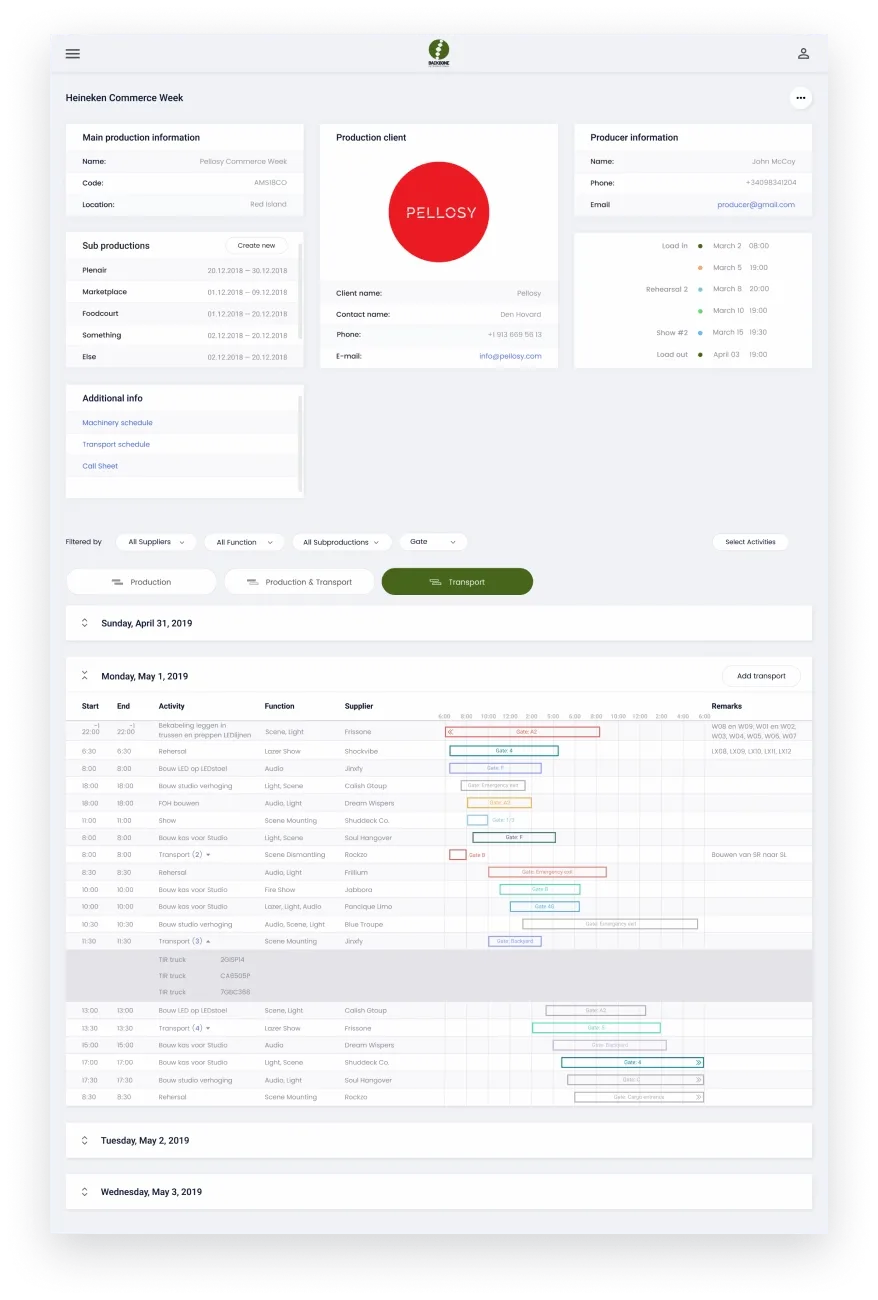
Results: The platform now manages over 20 events, with approximately 90 suppliers actively participating in activities across productions worldwide. Backbone's Tim de Jonge summarized the need the platform addressed: "It seemed clear that Backbone could profit from an application that supports a large number of the processes, so everyone could find and save their information in the same place."
Beyond Backbone, the platform proved reusable — TIGSports, another event production company, adopted a white-label version of the same system, customized to their own branding and workflows, without starting from scratch.
What a custom build includes
When Brocoders builds event production software for a new client, the delivery covers the same operational layer: contractor onboarding, availability-based scheduling, call sheet generation, time tracking, and payroll integration — configured to how your team actually operates, not how a SaaS product assumes you do.
AI-powered features — budget forecasting, contractor matching by role and availability, performance tracking across events — are built in where they add workflow value, not bolted on as an afterthought.
Agencies that have outgrown off-the-shelf platforms, or that are entering markets where differentiated tooling is a competitive advantage, use custom software to professionalize operations in ways that subscription platforms can't support.
See the full Backbone case study: Backbone Events Management Software.
To discuss your event production software build: Events Management Software Development